From Service
Open "Management Tools"-"Service" from Window control panel.
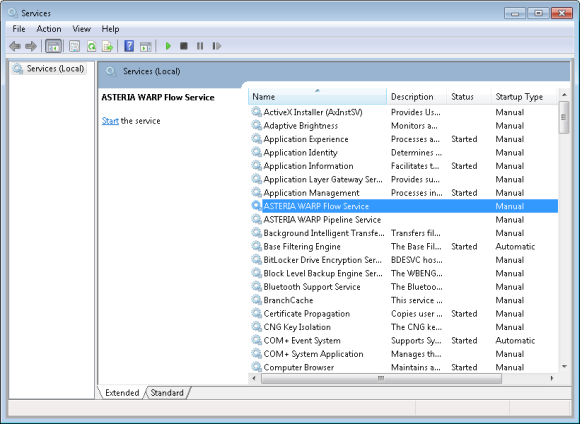
Confirm that the "ASTERIA WARP Flow Service" entry is existing, and double click it.
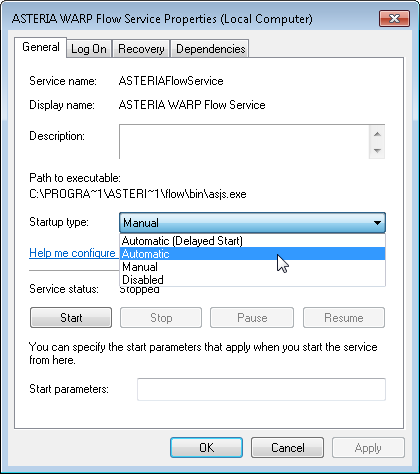
Once select "Automatic" for "Startup type", the Flow service will run automatically after Windows has run. Because windows account will be checked when the user access to the shared folder which is set as access control, please set a account as below.
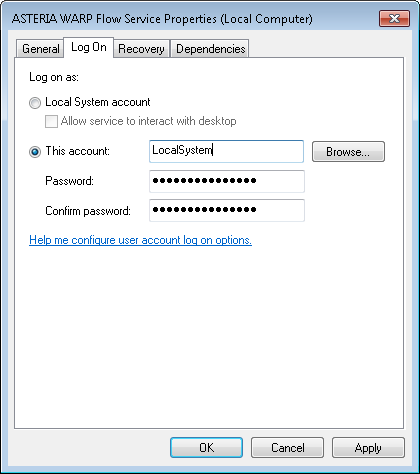
After having set the account, click "OK", and then click "Apply".
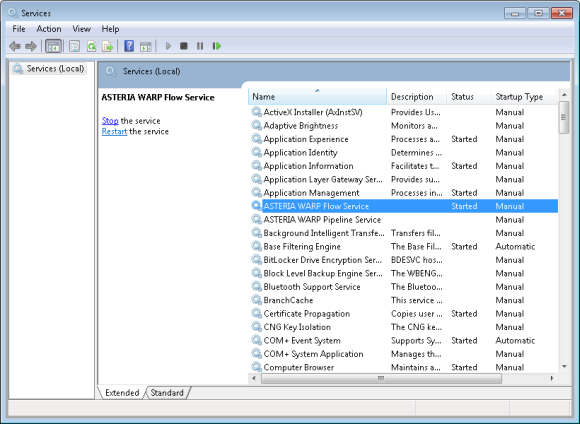
Once the service begin to run, the status will be shown as above. By checking [INSTALL_DIR]/flow/log/asteria-console.log file and [INSTALL_DIR]/flow/log/asteria.log file, user can know whether the service has run or not.
In the same way, select "Stop" button to stop the service.
Because [INSTALL_DIR]/flow/bin/asjs.conf is used as Flow service's environment variable for running service from Windows "service", it's necessary to edit for adding running path.
Comparing with the method that start or stop Flow service from "start" menu, we recommend this method, because Flow service will run automatically after Windows has run by this method.