Flows' Functions
Here is the introduction for the whole Flow Service.
What's Flow Service?
Flow Service is a platform where a processing of an information system is shown as an icon. By connecting icons according to a processing procedure, you can control and execute a Flow which records the whole processing. A processing location is called component, the place where the processing is recorded is called Flow. By connecting Flow Designer where a Flow is designed to Flow Service where a Flow runs, then creating a Flow and saving it into the server,you can execute the Flow by trigger. For example, once you input an HTML file and send it, the HTTP server where Flow Service is built will receive the HTTP request, then Flow Service will execute the Flow connected to a URL, at last, the input data will be processed by kinds of components and output into the database.
The Flow Service has prepared daily processings with component. The interfaces built in some components support Internet protocols and applications which is needed to connect systems inside and outside an enterprise, and some components are used to input and output kinds of datas, such as CSV, XML, Excel. By connecting icons with lines, the whole system can be understood easily, so that the communication gaps between the members in one system development team will disappear. As a result, you can handle with the problems in a system flexibly, such as add or change. Moreover, by collecting up processings with component, you can use them repeatedly without coding every time, so that you can spend less time and money on developing a system.
There are 6 kinds of triggers for running a Flow as below. Moreover, we also have prepared some commands for running a Flow.
| Execution methods | Flow Service | Triggers |
|---|---|---|
| Run by HTTP | Make a connection between a Flow and a URL | Send an HTTP request from any client to run a Flow. |
| Run by SOAP | Make a connection between a Flow and a method name | Send a request from any SOAP client to run a Flow. |
| Run by FTP | Monitor a folder with an FTP service in which the Flow Service is built. | Forward a file by FTP from an external system to run a Flow |
| Run by mail | Monitor a mail server regularly | Send a mail from any mail client to run a Flow |
| Run by message queue | Monitor a message queue regularly | Send a message from any client to run a Flow |
| Run by schedule | Control with a scheduler in which the Flow Service is built | Run a Flow by any time, date or interval |
Triggers for running Flow
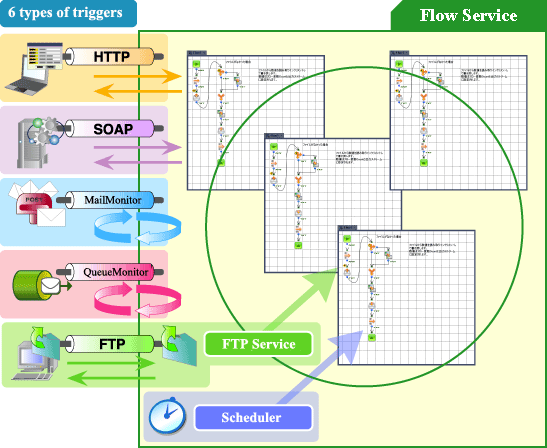
Flow Function's Products
Flow function consists of the Flow Designer which is an integrated design environment based on GUI and the Flow Service which is its execution environment. Moreover, the web-based "Flow Service Management Console" function is built in the Flow Service for setting and maintainence.
| Flow Designer | It's an integrated development environment based on GUI. |
| Flow Service | It's a server environment for running services related to Flow. |
| Flow Service Management Console | It's a management tool for the Flow Service settings. |
Flow Designer
Flow Designer is an integrated development environment, which represents a series of processings graphcally, such as data extraction, transmission or distribution by creating, saving and running a Flow. The most basic operation is to create a Flow by Flow Designer, then log into the Flow Service, and at last run the Flow there. There are kinds of icons representing daily functions in the Flow Designer, for example, the icon for sending request to HTTP server, the icon for getting data from RDB, the icon for converting data. You can program easily by dragging icons into workspace, and connecting them with lines.
The Flow Designer contains the below tools.
| Trigger management | The tool has monitoring function. Having been connected, the tool can monitor "Execution settings" for defining Flow and execution method, and the execution status of a Flow. |
|---|---|
| Log viewer | Having been connected, the tool can display logs output by the Flow Service. |
| Diff tool | By comparing with 2 projects or function collections, the tool will display the modification graphically. |
| WebMacro recorder | The tool records the data input for URL and FORM in Web browser by user. |
Flow Service
The Flow Service is a platform for running a created Flow. You can register a Flow created by Flow Designer into the Flow Service and save it, then run the Flow by external trigger or schedule. In the Flow Service, running a Flow by multithreading is most effective.
Management Console
Flow Service Management Console is a tool for setting and maintaining by Web browser. You can create your Flow Service account, or check logs, or start/stop process here.
Function list
Flow Service Management Console's functions are as below.
| Functions | Descriptions | ||||||||||||||
|---|---|---|---|---|---|---|---|---|---|---|---|---|---|---|---|
| "Status" tab |
It contains tabs for checking and managing the Flow Service and the execution status of Flows.
|
||||||||||||||
| "Settings" tab |
It's used to set Flow Service communication.
|
||||||||||||||
| "Tools" tab |
The setting is for the tools used in the Flow Service.
|
||||||||||||||
| "Help" tab |
Here provides kinds of information and help links.
|
Flow Service's Specification
Supported Formats
| XML / HTML / CSV / Fixed length / Text / Binary / ZIP / PDF / Excel (※1)/ EDIFACT (※1) /XBRL (※1) ※1:Optional product |
Supported Databases
|
Oracle 8i / 9i / 9iR2 / 10g / 10g R2 / 11g / 11g R2 IBM DB2 UDB V8.1 / V8.2 / V9.1 / V9.5 / V9.7 IBM AS/400 iSeries DB2 V5R1 / V5R2 / V5R3 / V5R4 / V6R1 Microsoft SQL Server 2000 / 2005 / 2008 / 2008R2 / SQL Azure Microsoft Access 2000 / 2002 / 2003 / 2007 / 2010 (※1) PostgreSQL 8.0 / 8.1 / 8.2 / 8.3 / 8.4 / 9.0 MySQL 5.0 / 5.1 / 5.5 Dr.SumEA 2.3 / 2.4 / 2.5 / 2.5 SP1 / 3.0 / 3.0SP1 / 3.0SP2 / 3.0SP3 FileMaker 9.0 / 10.0 ※1:Only 32bit version ASTERIA WARP Server is available. |
Supported Networks
| HTTP / HTTPS
SMTP / SMTPS POP3 / POP3S IMAP / IMAPS FTP / SFTP LDAP SOAP 1.1 |
Supported Applications
| IBM Lotus Notes/Domino 6.5 / 7.0 / 8.0
/ 8.5
(※1) Cyber Luxeon 1.0 / 2.0 NeoCoreXMS 3.1 Microsoft Excel 2000 / 2002 / 2003 / 2007 / 2010 ※1:Only 32bit version ASTERIA WARP Server is available. It's an optional product. |
the Flow Service's Process Structure
Inside the Flow Service, where you can run a Flow, there are multiple services. In these services, the one which has an engine for running a Flow and manages the execution is called Flow Service. In this part, the whole execution environment, Flow Service, is considered as a "server".
Each service is stored as a process in the memory, and each process has a seperate Java VM (Java Virtual Machine)instance. Moreover, each service can process multiple requests at the sametime by multithreading.
In these services, ASTERIA Monitor is a super process, which runs or stops the other services as subprocesses, and monitors their execution statuses.
Server (the whole Flow Service) structure image
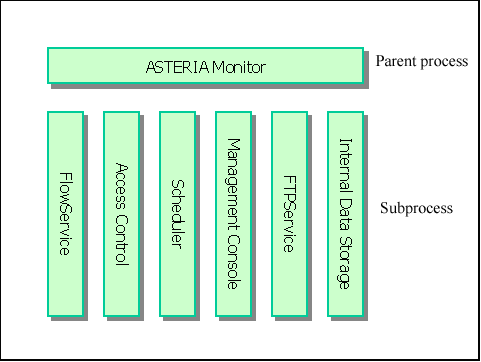
Service name list
In a standuard structure, the services as below are registered.
| Service names | Descriptions |
|---|---|
| FlowService | The service has an engine used to run Flow and an HTTP listener. |
| AccessControl | The service manages and authenticates the Flow Service account. |
| Scheduler | By registering a specified date and time or a start date and a repeat interval, the service will run the specified Flow once the time comes. |
| ManagementConsole | The service can set and maintain the "Server" by Web browser. |
| FtpService | It's an FTP server installed standurdly in the "Server". It can run a Flow once a file is received. (In the default setting, it's set not to run.) |
| InternalDataStorage | The database is used when the "server" stores internal data. Because it's for BtoB only, the data for other usual purposes won't increase. Moreover, inside the service, "HSQL (http://hsqldb.sourceforge.net/)"is applied. |
| Tomcat | To make Servlet and JSP program created by user run on the same machine with the "server", you can use this service. Because starting or stoping the Tomcat service is controlled by ASTERIA Monitor, if Tomcat service breaks down for any reason, it can restore or start the "server" automatically. (In the default setting, it's set not to run.) Please refer to below URL for more information about Tomcat. http://jakarta.apache.org/tomcat/ |
FlowService's structure
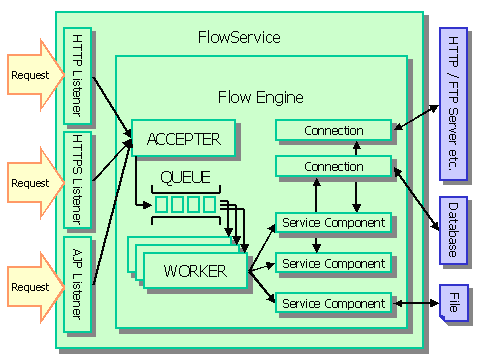
As the "server"'s core, FlowService consists of kinds of listeners and a Flow Engine. The listeners are used to receive external events, and the Flow engine is used to run Flow.
After reading project files (the extension is ".xfp") dynamically, which are XML files used to record Flow's processing procedure, Flow Engine compiles the files and saves them. Then it runs the Flow specified by trigger, listerner, by multithreading.
Inside a Flow, components works in cooperation. Some communications with FTP server or database server outside the "server" use connection. Because a pool of connections can be made, we can cost less when initialize.
The concept image is as below. For more information about each concept, please refer to "Flow Service's architecture"-"Flow Service's execution model" under "More topics" in the left side menu.
FlowSerive's concept image
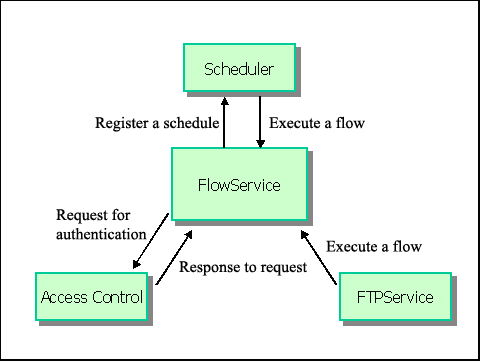
Cooperation between the Flow Service and the other services
The Flow Service works in cooperation with the other services, such as Scheduler and AccessControl. The operation model is as below.
Operation model image
Flow Service's File Structure
The files of the Flow Serive are put in 2 places as below. We will instrcut about these folders by using "folder notation".
| Target | Folder notation | Default path | |
|---|---|---|---|
| Flow Service Installation folder | [INSTALL_DIR] | Windows | C:\Program Files\asteriawarp |
| UNIX | /[Installtion user's home directory]/asteriawarp | ||
| Data folder | [DATA_DIR] | Windows | C:\asteriahome |
| UNIX | /[Installtion user's home directory]/asteriahome | ||
Installation folder's structure
The folerd with (※) will be used when a user configures or refers to files for applying or developing. For more information about the files used for maintenance or migration, please refer to "Administration"-"Maintainence", "Backup"
| Folder | Description |
|---|---|
| [INSTALL_DIR]/common | Libraries shared with other services |
| [INSTALL_DIR]/license (※) | Licence files |
| [INSTALL_DIR]/jre/lib/ext (※) | Drivers, such as JDBC |
| [INSTALL_DIR]/flow/bin (※) | Execution files |
| [INSTALL_DIR]/flow/conf | Setting files |
| [INSTALL_DIR]/flow/data | InternalDataStorage data, such as SSL and KeyStore |
| [INSTALL_DIR]/flow/lib | Libraries |
| [INSTALL_DIR]/flow/lib/flowlib | Libraries about components and mapper functions |
| [INSTALL_DIR]/flow/log (※) | Log files that can be referred to with the Management Console and the log viewer |
| [INSTALL_DIR]/flow/services | Original definition files of service |
| [INSTALL_DIR]/flow/services/flowservice/conf | Flow Service's setting files |
| [INSTALL_DIR]/flow/webapps | Files related to the Flow Service Management Console |