Error Processing
When the components of a Flow can't continue processing data or failed to process the data, an error happens. In the component's "error processing" property or the Flow's "general error processing" property , you can set post-processings for the error. If you don't do that, the Flow will stop abnormally when an error happens.
Select a post-processing in the "Select Flow" dialog box
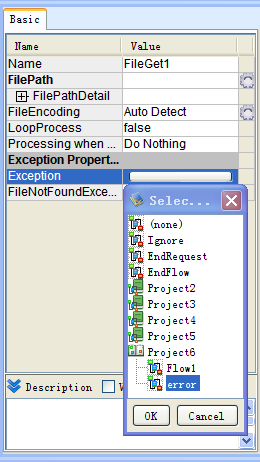
When an error happens in a Flow or a component, the Flow selected for the post-processing will be called out. The Flow is called Error Processing Flow. It will inherit the Caller Flow's session, connection and transaction status.
We'll instruct about error processing by the below steps.
- Post-processing type specified in the error processing property
- Error Processing Flow
- Error message
- Make an error happen in a Flow
About Error processing transaction, please refer to "Flow elements"-"Transaction"'s "Error processing Flow and transaction" under "More topics" in the left side menu.
Post-processing type specified in the error processing property
By clicking each property's value's field under "error processing" property, you will open a dialog box for selecting a Flow. Then you can select the below post-processings in the dialog box. Having selected a processing type except "(none)", there will be a  (error processing) shown on the component's icon.
| Post-processing | Discription |
|---|---|
| (none) | Don't process anything. In this case, the Flow will stop abnormally. |
| Ignore error | Ignore the error, and continue executing the next component. The output stream will be searched by the below order, and output the first one that can be output.
|
| End request | End the running Flow immediately. When the running Flow is called by another Flow, all of the Flows will be ended in order from the called Flow to the Caller Flow. Output stream is the input stream of the error component. |
| End Flow | End the running Flow immediately. When the running Flow is called by another Flow, namely, when a SubFlow occurs, it will return to the Caller Flow, and continue on processing. When it isn't called by another Flow, namely, when there is only a main Flow, it will end immediately. When a SubFlow occured, the output stream is the Caller Flow's SubFlow component's output stream. If there is only a main Flow, there will be no output stream. |
| Call Error Processing Flow | Call the selected Flow. Open the project tree, and select a Flow created for processing error. |
About error processing property
The below is the error processing's running order and the method about how to specify the error processing property.
Error processing's running order
You can set an Error Processing Flow for a Flow and a component seperately. When an error happened, the post-processing can be done according to the specified error processing property of the component as below.
When the component's error processing property isn't specified as "(none)"
The specified post-processing will be done.
When the component's error processing property is specified as "(none)"
- When the Flow's general error processing property has been specified, the post-processing will be done as specified.
- When the Flow's general error processing property hasn't been specified, the Flow will stop abnormally.
Specify error processings for a component
You can specify the post-processing for an error in a component's property. Every component has a general property. Some components have their own specific error processings to process some special errors.
Let's take the POP3 Component as an example. Because there is a property named "No mail exists" for processing the error which will happen when there isn't any mail in the mail-box, so the error can be treated differently with other errors such as communication failure. If an error happened in the POP3 Component when there isn't any mail, if the property named "No mail exists" was specified, the error is processed as specified, if the property wasn't specified but the "general" property was, the error is processed as what the "general" property was specified.
Having set an Error Processing Flow, there will be an icon shown on the upper-left of the component.
Click the icon to open the Error Processing Flow List, then you can jump to the selected Error Processing Flow.
Specify error processings for a Flow
You can specify a post-processing for an error in a Flow's property.
- Click
 (Flow) in the tree pane.
 - Click the field behind the "General" property in the opened inspector.
- Select a post-processing or select a Flow from the project list in the "Select Flow" dialog box.
Error Processing Flow
The Error Processing Flow is the Flow called out when error happened. The Error Processing Flow will inherit the Caller Flow's session, connection and transaction status.
Input
The Error Processing Flow's input stream is decided by the component's error type. Please refer to the component's "Help" document. If you define and publish the Flow variable name as same as the Caller Flow for the Error Processing Flow, when error happenes, the Caller Flow's Flow variable's value will be set to the Error Processing Flow's Flow variable automatically. About the input information, you can refer to the error processing information including error message from system variable.
Output
You can decide the End Component according to whether to return a response or continue to process or not.
After having processed the error by Error Processing Flow, finish the whole processing.
If the trigger for running a Flow is HTTP or SOAP, and the response data is needed, you can finish the Flow with the HttpEnd Component and the EndResponse Component seperately. If the trigger is FTP, mail monitoring, message queue monitoring, or schedule monitoring, and usually the result data isn't needed in these cases, so you can finish the Flow with the End Component. If you use the parallel processing or loop processing in the Error Processing Flow, you can finish the Flow with the Break Component.
Usually, if the Error Processing Flow is ended by these components, both the Flow and the requests are ended.
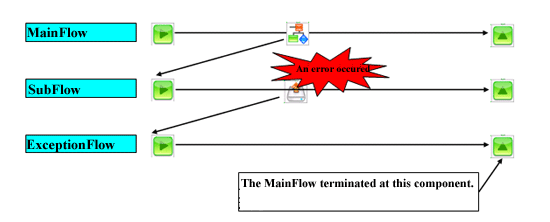
After having processed the error by Error Processing Flow, return to the Caller Flow and continue to process
End the Error Processing Flow with the ExceptionReturn Component. In the component's property, you can select the place where the Error Processing Flow will return or the output type. Please refer to the ExceptionReturn Component's "Help" document.
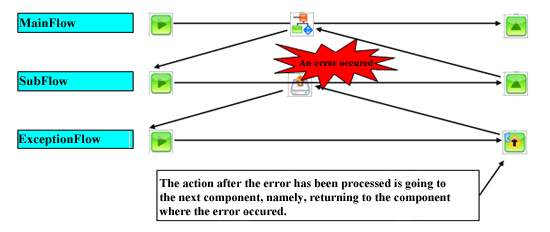
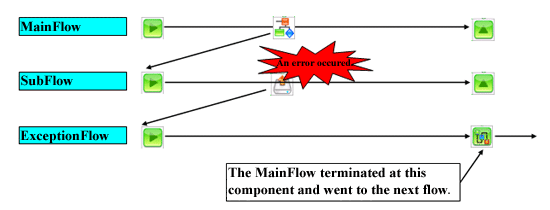
◎When the ExceptionReturn Component 's"Action after error processing" property is "The next component"
In this case, the output stream types of the error component and the Error Processing Flow's ExceptionReturn Component are the same.
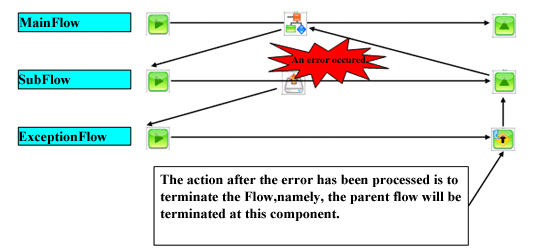
 ◎When the ExceptionReturn Component's
 "Action after error processing" property is "End Flow"
In this case, the output stream types of the Flow and the Error Processing Flow's ExceptionReturn Component are the same. In the case as below, the output stream types of the SubFlow and the ExceptionReturn Component are the same.
After having processed the error by Error Processing Flow, end the Caller Flow and the main Flow, then run another Flow
End the Error Processing Flow with the NextFlow Component. After the Caller Flow and the main Flow is ended, the Flow specified in the "The next Flow " will run.
Error message
Error message will be set to the system variable and the error component's output information automatically when an error happens.
Refer by mapper
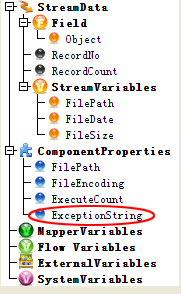
Put a mapper following the processing component, then open the mapping window. You will see there is an "error message" shown under the "Component" in the input side. Because it's only for reference, it's not shown in the component's inspector or the mapping window's output side.
The error message can be decided by the post-processing of the happened error. To design the error processing with a Flow, you can put the BranchByException Component following the Processing Component, then create a branch processing by using the Processing Component's "Error message" property as its condition.
| Post-processing | Error message |
|---|---|
| Ignore error | The error component's error message |
| Call out the Error Processing Flow | The Error Processing Flow's ExceptionReturn Component's return value (When "Action after error processing" property is "The next component") |
Refer by system variable
Refer to the system variable's error processing variable group in the Error Processing Flow. Please refer to the "Flow elements"-"Variables"-"System variables"'s "Error Processing" under "More topics" in the left side menu.
Make an error happen in a Flow
To make an error happen in a Flow, you can use the Exception Component. By setting the Exception Component's "error code" and "error message" property, you can refer to the system variable from "error code" and "error message" in the Caller Flow or the Error Processing Flow.