Stream
Here are the details about stream.
- Stream container
- Convert stream type
- Data representation of stream
- Convert data type
- DateTime type's format
Stream container
Container is used to merge multiple streams into one. For example, if the FileGet Component's "Begin loop" property is set as "No", and its "File path" property is set as "*.csv", and there are 3 files that can match the properties, the 3 streams can be merged into one, and output as a container. Namely, after the 3 CSV streams that have 3 records, 5 records, 10 records seperately are containerized, you can process the 18 records as CSV stream by using Mapper Component. In the below Flow, the output data of the FileGet Component can be processed as an 18-line CSV stream.
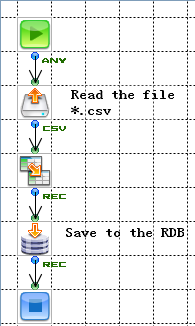
A container has the below features.
- It can share stream type, stream property and field definition.
- It can access to records transparently.
Not all of the components can receive a container. If a container is input into a component that can't receive it, an error will happen. However, some components can spread a container to use. For example, if an attachment is added by the SimpleMail Component, each stream in the container can be used as an attachment.
Convert stream type
To convert a stream type means to convert a stream into another type and read it. For example, you can store the whole CSV stream into a Flow variable by converting a CSV stream into a Binary stream. According to the Converter Component, some streams can be converted into another type, but some can't.
Memo
Except the streams with single field (MIME, HTML, TEXT, Binary), when you want to convert a stream type that can define multiple fields into another stream type that can also define multiple fields, you can't change the number of the fields and the name.
| Input\Output | Binary (※1) | Text (※2) | HTML (※3) | CSV | Fixed | XML | Record | Parameter | MIME (※8) |
|---|---|---|---|---|---|---|---|---|---|
| Binary | ○ | ○ | ○ | ○ (※4) | ○ (※6) | ○ (※7) | × | × | ○ |
| Text | ○ | ○ | ○ | ○ (※4) | ○ (※6) | ○ (※7) | × | × | ○ |
| HTML | ○ | ○ | ○ | × | × | ○ (※7) | × | × | ○ |
| CSV | ○ | ○ | × | ○ (※5) | ○ (※5) | × | ○ (※5) | × | ○ |
| FixedLength | ○ | ○ | × | ○ (※5) | ○ (※5) | × | ○ (※5) | × | ○ |
| XML | ○ | ○ | ○ | × | × | ○ | × | × | ○ |
| Record | ○ | ○ | × | ○ (※5) | ○ (※5) | ○ (※1) | ○ (※5) | × | ○ (※1) |
| ParameterList | ○ | ○ | × | ○ (※5) | ○ (※5) | ○ (※1) | ○ (※5) | × | ○ (※1) |
| MIME | ○ | ○ | × | × | × | × | × | × | ○ |
※1 The stream's binary value is used here.
※2 The stream's string value is used here.
※3 The validity of the HTML isn't checked.
※4 When the input data is CSV format.
※5 The fields are matched by index instead of their names. Moreover, the field definition can't be changed.
※6 When input data according to the field definition
※7 When the input data is XML format
※8 To convert the data into MIME is to add an appropriate MIME header according to the stream type.
Data representation of stream
All of the streams represents their data content by the below 3 methods.
- Binary representation
- String representation
- Record representation
A component processes a stream with the arbitrary one of the above 3 methods. For example, the FilePut Component converts a stream into a file by using binary representation; The Mapper Component makes the mapping of each field of the stream graphical by using record representation; Both the string representation and the record representation can be used in the Velocity Component.
XML
- Binary representation
It will be converted into the XML byte sequence according to the "Output encoding" property. - String representation
It will be the XML string itself. There will be an identifier specified in the "Output encoding" property in the XML statement. - Record representation
The field definition will specify the repeated element and the node type besides the field name and the data type.
CSV
- Binary representation
It will be converted from the string value into the value in byte according to the "Output encoding" property. - String representation
It will be the string itself. - Record representation
The field definition specifies the field name and the data type only.
FixedLength
- Binary representation
It will be converted into the stream's byte sequence according to the field definition and the "Output encoding" property. - String representation
It will be converted into the stream's string according to the field definition and the "Output encoding" property.
※If there is a Binary type or a ZonedDecimal type or a PackedDecimal type in the field, the data can't be converted into the string correctly. - Record representation
The FixedLength Stream's field definition specifies the start position, the field length, and the point position besides the field name and the data type.
Record
- Binary representation
It will be converted into the Flow Service's own XML format. - String representation
It will be converted into the Flow Service's own XML format. - Record representation
The field definition specifies the field name and the data type only.
ParameterList
- Binary representation
It will be converted into the Flow Service's own XML format. - String representation
It will be converted into the Flow Service's own XML format. - Record representation
The field definition specifies the field name and the data type. String array can be used in the data type.
MIME
- Binary representation
It will be the stream's own binary sequence. - String representation
It will be converted into a string. In the main part, if charset has been specifed as Content-Type's parameter, the encoding will be used when it is being converted into a string. If charset hasn't been specified, the stream content will be converted into a string by platform's encoding. In this case, some MIME's contents can't be converted into string correctly.
Text, HTML
- Binary representation
It will be the value converted from string value to byte according to the "Output encoding" property. - String representation
It will be the stream itself. - Record representation
It will the record that has a single field in String Type.
Binary
- Binary representation
It will be the stream's own byte sequence. - String representation
It will the steam's hex dumo. - Record representation
It will a single record that has a single field in Binary Type.
Convert data type
When a value is assigned to a field or a variable by the Mapper Component, the data type will be converted implicitly. If a value that can't be converted is assigned, an error will happen.
| Input\Output | Boolean | Integer | Decimal | Double | String | Binary※1 | DateTime |
|---|---|---|---|---|---|---|---|
| Boolean | - | ○※2 | ○※2 | ○※2 | ○※3 | ○ | × |
| Integer | ○※4 | - | ○ | ○ | ○ | ○ | ○※5 |
| Decimal | ○※4 | ○ | - | ○ | ○ | ○ | ○※5 |
| Double | ○※4 | ○※11 | ○ | - | ○ | ○ | ○※5 |
| String | ○※6 | △※9 | △※9 | △※9 | - | ○ | △※10 |
| Binary ※7 | ○ | △ | △ | △ | ○ | - | △ |
| DateTime | × | ○※5 | ○※5 | ○※5 | ○※8 | ○ | - |
○=can be converted, △=depend on format, ×=can't be converted
※1 To convert data to Binary is to convert it into String, then convert it into byte by the system's encoding. (Please take care of the platform dependencies)
※2 True=1, False=0
※3 True="true", False="false"
※4 0=False, otherwise,0=True.
※5 DateTime Type can be converted with Numeric Type in milisecond from 00:00:00 GMT January 1st 1970.
※6 There is no difference between capital letter and small letter in it, and if it matches to "true", it will be True, otherwise it will be False.
※7 You can convert the data from Binary when it has been converted into String by the system encoding. (Please take care of the platform dependencies.)
※8 The standard data fomat in the Flow Service is "yyyy-MM-dd'T'HH:mm:ss'.'sss z".
※9 Only demical number is valid. (The blanks before and after the number can be ignored.)
※10 Please refer to the DateTime Type's format.
※11 The part after the point of the value can be rounded up.
No matter what the data type is, null can be converted into every type. If it failed to convert when it was input into the field by the Mapper Component, an error will happen.DateTime Type format
The standard date format in the Flow Service is the "yyyy-MM-dd'T'HH:mm:ss'.'SSS z" format defined in the ISO8601. The format will be used when the date type is output as a string. z represents time zone, and is recorded as ’JST’, ’+0900’, ’GMT-01:00’ etc. If the time zone is omitted, it will be processed as the local time.
Moreover, the date string in the below formats can be read. Please use either of the below formats when set the DateTime value as string for the property.
yyyy-MM-dd'T'HH:mm:ss z
yyyy-MM-dd'T'HH:mm:ss'.'SSS z
Moreover, only when the format is "yyyyMMdd'T'HH:mm:ss'.'SSS", if the UTC specified “Z” is added to the data directly, it will be processed as GMT.