Flow Variable
Flow variable can be set and referred to in the Flow only. It will be initialized when a Flow begins, and will be valid until the Flow has finished. Although the Flows belong to the same project, but if the Flows are different, the Flow variable should be defined seperately.
Define a Flow variable
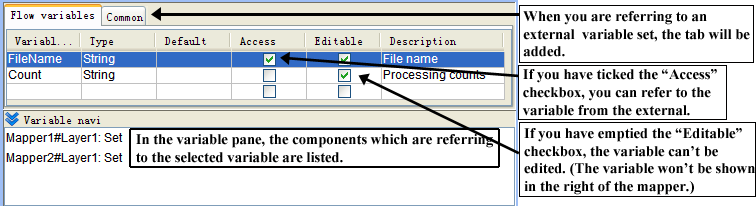
Variable name, data type, initial value, public, change, discription can be defined under the "Flow variable" tab of the variable pane. Value is initialized by the value specified for the default when the Flow was running. The discription of the initial value can be omitted.
Stream pane that displayed Flow variable
Publish Flow variable
To publish Flow variable means that the Flow will publish the Flow variable to the caller Flow when it is called by another Flow. The Flow called by SubFlow, Error Processing Flow, NextFlow Component will be the parameter when the Flow is called by another Flow. If the Flow variable isn't published, it will be referred to and set inside the Flow only. In the stream pane, please select the "publish" check box.
Memo
If the variable that can't be changed has been published, you can set value from external.
Set Flow variable not to be changed
If a Flow variable is set as can't be changed, only the defined Flow variable can be referred to, and in the mapping window of the mapper of the Flow, only the input side can be displayed. If it is set as can't be changed, you can define the initial value for the Flow variable and use it just as use a constant. In the stream pane, please select the "Change" check box.
Flow variable's reference location
In the variable navigation list box under the variable pane, the reference ・setting location is displayed in the Flow of the Flow variable.