Stream Varible
Stream variable can be set/ referred to when a Flow is valid. You can refer to it as addition information of an output stream of a component and use it in the Flow processing. Or you can also add information into input stream and use it in the processing by component.
You can use a stream variable by the below methods. For more information, please refer to the below parts.
- The Flow Service defined stream variable uses name reserved in the Flow Service
- Component defined stream variable uses the field defined by the component's property as a stream variable
- User defined stream variable is defined with any name by user
For example, after a file has been read by the FileGet Component, the Flow Service defined stream variable will be set as the component's output stream. Then, by configuring a mapper after the FileGet Component, you can refer to a stream variable in the mapper. Next, if you configure a component that output the input stream directly after it, the stream will remain and the stream variable will be kept, and if you configure a component that can process the stream and create a new one by itself, the stream variable won't be inherited although the stream type is the same.
Memo
For more information, pleaser refer to the "Help" document of each component.
The Flow Service defined stream variable
The Flow Service defined stream variable uses a variable name reserved in the Flow Service. You can define the reserved variable name by using the mapper variable and set a value for the component's input stream, then use it as essential information for the component's processing. In the component's outputs stream, you can refer to the value from the automatically added stream variable.
Define stream variable
By selecting a mapper and opening an insepctor, you can define the reserved variable name, data type, the initial value and select "Yes" for the "stream variable" item under the "mapper variable" tab. The initial value can be omitted.
Input stream's stream variable
In the input stream variable, there are the below things now. For example, when you create a mail attached with a file by the SimpelMail Component, for the stream input into the SimpelMail Component, which will be an attachment, after you have defined the attachment file name for the stream variable name "FilePath" by mapper, the name will be the attachenment file name when the mailer received the mail.
| Component name | Reserved variable name | Variable discription |
|---|---|---|
| SimpleMail SimpleSMIMEMail |
FilePath | File name when an attachment file exists |
| MIMEType | Content-Type when an attachment file exists | |
| Zip | FilePath | File name inside Zip when an attachment file exists |
Use stream variable and stream container
By selecting "Yes" for the "Attached file" property of the SimpleMail Component, you can attach a file and send the mail. The attached file's name is the stream variable "FilePath". For example, the below is a Flow used to send a mail attached multiple files. No matter whether the data input into the SimpleMail Component is a stream container or not, you can consider each stream as each attached file, and name each file seperately.
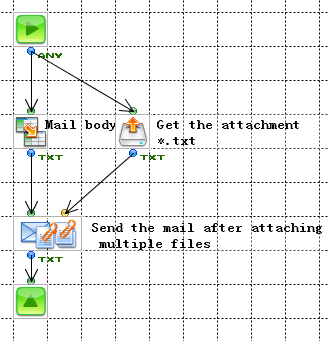
Output stream's stream variable
In the output stream variable, there are the below things. For example, when a file is read by the FileGet Component, you can refer to the file's last update date/time and its size from the stream variable "FileDate" and "FileSize" of the mapper configured after the FileGet Component.
| Component name | Variable name | Variable discription |
|---|---|---|
| FileGet FTPGet RecordGet UnZip |
FilePath | The file name of the input file |
| FileDate | The last update date/time of the input file. | |
| FileSize | The size of the input file | |
| MIMEDecode | FilePath | The file name when a part of the output objects have the Content-Disposition header |
Component defined stream variable
The component defined stream variable can be automatically converted from any name field defined in the component's "Category" property (※). Usually, to refer to a component's property, you can configure a mapper after the component, and refer to it from the "property name" field in the mapping window; By converting the "Category" property into the stream variable, not only the component's property but the output stream's valid period can be referred to as a stream variable.
※The "category" property is the tab different from the "Basic" tab in the inspector after selecting a component. It defines the fields, such as parameters, which is used to process the data by component.
The category property's object field uses the component's property as a output stream variable, so you can see it as a property from the mapper configured before the component, while you can see it as a stream variable from the mapper configured after the component.
Output stream variable
In the stream variable, there are the below things now. For example, you have defined a header name under the "Received header" tab of the HTTPGet Component. Next, by configuring a component that can output the input stream directly and configuring a mapper after it, you can map and refer to the output stream variable from the "stream variable" field which also can be considered as a header content.
| Component name | Category property name | Variable discription |
|---|---|---|
| HTTPStart | Cookie | HTTP request's Cookie |
| SubFlow | Parameter | SubFlow's paramter |
| HTTPGet HTTPPut |
Received header | Received header |
| IMAP4 POP3 |
Mail header | Mail header |
| ExcelInput ExcelSlim(Input) |
Single cell | Single-cell area defined by the Excel builder |
| JavaInterpreter JavaClass |
Parameter | Parameter |
| XPathString | XPath | XPath expression |
User defined stream variable
The user defined stream variable is used when data is processed by the custom component after adding information to the input stream, or it can be defined and referred to as an output stream's additional information and used in the Flow processing.
Define stream variable
Under the "mapper variable" tab of the mapper's inspector, define variable name, data type, initial value and select "Yes" for the stream variable item. The initial value can be omitted.