 REST
REST
The REST component communicates with the HTTP server by using specified http method. When transporting using a SSL protocol, the certificates registered by a management console are used, then the data will be transported following a public key infrastructure.
Stream Information
| Input | Format | Binary,Text,HTML,ParameterList,CSV,FixedString,MIME,XML |
|---|---|---|
| Number of Inputs | 1 | |
| Description |
If HTTPMethod != GET or DELETE, It becomes transmission data. if GET or DELETE, it is not used. In the case of a ParameterList input stream, each parameter is sent as a separate form field. |
|
| Output | Format | XML,CSV,FixedLength,Text,HTML,Binary,MIME |
Output Stream Variables
| Name | Data Type | Description |
|---|---|---|
| StatusCode | int | Status code of HTTP response. |
Component Properties
| Name | Data Type | Mapping | Description | ||||||||||||
|---|---|---|---|---|---|---|---|---|---|---|---|---|---|---|---|
| UseConnection | boolean | - |
Specifies if the Connection property is used to specify the HTTP server information.
|
||||||||||||
| Connection | connection | - | If UseConnection=true, specifies the HTTP connection to use. The connections are defined in the Connection Pane of Flow Designer or the Flow Service Management Console. | ||||||||||||
| ConnectionInfo | group | - | The HTTP server connection property settings' place holder displayed when UseConnection is set to false. | ||||||||||||
| URL | string | In & Out |
Specifies the URL of the HTTP server. The full URL in the form "http(s)://..." must be specified. If UseConnection=false, this is used. |
||||||||||||
| URLEncoding | choice | In & Out |
Specifies the character encoding set in the Body. if the input stream is a ParameterList. If UseConnection=false, this is used. |
||||||||||||
| Timeout | int | In & Out |
Specifies the timeout value, in seconds, for connection, communication with the HTTP server. If UseConnection=false, this is used. |
||||||||||||
| BasicAuth | group | - |
The authentication properties' place holder if UseConnection=false, this is used. Supporting authentication is as follows.
|
||||||||||||
| Username | string | In & Out |
Specifies the username to use if the server performs authentication. If UseConnection=false, this is used. |
||||||||||||
| Password | password | In & Out |
Specifies the password to use if the server performs authentication. If UseConnection=false, this is used. |
||||||||||||
| UseProxy | boolean | - |
Specifies whether the proxy server settings defined in the Flow Service Managenemt Console are to be used. If UseConnection=false, this is used.
|
||||||||||||
| Path | string | In & Out | Specifies the URL location from which to Get data. This value is appended to the end of the URL defined by the selected Connection. If UseConnection=false, this is used. | ||||||||||||
| HTTPMethod | choice | - |
Specifies the HTTP method to use for the request. Other methods can use if you input a method name.
|
||||||||||||
| HTTP body | choice | - |
Specifies the HTTP message body.
|
||||||||||||
| HTTPVersion | choice | - |
Specifies the HTTP version to use for the request.
When HTTP/1.1 , component sets Connection:close header field.
|
||||||||||||
| RetryCount | int | In & Out | Number of times to retry the request if it fails. If no retry attempts are to be made, set this value to zero ("0"). | ||||||||||||
| RetryInterval | int | In & Out | Number of seconds to wait between retry attempts. | ||||||||||||
| FollowRedirects | boolean | - |
Specifies if redirects or not when the server returns rediretion information.
|
||||||||||||
| URLParameters | category | In | Any parameters present in the URLParameters category are set in the URL query and sent with the HTTP request. | ||||||||||||
| RequestHeaders | category | In | Any parameters present in the RequestHeaders category are set in the HTTP header and sent with the HTTP POST request. | ||||||||||||
| ResponseHeaders | category | Out | When the response is received from the server, any HTTP header whose name matches that of a parameter in the ResponseHeaders category has its value copied to the corresponding ResponseHeaders parameter. |
Transaction
| Commit | Do nothing |
|---|---|
| Rollback | Do nothing |
Exceptions
| Type | Parameter | Stream for error handling flow | Error Code | Description | |||||||||
|---|---|---|---|---|---|---|---|---|---|---|---|---|---|
| Exception | None | This component's input stream | - | The specified Connection could not be found. | |||||||||
| - | The HTTP server could not be contacted. | ||||||||||||
| HTTPException |
| The MIME content contained in the HTTP response returned by the server. | Status code of HTTP response | The HTTP server returned an error. |
Difference between REST and HTTPGet(or HTTPPost)
This component contains all functions of HTTPGet and the HTTPPost component, and can substitute it. The difference point with those components is as follows.
- It can select the HTTP method, and can send the request of PUT or DELETE.
- It can specify the URL parameters.
- It can convert JSON to XML.
- It can execute test.
The HTTPPost component can completely replace by the "Replace component" of right click menu, but the HTTPGet component that uses input stream is necessary to set the input stream field to the URLParameters property.
Cancel of the flow
When flow is canceled, the flow usually aborts after the execution of that component is ends. However, the execution of this component is forced to be ended, then it aborts.
URL Encoding
For example, if the "param" field of PrameterList is set to "(abc)" and URLEncoding is set to UTF-8, the POST data will be as follows.param=%28abc%29For further information on URLEncoding refer to RFC1738.
Using Connection
When not using connection, all the information must be specified in the component. But, URL can be generated with the value of Path property and the basic information defined in the connection. For example, URL of the connection definition is set to :
http://SERVERNAME
and, the Path property is set to "/page1.html", then requests to
http://SERVERNAME/page1.html
When multiple HTTP components connect to the same web server and following condition is met, it is convenient to use connections.
- Web server requires authentication
- Web server may change to another server
Topic
- As for the value set in the Timeout property, the time-out that OS manages even if the value that rises time until the time-out that OS manages is set is given to priority.
For example, it becomes a time-out at 30 seconds even if 60 seconds are set to Timeout when time until the time-out that OS manages is 30 seconds.
The test of HTTP request
Click the "Execute test" from right click menu of this component, or double-click this component, then the test dialog is displayed.
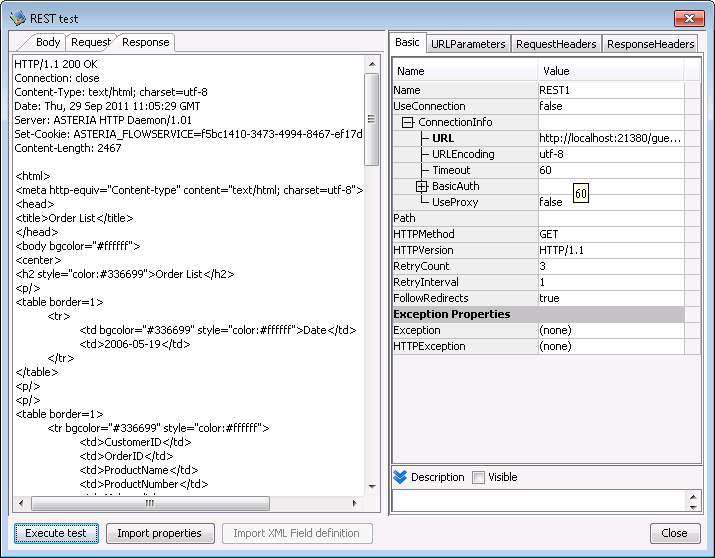
The test dialog consists of the following elements.
- Inspector
At first, the values of component properties are set.
The change of here is not set to the component as long as "Import properties" button is not clicked. - Body tab
The body sent with POST or PUT method can be input as the text. - Request tab
The MIME of request is displayed. - Response tab
The MIME of response is displayed. - Execute test button
The HTTP request is executed according to the inspector setting.
The result is displayed on Request tab and Response tab. - Import properties button
The change of the inspector is set to the component. - Set POST parameters button
It is enabled when HTTPMethod property is POST and the output stream of previous component is ParameterList.
The input dialog is shown and its values are set to Body tab. - Import XML Field definition button
If the response is XML, import its structure to the output stream definition as XML.
If the response is JSON, it is converted to the XML and imported. - Close button
Close this dialog.
Notes of test
- If the "Content-Type" header is not exist in RequestHeaders, the "Content-Type" of test execution becomes to one of followings.
- text/xml; charset=utf-8 (The value of Body tab is XML)
- application/x-www-form-urlencoded (HTTPMethod property is POST and the output stream of previous component is ParameterList)
- text/plain; charset=utf-8 (Others)
- A part of header such as Cookie might be different for the test execution and runtime.
- The test cannnot use the property formula.