 RecordJoin
The RecordJoin component joins records (Record, CSV, FixedLength) in the first input stream with records in the second input stream (Record, CSV, FixedLength).Note: To display the input streams' order in the Flow Designer, right-click the RecordFilter component and select Change Input Order. By selecting an input connection, the input stream order can be changed.
Note: If the input streams' order are changed, the JoinKey and the OutputField settings must also be changed to reflect the new ordering.
Stream Information
| Input | Format | Record,CSV,FixedLength |
|---|---|---|
| Number of Inputs | 2 | |
| Output | Format | Record,CSV,FixedLength |
| Description | The results of the JOIN performed on the two input streams. |
Component Properties
| Name | Data Type | Mapping | Description | ||||||
|---|---|---|---|---|---|---|---|---|---|
| JoinMode | choice | - |
Specifies whether an outer join or an inner join is to be performed on the input streams.
|
||||||
| LoopProcess | loopProcess | - |
Specifies if it outputs results as an individual stream or as a single stream.
|
||||||
| JoinKey | category | - |
The key used to perform the join on the input streams.Select which field in the first input stream is to be used as a key in the in[1] KeyName column. Select which field in the second input stream is to be used as a key in the in[2] KeyName column. The field names that appear in each pull down list are the field names available for that input stream. Records in the first input stream are joined with records in the second input stream where the selected key fields match. Multiple keys can be selected. If multiple keys are selected, the and condition is applied.
|
||||||
| OutputField | category | - | Specifies the fields to be output by selecting in "Select output fields" dialog box after double clicking this component. For details, please refer to following topic "Selecting output fields". |
Loop
If LoopProcess=true, each record in the join result will be sent out as an individual record set. This results in looping.
Transaction
| Commit | Do nothing |
|---|---|
| Rollback | Do nothing |
Exceptions
| Type | Parameter | Stream for error handling flow | Error Code | Description |
|---|---|---|---|---|
| Exception | None | This component's input stream | - | Two input streams are not connected to the component. |
| - | The output stream fields are not defined. | |||
| - | The defined output stream fields do not exist in the input streams. | |||
| - | The JoinKey is not defined. | |||
| - | The defined JoinKey does not exist. | |||
| RecordNotFoundException | None | This component's input stream | - | The resulting output stream contains zero records. |
Limitations
- If the number of records being processed is very large, an error might occur during execution.
- If LoopProcess is set to true, the output stream is set to CSV or FixedLength, and the output stream's
StartRowis set to 2 or higher, the output stream data will consist of zero records. Because of this, if LoopProcess is set to true, and the output stream is set to CSV or FixedLength, set the output stream'sStartRowto 1 so that one record will be output.
Selecting output fields
When specifying the field to get, use Select output fields dialog displayed when double clicking this component.In Select output fields dialog, fields of first input stream and second input stream are displayed like in[1].<Field Name> and in[2].<Field Name>. In the list, it becomes target when enables the checkbox of the field to get, then it is displayed in OutputField property
The name of output fields are field name of output stream. This can be changed by clicking the field. Input field name is read-only.
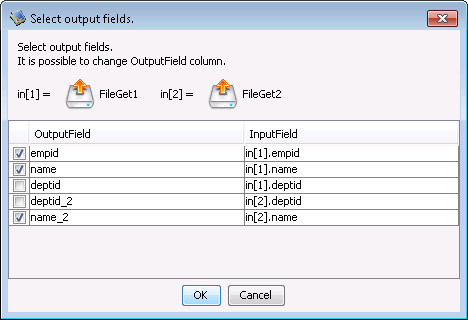
JoinMode=inner Example
Input stream 1 contains the record data outlined in the table below.| empid | name | deptid |
| 1 | aaa | 2 |
| 2 | bbb | 3 |
| 3 | ccc | 1 |
Input stream 2 contains the record data outlined in the table below.
| deptid | name |
| 1 | dev |
| 2 | sales |
The component's settings are outlined in the table below.
| Property Name | Value | Description | |
|---|---|---|---|
| JoinMode | inner | Perform an inner join on the input records. | |
| JoinKey | in[1] KeyName | xxxx.deptid | xxxx is the first input stream's component name. |
| in[2] KeyName | yyyy.deptid | yyyy is the first input stream's component name. | |
| OutputField | empid | Output the first input stream's field named empid. | |
| name | Output the first input stream's field named name. | ||
| name_2 | Output the second input stream's field named name. | ||
The output results are as follows:
| empid | name | name_2 |
| 1 | aaa | sales |
| 3 | ccc | dev |
Because JoinMode=inner, only records from the first input stream and the second input stream which have matching deptid field values are joined and output.
JoinMode=outer Example
Input stream 1 contains the record data outlined in the table below.| empid | name | deptid |
| 1 | aaa | 2 |
| 2 | bbb | 3 |
| 3 | ccc | 1 |
Input stream 2 contains the record data outlined in the table below.
| deptid | name |
| 1 | dev |
| 2 | sales |
The component's settings are outlined in the table below.
| Property Name | Value | Description | |
|---|---|---|---|
| JoinMode | outer | Perform an outer join on the input records. | |
| JoinKey | in[1] KeyName | xxxx.deptid | xxxx is the first input stream's component name. |
| in[2] KeyName | yyyy.deptid | yyyy is the second input stream's component name. | |
| OutputField | empid | Output the first input stream's field named empid. | |
| name | Output the first input stream's field named name. | ||
| name_2 | Output the second input stream's field named name. | ||
The output results are as follows:
| empid | name | name_2 |
| 1 | aaa | sales |
| 2 | bbb |
|
| 3 | ccc | dev |
Because JoinMode=outer, even records which do not have matching deptid field values in either input stream are output.