Create pie chart
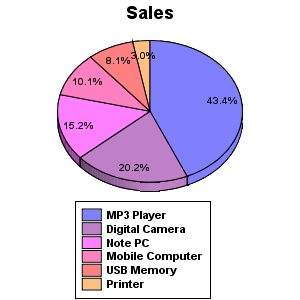
Generates a pie chart from specified data and saves as an image file.
Uses values specified in "Value" and generates the pie chart as percentage of the total. The result is saved as image file.
Properties
| Name | Description |
|---|---|
| Folder name |
Specifies the directory when output file is saved to. Does not discriminate between the separators "\" and "/" When the relative path is specified, the starting point is [DATA_DIR]/pipeline/home/pipeline/_fileroot. |
| Filename |
Specifies the name of file where image is to be saved. The file extension is assigned as ".png." |
| Graph title |
Specifies the title of the graph. Displayed at the top of the image file to save. |
| Chart width |
Specifies the width of the image file. Unit is in pixel. |
| Chart height |
Specifies the height of the image file. Unit is in pixel. |
| Output a HTML |
Outputs a HTML file containing the image file that was saved. Filename is that specified in "Filename.html." |
| Label |
Specifies the labels of items in the pie chart. Displays at the bottom part of the chart as explanatory notes. |
| Value |
Specifies data to generate the pie chart. Generates the pie chart in percentage of the total value. |
* Properties with thin font can be set in detailed mode.
Error Handling
| Error Code | Request will | Description |
|---|---|---|
| A0114-0100 | unknown |
|
| A0114-0101 | unknown |
|
| A0114-0102 | unknown |
|