See Database Content
Click"Manage Database"from the right side menu of [Monitor] tab and in the shown page, database tables which are used in the internal pipeline will be shown in a list of 50 records per page. You can refer to the contents for each table. Besides, you can also delete tables or records from those database only for actions.
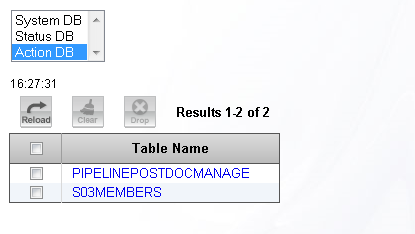
Click the link of each table name, to View table contents.
Type of database
Select the database which is used in the internal pipeline.
| System DB | It is database which is used as data saving queue or error queue of pipeline. You can change the target to connect in System DB page. |
|---|---|
| Database for status | It is database which is used as request status of pipeline. |
| Database for actions | It is database which is used when the internal database is specified in the action of database. |
Button operations
Check the checkbox on the left side of the table name you want to operate, by pressing the button on the top of the list, the following operations can be done to the tables.
 |
Reload page. |
|---|---|
 |
Clear record. When you are using the table which is selected by the running pipeline, you may not be able to clear records. |
 |
Delete record. When you are using the table which is selected by the running pipeline, you may not be able to delete tables. |
- Related items