Maintenance
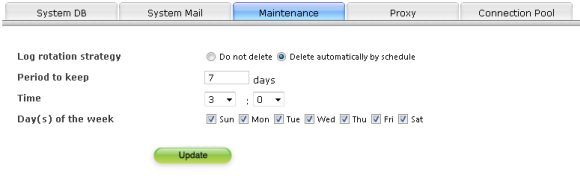
You can set log file or the deleting schedule of working file.
Attention
Files to be deleted are as follows.
- Monitor log
Logs of each pipeline in [DATA_DIR]/pipeline/data/monitor/log/pipeline/ - Status DB
Drops of each status table in [DATA_DIR]/pipeline/data/monitor/status/ - Working file
Working files of each pipeline in [DATA_DIR]/pipeline/data/log/ - Pipeline log
Group of log files in [INSTALL_DIR]/pipeline/log/application - System log
Group of log files in [INSTALL_DIR]/pipeline/log
※ [DATA_DIR] is the data folder, and [INSTALL_DIR] is the install folder. About the path in the default installation, please refer to "Administration".
※ Error queue's requests can also be deleted by maintenance function. Before requests are deleted by maintenance function, please fix the error and manually retry, or cancel the request. About the status of request, please refer to"Introduction"-"Pipeline"-"Status of request".
- Related items
- About the details of files to be deleted, please refer to"Administration"-"Maintenance".
About setting items
| Schedule | The files of past date can be deleted automatically. |
|---|---|
| Saving period | Specify the number of days to keep files. Those files whose dates are older than the specified date will be deleted automatically by schedule. |
| Execution time | Specify the time to delete files. Files will be deleted in this given time. |
| Set days | Delete files in the specified day. You can select multiple days to delete files. |
Notes for executing the maintenance processing
- Maintenance processing can only be performed once a day. Therefore, even you change the schedule settings after executing the maintenance processing, the maintenance processing will not be performed that day.
- One maintenance processing can only delete up to 10 days' data. This is to avoid burdening the system when you set the maintenance processing and execute it if there are a lot of past logs. When you perform regular maintenance processings, only those log files which are set in"Saving period"will be saved.
- When deleting system logs and pipeline logs, only those log files are deleted to whose names are appended with the date.