Pipeline Data Flow
Data flows in order of "Sensor", "Filter", and "Joint" in pipeline.
Dynamic data is generated with "Sensor" and "Filter".
Input data of sensor
The data input in sensor changes according to action settings. Data includes record type and parameter type.
Data of parameter type
There is only one data of parameter type in one request. A file name can be got in action of folder monitoring type is the one. In action of folder monitoring type, request is executed corresponding to updated files one by one. In a word, one request can correspond to one file data.
Data of record type
The data of record type is data with two or more values in the same name in one request. It has some fields like action of database type, and the one with the value of two or more records in one request is the one. In action of database type, regularly monitor database and the value of two or more records is processed in one request. In a word, two or more record datas can correspond to one request.
Variable addition in Filter
When the data is processed in Filter and is captured in sensor, it is impossible to use former data again if update the value as it is. A new variable can be added in Filter at this time. There are user variables and record variables in variables that can be added in Filter.
Record variables and user variables are added in data tab of Filter stage.
User variables
User variables have only one value in request. For example, only the result of the first record value is valid when the data of record type is converted and substitutes it in user variables.
Record variable
When the sensor reads data of record type, the record variable can have the value corresponding to each record. For example, conversion result corresponding to the data of conversion origin of each record is stored in record variable when the data of record type is converted and substitutes it in record variable.
Dynamic data and attached information
If data is accumulated in sensor, attached information of data is automatically defined and the following two information is dynamic data.
- The accumulated data
- Attached information of data
For example, when the file is read in sensor action, dynamic data is contents of files and attached information of files (file path, size of file, and last updated date and time, etc.). See these datas in Filter and Joint. There is no attached information and it only includes the data according to the kind of accumulated data.
Aabout contents of dynamic data please see help of sensor action.
Dynamic data reference
In pipeline coordinator, all dynamic datas are displayed in expressions $< ;xxx.yyy>of pipeline format.
Definition of data
About data is accumulated in sensor,when user defined name and data type in coordinator, in $<xxx.yyy> xxx is a reserved word, yyy is a defined name. And, it is same when the variable is defined.
For record
Records and record variables defined in sensor action are displayed as follows.
$<Record.defined name>
For single data
In $<xxx.yyy> the part of xxx is a reserved word of each kind of accumulated data decided beforehand, and the part of yyy is an arbitrary name defined. For example,Excel file is $<CellData.defined name>,a form request of browser is $<Query. defined name >. User variable is $<UserData. defined name >.
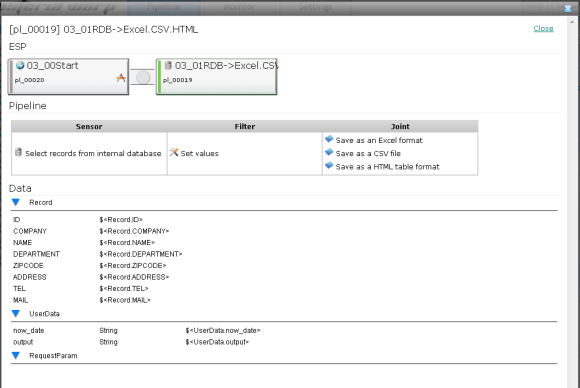
Attached information of data
In attached information expression of accumulated data,in $<xxx.yyy>all kinds of xxx, yyy are defined as a reserved word. For example, the file path, the size of file, and last updated date and time are automatically defined as attached information of read files in action of "File folder" category of sensor. Expressions of each information are decided as follows.
| Absolute path including file name | $<FileData.Path> |
| File name | $<FileData.Name> |
| Body of data | $<FileData.Data> |
| File size | $<FileData.Size> |
| Last updated date and time | $<FileData.LastModified> |
In the action that reads data from FTP server is $<FtpInformation....>,In action that reads attached files to mails is like$<Mail....>,a variety of attached information is expressed by each reserved word as a expression.
Exprssion setting in coordinator
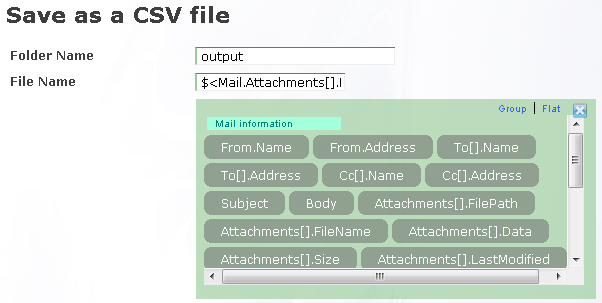
Click the item that can set the dynamic data on the action setting screen of Filter and Joint, the alternate of expression will be displayed, click one of items in alternate items to input setting in the field. When selecting it from alternate items, select defined names from displayed names according to expression type.
The order of data flow
The action is executed in each stage of pipeline one by one.
If there is data of record type, enter into the following action after processing is completed.