Example of flow using various chart components
Here are two of sample flows. These are using chart components and return the image of PNG format. It can be referred in HTML in the web browser.
- Direct reference by img tag in HTML
- Interactive chart by embedded area tag in HTML
Pattern 1 - Direct reference by img tag in HTML
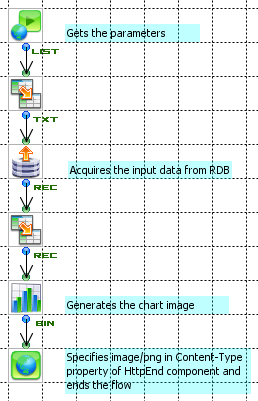
Flow invoked by img tag directly
The flow invoked by img tag directly can be made as follows.
- Starts by HttpStart and gets the parameters
- Acquires the input data from data source like RDB
- Generates the chart image by a chart component.
- Specifies image/png in Content-Type property of HttpEnd component and ends the flow
Specifies the URL path of URL trigger for this flow in the Trigger Manager. Specifies its URL in the img tab of HTML displayed in Web browser.
It is an example of the img tag of HTML when the parameter named year and userid is received by the HttpStart component, and flow for which the URL path of "showGraph" is specified by the URL trigger is called as follows.
<img src="showGraph?year=2009&userid=1"/>
Pattern 2 - Interactive chart by embedded area tag in HTML
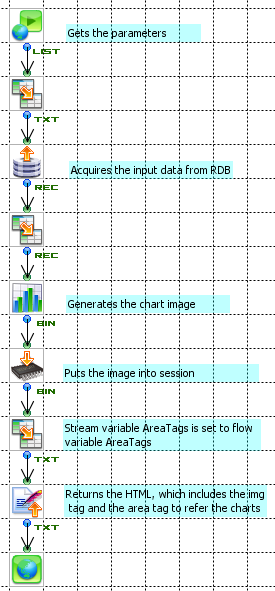
Flow which generates the HTML including embeded area tag
It is the same as a part where the parameter is received and the graph is generated. Geneated chart, which is Binary stream, is saved in the session by StreamPut component.
After that, it returns the HTML, which includes the img tag and the area tag to refer the charts, created by Velocity component. The Velocity template is as follows. In this example, stream variable AreaTags is set to flow variable AreaTags.
<img src="showGraphBySession?id=graph1&t=$flow.now.intValue()" usemap="#map1"/>
<map name="map1">
$flow.AreaTags
</map>
* If it specifies only id in the flow which generates a chart from session, cached old image may be displayed by web browser. For avoiding this, it is recommended to pass the current timestamp as a parameter so that the URL can become unique.
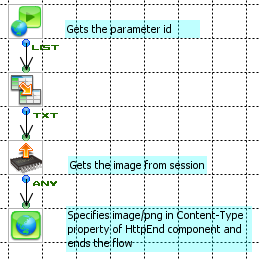
Flow which returns the chart image from the session
It is an example of the flow, which gets id from HttpStart component and returns the chart image stored in the settion by StreamPut component. This has URL path of "showGraphbySession" of URL trigger.
This flow returns the stream which is get by specified id from the session. Note that the stored chart is not be able to be get if the "CloseSession" property of these flow is set to "Close".