 REGEXPREPLACE
The REGEXPREPLACE function performs regular expression pattern matching on the input string, replacing matches with the specified replacement string.
Input/Output
Number of Connections: Min: 1/Max:3| Input | Data Type | Description |
|---|---|---|
| Input1 | String | The input string. |
| Input2 | String | Sets the RegExp property. (optional) |
| Input3 | String | Sets the Replace property. (optional) |
| Output | Data Type | Description |
|---|---|---|
| Output1 | String | The modified string. |
Property
| Name | Property Type | Description | ||||||||||||||
|---|---|---|---|---|---|---|---|---|---|---|---|---|---|---|---|---|
| RegExp | string | The regular expression used to locate the data to be replaced. | ||||||||||||||
| Replace | string |
The replacement string. The replacement string set by this property can use macros such as $1 or $2, as seen in the example below, that represent the regular expression portion of the RegExp that appear in brackets () in the order that they appear. |
||||||||||||||
| CaseInsensitive | choice |
Defines whether the query distinguishes from upper and lower case characters.
|
||||||||||||||
| Global | choice |
Specifies which matches are to be replaced.
|
||||||||||||||
| EnableMetaCharacter | choice |
If set to true, meta characters may be used in the Replace property. The following meta characters can be used.
|
Topic
- Please refer to a more detailed explanation of regular expression query language located at https://svn.apache.org/repos/asf/jakarta/oro/trunk/docs/api/org/apache/oro/text/regex/package-summary.html.
Regular Expression Dialog
When double-click the regular expression functions, the Regular Expression Dialog is displayed. You can configure the properties and test the regular expressions.
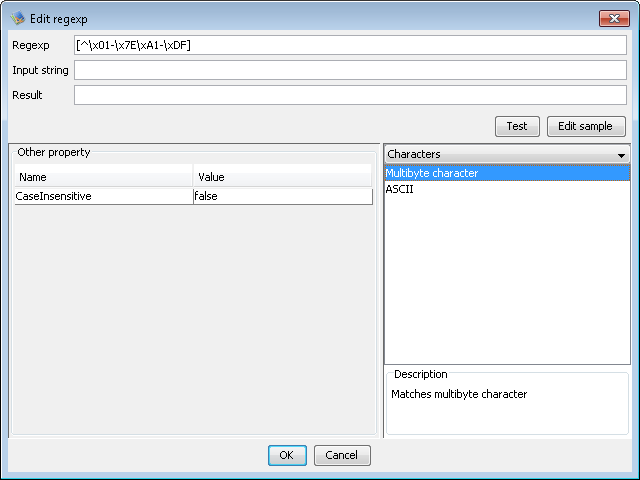
| Regexp | Input regular expression property. When the item is selected by listing the lower right of the screen, the corresponding regular expression is set. |
|---|---|
| Input string | Input the string to be used by test. |
| Result | The result of test is displayed. |
| Other property | Properties of editing function is displayed except for regular expression. |
| Selection list | If selects the category, regular expressions are displayed below. The corresponding regular expression is reflected in the input column when the item is selected from the list, and the explanation is displayed under the screen. |
| Test button | Test the current configurations with Input string. |
| Edit sample button | Edits the regular expression list of Selection List. |
Regular expression list is simple CSV file and it is freely customizable.
Specification of regular expression sample data
- The file path is DESIGNER_HOME/resources/Regexp/Regexp.txt
- Comment the line started with "#"
- Column 1 - Categor
- Column 2 - Label displayed in the list
- Column 3 - Regular expression
- Column 4 - Description(Line feed is "\n")
Example
Example 1 : If Global=false, only the first matching "abc" is replaced. If Global=true, each match is replaced.| Property | Output | |||
| Input1 | abc def hij abc | RegExp | abc | ZZZ def hij abc |
| Replace | ZZZ | |||
| CaseInsensitive | true | |||
| Global | false | |||
Example 2 : The "$1" in the Replace property is a macro that refers to the string that matches the regular expression located in the first set of brackets in the RegExp property.
| Property | Output | |||
| Input1 | (1,2) (2,3) (3,4) | RegExp | \(([0-9]),([0-9])\) | (2,1) (3,2) (4,3) |
| Replace | ($2,$1) | |||
| CaseInsensitive | true | |||
| Global | true | |||