Triggers
You can use triggers to process data from an external system. Triggers execute flows when an external system causes a trigger event.
Creating Flows Run by a Trigger
See below to create each type of trigger and create flows for this trigger type, as well as find guides to prerequisites and other tasks.
- URL Triggers
Send an HTTP request to the trigger's URL to execute a flow. - SOAP Triggers
Send a SOAP request to the trigger's URL to execute a flow. - FTP Triggers
Upload a file to the Flow Service's FTP server to execute a flow. - Mail Monitor Triggers
Monitor a mail server and process the new messages. - Message Queue Monitor Triggers
Monitor a JMS queue and process the new messages. - Schedule Triggers
Run a flow on a schedule.
Setting Flow Input and Getting Flow Output
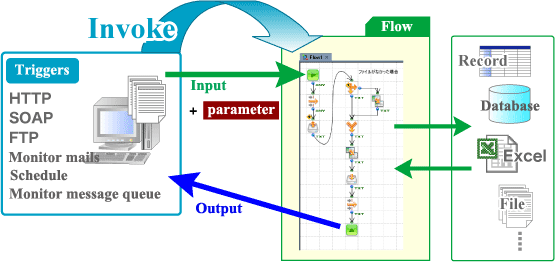
A trigger can pass data to the flow. And, the flow can return the results of processing to the trigger's caller, as shown in the diagram below.
Processing Flow Inputs and Returning Flow Outputs
The following diagram shows the flow of data through a flow that's invoked by a trigger.
- You can process the input stream and flow parameters to get inputs data from the trigger's caller.
- You can configure the output stream to return the results of processing to the trigger's caller.