Streams
See below for more advanced operations you can perform on streams; for example, convert a record-type stream to a CSV-type stream.
- Combining Streams in Containers
- Converting Stream Types
- Representing Stream Data
- Converting Field Data Types
- Formatting Datetimes
Combining Streams in Containers
A container combines multiple streams. Most often, you use containers transparently, just like single streams; this section explains more about stream containers to show the common tasks of processing multiple data sources with a component.
For example, you can loop over each CSV file in a folder or process the CSV records as a single result set in memory.
- Example: Processing a Container as a Result Set
- Shared Functionality with Streams
- Additional Functionality and Limitations
Example: Processing a Container as a Result Set
The example flow inserts CSV files to a database using the following components: FileGet, Mapper, and RDBPut.
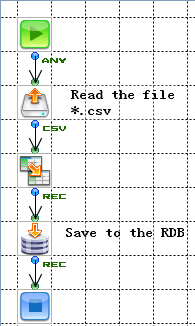
Configuring the FileGet Component
Set the following properties to configure the FileGet component to output a container.
- LoopProcess: Set this to false.
- FilePath: Set this to a glob pattern like "*.csv" to return multiple files.
Walking through the Example
Follow this flow to process 3 CSV files with 3 records, 5 records, and 10 records, respectively.
- The FileGet component reads the data from files matching the pattern "*.csv." It combines the 3 resulting streams into a container.
- In the Mapper component, you map the inputs to outputs, just like you connect a single input stream.
- The RDBPut component processes the 18 records as a single stream, instead of performing the same operation on three separate streams.
Shared Functionality with Streams
The example highlights the features that containers share with single streams:
- You can access records transparently, just like you would work with a single stream -- in the example, the Mapper processes the container just like a stream with 18 records.
- A container shares the stream type, stream properties, and field definitions with the streams it contains -- that is, in the container, all streams must have a single, shared stream definition.
Additional Functionality and Limitations
Containers have the following differences from single streams:
- Not all components can receive a container. If you connect a container to a component that isn't compatible, an error will occur.
-
If a component does accept a container as input, you can drag and drop to connect multiple streams.
For example, consider the SimpleMail component. You can use this component to send an email with multiple attachments. To specify the attachments, connect multiple input streams to the SimpleMail component; each attachment is a stream in a container.
Converting Stream Types
You can use the Converter component to convert compatible stream types; for example, you can convert a CSV stream to a binary stream. You could then store the whole CSV stream in a flow variable.
Note
-
Not all type conversions are valid.
-
When converting a stream type that can define multiple fields into another stream type that can also define multiple fields, you can't change the number of the fields or the field names. Note that this doesn't apply when you are converting a stream to a type that has a single field (MIME, HTML, text, and binary).
| Input/Output | Binary *1 | Text *2 | HTML *3 | CSV | FixedLength | XML | Record | ParameterList | MIME *8 |
|---|---|---|---|---|---|---|---|---|---|
| Binary | ○ | ○ | ○ | ○ *4 | ○ *6 | ○ *7 | × | × | ○ |
| Text | ○ | ○ | ○ | ○ *4 | ○ *6 | ○ *7 | × | × | ○ |
| HTML | ○ | ○ | ○ | × | × | ○ *7 | × | × | ○ |
| CSV | ○ | ○ | × | ○ *5 | ○ *5 | × | ○ *5 | × | ○ |
| FixedLength | ○ | ○ | × | ○ *5 | ○ *5 | × | ○ *5 | × | ○ |
| XML | ○ | ○ | ○ | × | × | ○ *9 | × | × | ○ |
| Record | ○ | ○ | × | ○ *5 | ○ *5 | ○ *1 | ○ *5 | × | ○ *1 |
| ParameterList | ○ | ○ | × | ○ *5 | ○ *5 | ○ *1 | ○ *5 | × | ○ *1 |
| MIME | ○ | ○ | × | × | × | × | × | × | ○ |
*1 The stream's binary value is used to convert binary to binary.
*2 The stream's string value is used to convert to a text stream.
*3 The HTML stream resulting from conversion isn't validated.
*4 Binary and text streams can be converted to CSV when the input data is in the CSV format.
*5 When converting across CSV, FixedLength, Record, and ParameterList streams, the fields are matched by index instead of their names. Note that the field definitions can't be changed.
*6 Binary and text streams can be converted to FixedLength when the input data conforms to the field definitions.
*7 Binary, text, and HTML streams can be converted to XML the input data is in the XML format.
*8 The conversion to MIME data adds the appropriate MIME header according to the stream type.
*9 An XML input stream is passed to an XML output stream without any changes. The input stream's field definitions will not be converted into the field definitions of the output XML stream.
Representing Stream Data
There are 3 ways to represent the data in any stream. Components use these representations to manipulate the data:
- As a binary byte sequence: For example, the FilePut component converts a stream into a file by using the binary representation.
- As a string: For example, the Velocity component can use both the string representation and the record representation.
- As a record: For example, the Mapper component uses the record representation to enable you to graphically access the stream fields.
The following sections describe each stream type's 3 representations:
XML
- Binary: The XML byte sequence converted according to the Output Encoding property.
- String: The XML as plaintext, including the XML declaration. The XML declaration contains the identifier specified in the Output Encoding property.
- Record: A record with definitions that define the following attributes: repeat element, node type, field name, and data type.
Back to Representing Stream Data
CSV
- Binary: A byte sequence converted from the string value according to the Output Encoding property.
- String: The CSV data represented as plaintext.
- Record: A record with field definitions that define the field name and the data type only.
Back to Representing Stream Data
FixedLength
- Binary: A byte sequence converted according to the field definitions and the Output Encoding property.
- String: A string converted according to the field definitions and the Output Encoding property. Note that if a field contains a Binary, ZonedDecimal, or PackedDecimal type, the data can't be converted into a string correctly.
- Record: A record with field definitions that define the start position, the field length, and the decimal point position besides the field name and the data type.
Back to Representing Stream Data
Record
- Binary: A byte sequence converted from the string representation in the Flow Service's own XML format.
- String: The forced stringification to the Flow Service's own XML format.
- Record: A record with field definitions that define the field name and the data type only.
Back to Representing Stream Data
ParameterList
- Binary: A byte sequence converted from the string representation in the Flow Service's own XML format.
- String: The forced stringification to the Flow Service's own XML format.
- Record: A record with field definitions that define the field name and the data type. You can have a field data type of a string array.
Back to Representing Stream Data
MIME
- Binary: The stream's byte sequence.
- String: The forced stringification of the stream's content into a string. If the charset is specifed as the Content-Type parameter in the main part, the conversion uses the specified encoding. If the charset isn't specified, the conversion uses the platform's encoding -- note that in this case the MIME contents may not be converted correctly.
Back to Representing Stream Data
Text, HTML
- Binary: The byte sequence converted from the string value according to the Output Encoding property.
- String: The plain text.
- Record: A record that has a single field with a string type.
Back to Representing Stream Data
Binary
- Binary: The stream's byte sequence.
- String: The stream's hex dump.
- Record: A single record that has a single field of the binary type.
Back to Representing Stream Data
Converting Field Data Types
When a value is assigned to a field or a variable by the Mapper component, the data type will be converted implicitly. If a value that can't be converted is assigned, an error will occur.
| Input/Output | Boolean | Integer | Decimal | Double | String | Binary*1 | DateTime |
|---|---|---|---|---|---|---|---|
| Boolean | - | ○*2 | ○*2 | ○*2 | ○*3 | ○ | × |
| Integer | ○*4 | - | ○ | ○ | ○ | ○ | ○*5 |
| Decimal | ○*4 | ○ | - | ○ | ○ | ○ | ○*5 |
| Double | ○*4 | ○*11 | ○ | - | ○ | ○ | ○*5 |
| String | ○*6 | △*9 | △*9 | △*9 | - | ○ | △*10 |
| Binary *7 | ○ | △ | △ | △ | ○ | - | △ |
| DateTime | × | ○*5 | ○*5 | ○*5 | ○*8 | ○ | - |
○=can be converted. △=depends on the format. ×=can't be converted.
*1 Conversions to binary: the data is first converted to a string and then to bytes by the system's encoding.
*2 Boolean to numeric type conversions: True converts to 1 and False converts to 0.
*3 Boolean to string conversions: True converts to the string "true" and False converts to the string "false".
*4 Numeric type to boolean conversions: 0 converts to False and other values convert to true.
*5 Numeric to datetime conversions: you can convert values in milliseconds that count from 00:00:00 GMT January 1st 1970.
*6 String to boolean conversions: the conversion is not case sensitive.
*7 Conversions to binary: data is converted to binary after it has been stringified using the system's encoding.
*8 Datetime to string conversions: the standard date format in the Flow Service is "yyyy-MM-dd'T'HH:mm:ss'.'sss z".
*9 String to numeric conversions: only decimal numbers is valid. The Flow Service will ignore any blanks before and after the number.
*10 String to datetime conversions: refer to Formatting Datetimes, below.
*11 Double to integer conversions: the digits after the decimal point are truncated.
Note
-
No matter what the data type is, null can be converted successfully into every type.
-
If conversion fails in the Mapper component, an error will happen.
Formatting Datetimes
The standard datetime format in the Flow Service is the "yyyy-MM-dd'T'HH:mm:ss'.'SSS z" format defined in ISO 8601. This format is used when the datetime type is output as a string. z represents the time zone, and is recorded as "JST", "+0900", "GMT-01:00", etc. If the time zone is omitted, the datetime value is processed as the local time.
You can also use the following formats to specify a datetime value as a string:
yyyy-MM-dd'T'HH:mm:ss z
yyyy-MM-dd'T'HH:mm:ss'.'SSS z
Note that the Z format specifier specifies UTC time in the following format:
yyyyMMdd'T'HHmmss'.'SSSZThis format is processed as GMT.