Flow Variables
See below to use flow variables in your flows (and subflows):
- Defining Flow Variables
- Accessing a Subflow's Flow Variables
- Setting Read-Only Flow Variables
- Finding References
Flow variables have a scope of a single flow:
- You can set or reference flow variables only in a single flow.
- Flow variables are initialized when a flow begins and are valid until the flow ends.
Defining Flow Variables
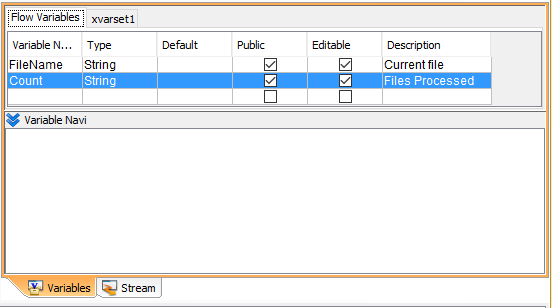
You can define flow variables in the Variables pane: open the flow in the workspace and click an empty space in the workspace. The flow's properties are then displayed in the inspector. In the Flow Variables tab of the Variables pane, define the variable name, data type, default value, and whether the variable is public and writable. Optionally, enter a description.
- Default: The variable is initialized to this value when the flow runs.
- Public: Select this option to reference the variable from a parent flow, which is calling the flow -- see below for more information. Leave this option blank to allow getting and setting the variable only inside the flow that defines the variable.
- Editable: If you clear this option, the output pane of the mapper won't display the variable.
Variables Pane
Accessing a Subflow's Flow Variables
You can get and set a flow's public flow variables from a caller flow. By setting the flow variables from a caller flow, you can pass input parameters to a subflow, error processing flow, or a flow that's invoked by the NextFlow component or one of the timer components. By referencing the flow variables from a caller flow, you can output additional return values from the flow being called.
Note
Flow variables are not shared across flows. You can get and set flow variables in a different flow than the flow that defines the variables, but changing the value in one flow doesn't change the value in another flow.
Setting a Flow Variable from a Caller Flow
You can set a public flow variable that's defined in a flow that you're invoking to pass input parameters to the flow.
To set the parameters, link a mapper to the component's input. You can link values to the public flow variable in the Param section under Component Properties in the mapper's output fields.
You can also set default values for parameters in the parent flow: Select the component and open the Param tab of the inspector, next to the Basic tab.
Referencing a Flow Variable from Another Flow
You can reference a public flow variable that's defined in a flow you're invoking to get outputs from the flow.
Public flow variables also output return values from a subflow, error processing flow, or a flow that's invoked by the NextFlow component or one of the timer components. To get the variable values, link a mapper to the component's output and draw a link from the Stream Variables section in the mapper's input fields.
Setting Read-Only Flow Variables
If you clear the Editable check box for a variable, you can only reference the flow variable; the flow variable is displayed in the mapper's input pane only.
You can use read-only flow variables as constants: clear the Editable option and set a value in the Default field.
Note
If you clear the Editable check box but select the Public check box, the caller of the flow can still change the variable's value. (The caller could be another flow or an external system invoking the flow.)
Finding References
Select a flow variable in the Variables pane. The Variable Navi box under the Variables pane lists where the flow variable is referenced and assigned in the flow.