Stream Variables
You can use stream variables to get and set information within a stream. Stream variables exist as long as the stream exists. See below for examples and guides to using stream variables.
- Getting and Setting a Component's Parameters
- Using Component Properties as Stream Variables
- Using User-Defined Stream Variables
Example Streams
- Processing file details: A FileGet component sets the FileName, FilePath, FileDate, and FileSize stream variables in its output stream. You can reference the stream variables in the Mapper, or, using the expression editor, in the properties for a downstream component.
- Processing downstream: If a component outputs the input stream unchanged -- the CopyFile component, for example -- you can access the stream variables in a downstream component.
- Mapping stream variables to a new stream: When using a Mapper component, you need to link the input stream variables to the output stream variables in the mapping window. The Mapper component is an example of a component that processes an input stream and creates a new stream. The new stream won't automatically inherit the stream variables.
Getting and Setting a Component's Parameters
You can use stream variables to set additional input parameters for a component and get additional output parameters.
- Creating Stream Variables as Input Parameters
- Setting a Component's Input Parameters
- Getting a Component's Return Values
- See Also
-
- You can find a reference to a component's stream variables in the Component reference.
Creating Stream Variables as Input Parameters
You can use an upstream Mapper to create stream variables that the component defines as input parameters: Add a Mapper after the component, double-click the Mapper, and create a mapper variable in the Variables tab of the inspector. Set the SV (stream variable) property to true.
Setting a Component's Input Parameters
You can use an upstream Mapper to set a stream variable in a component's input stream: in the mapping window, link a field to the stream variable.
For example, when using the SimpleMail component to send email, set the FilePath variable to rename an attachment. (If set, the FilePath stream variable specifies the file name when the mail server receives the email.) The following table contains additional examples.
| Component name | Input stream variable | Variable description |
|---|---|---|
| MIMEEncode | FilePath | The file name in the Content-Disposition header |
| SimpleMail SimpleSMIMEMail |
FilePath | The file name for an attachment |
| MIMEType | The Content-Type for an attachment | |
| Zip | FilePath | The name of a file inside a ZIP |
Using Stream Variables with Stream Containers
See below for an example of processing a stream container that contains multiple streams: using the SimpleMail component to send an email with multiple attachments.
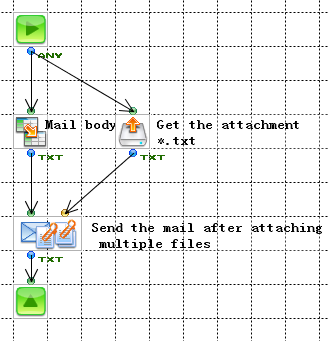
In the example, a FileGet component outputs multiple attachments to a SimpleMail component.
- A FileGet component returns a stream container that represents all files matching the pattern "*.txt." Each stream in the container represents a file that matches the pattern.
- A SimpleMail component processes the streams individually to create a file attachment for each file. The FileGet component outputs the FilePath stream variable for each stream. The SimpleMail component reads the attachment name from the FilePath stream variable.
- A Mapper component provides the mail body -- this could be text defined by a constant in the Mapper.
Note that to complete the example, you would also need to set the SimpleMail component's Attachment property to true.
Getting a Component's Return Values
You can use a downstream Mapper to reference the stream variables that a component sets in its output stream: in the mapping window, link a field to the stream variable in the output fields.
For example, the FileGet component outputs file metadata as stream variables such as FileDate and FileSize. See the following table for more examples.
| Component name | Steam variable | Description |
|---|---|---|
| AzureBlobGet AzureBlobPut AzureQueueGet AzureQueuePut AzureTableGet AzureTablePut |
Response headers | Headers in the server's response |
| ExcelInput ExcelSlimInput ExcelPOIInput |
Cell | A single-cell area defined by the Excel builder |
| FlowInvoker | Variables | The parameters of the flow to be executed |
| HTTPGet HTTPPost |
Response headers |
Headers in the server's response |
| HTTPStart | Cookie | A cookie in the HTTP request |
| Header | A header in the HTTP request | |
| IMAP4 POP3 |
MailHeaders | The mail headers |
| JavaInterpreter JavaClass |
UserProperties | Parameters passed to the component. |
| OnSheetForm | Single cell | Single cell area defined with the Excel builder |
| SubFlow | Parameter | A parameter of a subflow |
| XPathString | XPath | An XPath expression |
Using Component Properties as Stream Variables
You can use stream variables to reference the category properties you define on the category tabs next to the Basic tab in the inspector when you select the component, such as the Response Headers properties for HTTP components.
The Flow Service automatically converts the category properties to stream variables in the component's output stream.
You can reference the stream variables to access output from the component while the stream is valid, not only as component properties. You can also set category properties to pass input parameters to the component:
- Getting output parameters: Reference the stream variables from a downstream Mapper. In the mapping window, draw a link to the field in the Stream Variables section in the input fields.
- Setting input parameters: Set the category properties in an upstream Mapper. In the mapping window, draw a link to the field in the Component Properties section in the output fields.
Accessing Category Properties Downstream
The output stream variables derived from a component's category properties include the following:
| Component name | Steam variable | Description |
|---|---|---|
| AzureBlobGet AzureBlobPut AzureQueueGet AzureQueuePut AzureTableGet AzureTablePut |
Response headers | Headers in the server's response |
| ExcelInput ExcelSlimInput ExcelPOIInput |
Cell | A single-cell area defined by the Excel builder |
| FlowInvoker | Variables | The parameters of the flow to be executed |
| HTTPGet HTTPPost |
Response headers | Headers in the server's response |
| HTTPStart | Cookie | A cookie in the HTTP request |
| Header | A header in the HTTP request | |
| IMAP4 POP3 |
MailHeaders | The mail headers |
| JavaInterpreter JavaClass |
UserProperties | Parameters passed to the component. |
| OnSheetForm | Single cell | Single cell area defined with the Excel builder |
| SubFlow | Parameter | A parameter of a subflow |
| XPathString | XPath | An XPath expression |
Using User-Defined Stream Variables
You can define a stream variable to set additional input parameters in the input stream of a custom component. Or, you can define a stream variable and reference it downstream.
Define a Stream Variable
Define stream variables in a Mapper component: In the Variables tab of the Mapper's inspector, create a mapper variable and set the SV (stream variable) property to true.