 kintoneGet - Get from kintone
Get records from kintoneUse kintone builder to get the application list and field defination. Refer to "Guide of kintone builder" for detail.
Stream Information
| Input | Format | All |
|---|---|---|
| Number of Inputs | Unlimited | |
| Description |
This component doesn't use an input stream. |
|
| Output | Format | Record |
| Description | Output the records got from specified applications by the field defination to the output stream. The subtable field values will be output as JSON string. |
Component Properties
| Name | Data Type | Mapping | Description | ||||||
|---|---|---|---|---|---|---|---|---|---|
| Connection | connection | - | Specify the kintone to connect. Select the kintone name by connection pane or the management console. | ||||||
| Application ID | int | In & Out |
Specify the application ID. If the authentication method in connection settings kintone connection is "API token authentication" you do not need to be specified. |
||||||
| Query | string | In & Out |
Specify the query string to filter the records to get. To learn about the format of this property, please refer to the kintone API help here. |
||||||
| Sort Key | string | In & Out | Specify the field code to sort the order of output records. | ||||||
| Sort Order | choice | In & Out |
Specify the sort order of records. Not working when Sort Key is not specified.
|
||||||
| Limitation | int | In & Out | Specify the limit of record number to get. | ||||||
| Offset | int | In & Out | Specify the offset to skip records. When 30 is specified, the first 30 records will be ignored and the 31th and following records will be output. | ||||||
| Loop Process | loopProcess | - |
|
||||||
| Throw No Record Error | boolean | - |
Specify whether to throw an error if the record count is 0.
|
||||||
| API Limitation | int | - | Specify the max count of kintone records that can be got in one query. The limitation is defined by kintone API so that error will occur if a number larger than the limitation is specified. |
Loop
If Loop Process is 'true', this component will be the loop start and output the records one by one.
Transaction
| Commit | Do nothing |
|---|---|
| Rollback | Do nothing |
Exceptions
| Type | Parameter | Stream for error handling flow | Error Code | Description |
|---|---|---|---|---|
| Common | None | This component's input stream | 1 | Failed to change the type of a field value. |
| No record | None | This component's input stream | 2 | The record count is 0. |
| API Error | None | This component's input stream | 201 | Received an error code when exexuting API. |
Limitation
- kintone API does not support transactions, so that records may be inconsistency in case of multiple accesses.
- Can not get the values of related record list fields.
- Can not retrieve more than 10,000 records with Limitation or Offset specified.
About the relation between Flow service field defination and kintone field data type
Getting a field with multiple values
When getting values from a kintone field with multiple values(CHECK_BOX, MULTI_SELECT, FILE, USER_SELECT, ORGANIZATION_SELECT, GROUP_SELECT), the data type of the field should be "String".
In this case, the multiple values of the kintone field will be concatenated by "," and be got as a string.
kintone API call count
kintone API call count for the kintoneGet component is as follows:
If a Limitation or Offset is specified
| API | HTTP method | Call count | Description |
|---|---|---|---|
| records.json | GET | More than once |
If Limitation is specified, it will be called in units of API Limitation until the number of results reaches Limitation. If Limitation is not specified, it will be called from Offset position until all records are acquired in units of API Limitation. |
"Get record": 11 times
When neither Limitation nor Offset is specified
| API | HTTP method | Call count | Description |
|---|---|---|---|
| records/cursor.json | POST | Once | Create cursor. |
| records/cursor.json | GET | More than once |
Get record from cursor. Call until all records are retrieved in API Limitation units. |
| records/cursor.json | DELETE | Once | Delete cursor. |
"Create cursor": 1 time
"Get record from cursor": 4 times
"Delete cursor": 1 time
※kintone API is also used when using the kintone builder.
Guide of kintone builder
kintone builder is a tool to configure property and stream settings. You can do the following things easily with it.
- Specify the application and fields to read from kintone
- Specify the options and sort order of fields
- Specify arbitrary options of fields
- Edit and run the request parameters antomatically generated by kintone builder
- Test and confirm the result of getting records API
Start kintone builder
kintone builder can be started by the following actions.
- Double click the kintoneGet component.
- Right click the kintoneGet component and select "kintone builder" from the menu.
●Select Connection
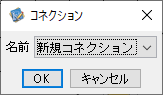
When Connection is not set, connection dialog will be shown after kintone Builder starts.
Select "Create Connection" to create a new connection.
To use an existing connection, select the connection name from the pulldown list. The selected connection will be used to connect to kintone.
●Create Connection
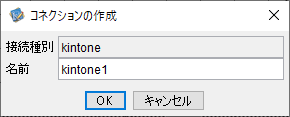
After selecting "Create Connection", "New Connection" dialog will be shown, input the connection name and click the "OK" button.
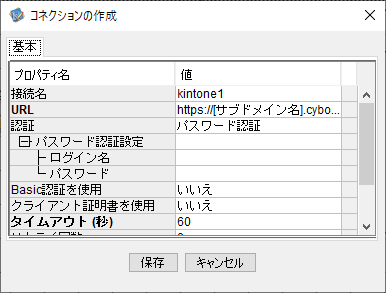
Connection properties dialog will be shown, input properties and click the "Save" button.
Attention
A new connection is saved at this moment.Use the new connection to connect to kintone.
If the connection to kintone is successful, the following dialog will be displayed.
kintone builder dialog
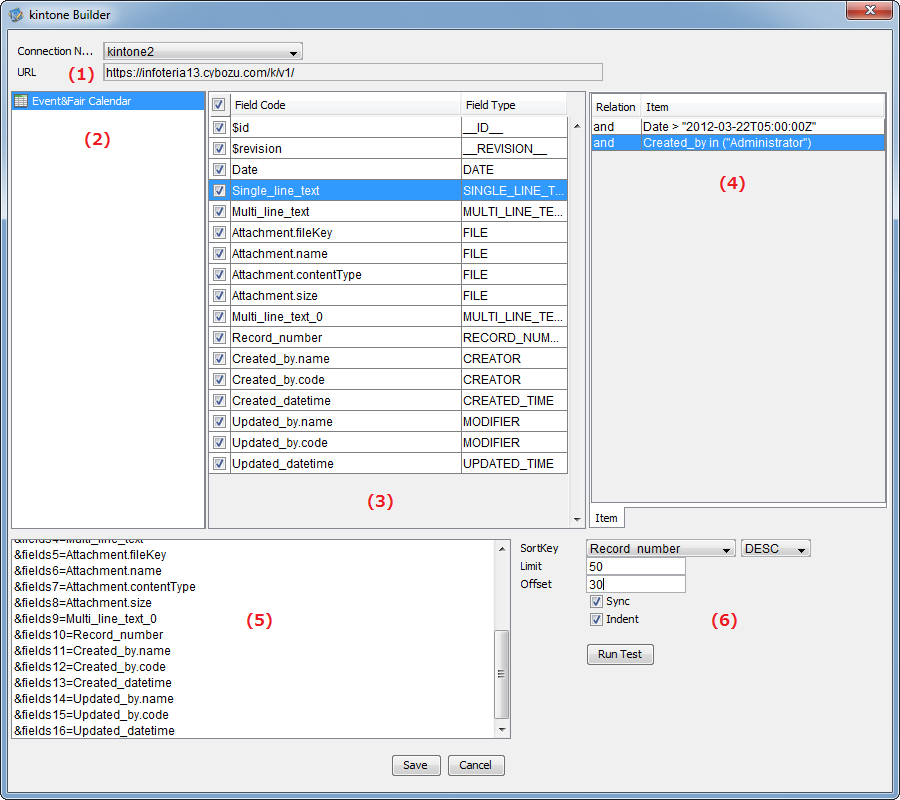
- (1)Dialog Top:Connection target
- (2)Dialog Left:Application list
- (3)Dialog Main:Field list
- (4)Dialog Right:Option items
- (5)Dialog Bottom Left:Display and edit the automatically generated request parameters
- (6)Dialog Bottom Right:Specify search items of the automatically generated request parameters
Select a connection
Select the connection to use from the connection target pulldown list of (1). Application list of the connection will be shown in (2).
Select the fields to get
Select an appliction from the application list in (2) and the field list of the application will be shown in (3). Check the check box on the left of the field name in the field list. To cancel the selection, uncheck it.
Specify the option items
Right click the field from the field list in (3), and select "Add Search Item" from the menu. Edit items in the "Edit Items" dialog and click "Save" button. Search items will be added into (4).
Edit option items
Click the item to edit from the item list of (4) and select "Edit" from the right-click menu. Edit items in the "Edit Items" dialog and click "Save" button. Search items in (4) will be updated.
Delete option items
Click the item to delete from the item list of (4) and select "Delete" from the right-click menu. The items in (4) will be removed.
Sort records
To get records in ascending or descending order, specify the sort key and sort order. There are two ways to do it.
- Right click a field from the field list in (3), and select "Set Sort Key" from the right-click menu.
- Select a field from the sort key pulldown list in (6).
After specifying the sort key, select "ASC" or "DESC" from the sort key pulldown list in (6).
Specify the limitation
Specify the limitation number of getting records in the limitaion field in (6).
Specify the offset
Specify the offset in the offset field in (6).
Display option of the automatically generated request paramters
You can specify the display option of (5) in (6).
About the edit of request parameters in (5)
The selected fields and specified items in kintone builder are called as models. When "Synchronize" checkbox is on, the models of (3)~(4) and request parameters of (5) are synchronized and automatically generated. The automatically generated request parameters can be edited directly. In this case, to stop the synchronization between editing models and editing request parameters, the "Synchronize" checkbox will be set to off automatically. To reset the modifications or to generate the request parameters automatically by the models edition again, please set the "Synchronize" checkbox to on.
Options
- Synchronize
When it is on, request parameters will be generated automatically according to field selection and item specification.
When it is off, request parameters will not be generated automatically according to field selection and item specification.
- Indent
When it is on, request parameters will be displayed with indent.
When it is on, request parameters will be displayed in the same line.
Use request parameters to test the record getting API
To use request parameters to test the record getting API, click the "Test" button of (5).
If the test ends successfully, the test result will be shown in JSON string format in the "Test Result" dialog box. If error occurred, the error message will be shown.
Atttentions
No more records than the max getting limitation of records, which is defined by the kintone API, can be fetched in a test.