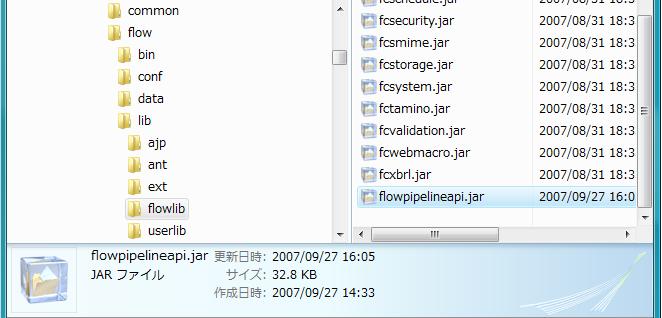
javaキットの中の flowpipelineapi.jar を[Install Dir]/flow/lib/flowlib 以下にコピーします。
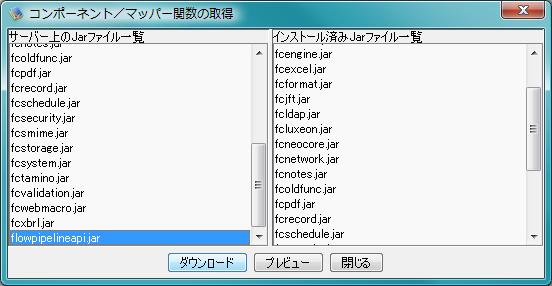
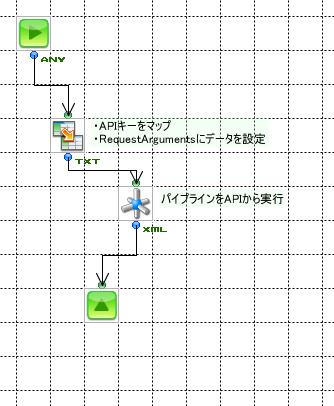
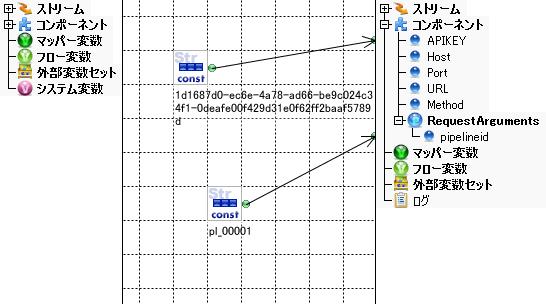
デザイナーでコピーしたコンポーネントのファイルをダウンロードします。 ダウンロー後、デザイナーを再起動します。
|
|
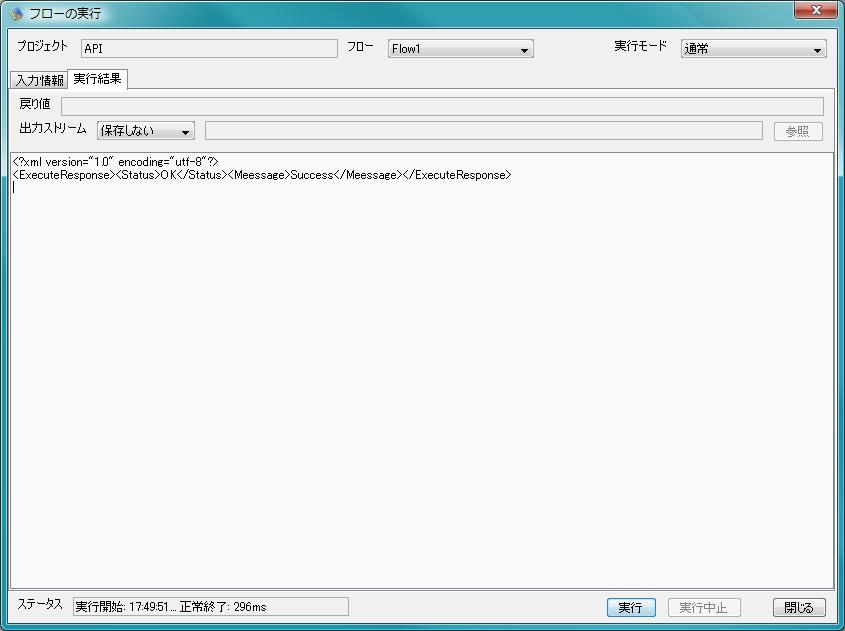
実行した結果内容
パイプラインサービスAPIとは、パイプラインサービスの特定の機能をさまざまな言語からWeb経由で呼び出すためのAPIです。
パイプラインサービスAPIを使用するためには、パイプラインサービスのAPI設定が有効である必要があります。また、パイプラインサービスで発行したAPIキーが必要です。
初めてAPI設定を有効にした場合はAPIキーが発行され、下部「APIキー」項目に表示されます。
初めてAPIキーを発行する場合は、上記「パイプラインサービスのAPI設定を有効にする」の手順で発行されます。APIキーを再発行する場合は、上記手順を参考にしてパイプラインコーディネーターで「API設定」画面を表示し、下部にある「APIキー」項目の「更新」ボタンをクリックします。「APIキー」項目に新しいAPIキーが表示されます。
リクエストのURLは以下のような形式です。
http://[ホスト名]:[ポート番号]/pipelineapi/[API指定]/[レスポンスタイプ]
| ホスト名 | パイプラインサービスのホスト名を指定します。 |
|---|---|
| ポート番号 | パイプラインサービスのポート番号を指定します。インストール時のデフォルト値は25080です。インストール時に変更した場合は、変更したポート番号を指定してください。 |
| API指定 | パイプラインサービスAPIのパスを指定します。APIリストを参照してください。 |
| レスポンスタイプ | xml,json,htmのいずれかを指定します。 パイプラインサービスが返すレスポンスは、XML(text/xml), JSON(text/javascript) ,HTML(text/html)の3つのコンテントタイプがあります。省略可能で、省略した場合はXMLになります。 |
それぞれのAPIサービスを使用するにはHTTPメソッドを指定します。
リクエストで指定されたレスポンスタイプ(XML,JSON,HTML)のいずれかの形式で返ります。
例えば、パイプライン一覧取得(list)のリクエストに対するレスポンスはそれぞれ以下のようになります。(サーバーアドレスはhostname、ポート番号は25080とします)
<リクエストURL>
http://hostname:25080/pipelineapi/list/xml
<?xml version="1.0" encoding="UTF-8"?>
<PipelineList>
  <PipeLine>
    <Id>pl_00001</Id><Name>パイプラインーサンプル</Name><Runmode>run</Runmode>
    <Createdate>2007-08-31T19:58:36.752 JST</Createdate>
    <Updatedate>2007-09-14T07:37:15.692 JST</Updatedate>
    <Description>Please write description</Description>
  </PipeLine>
  <PipeLine>
    <Id>pl_00002</Id><Name>パイプライン-テスト</Name><Runmode>stop</Runmode>
    <Createdate>2007-08-31T19:58:56.907 JST</Createdate>
    <Updatedate>2007-08-31T19:58:56.907 JST</Updatedate>
    <Description>Please write description</Description>
  </PipeLine>
  <PipeLine>
    <Id>pl_00005</Id><Name>新規パイプライン</Name><Runmode>stop</Runmode>
    <Createdate>2007-09-07T17:22:51.473 JST</Createdate>
    <Updatedate>2007-09-07T23:57:32.252 JST</Updatedate>
    <Description>Please write description</Description>
  </PipeLine>
  <PipeLine>
    <Id>pl_00006</Id><Name>SfDC</Name><Runmode>stop</Runmode>
    <Createdate>2007-09-10T17:40:55.334 JST</Createdate>
    <Updatedate>2007-09-10T18:25:03.015 JST</Updatedate>
    <Description>Please write description</Description>
  </PipeLine>
  <PipeLine>
    <Id>pl_00007</Id><Name>新規パイプライン</Name><Runmode>run</Runmode>
    <Createdate>2007-09-14T02:50:15.913 JST</Createdate>
    <Updatedate>2007-09-14T02:53:58.568 JST</Updatedate>
    <Description>Please write description</Description>
  </PipeLine>
</PipelineList>
<リクエストURL>
http://hostname:25080/pipelineapi/list/json
{"PipelineList":
     {"PipeLine":
        [
         {"Name":"パイプラインーサンプル","Description":"Please write description","Updatedate":"2007-09-14T07:37:15.692 JST",
          "Id":"pl_00001","Createdate":"2007-08-31T19:58:36.752 JST","Runmode":"run"},
         {"Name":"パイプライン-テスト","Description":"Please write description","Updatedate":"2007-08-31T19:58:56.907 JST",
          "Id":"pl_00002","Createdate":"2007-08-31T19:58:56.907 JST","Runmode":"stop"},
         {"Name":"新規パイプライン","Description":"Please write description","Updatedate":"2007-09-07T23:57:32.252 JST",
          "Id":"pl_00005","Createdate":"2007-09-07T17:22:51.473 JST","Runmode":"stop"},
         {"Name":"SfDC","Description":"Please write description","Updatedate":"2007-09-10T18:25:03.015 JST",
          "Id":"pl_00006","Createdate":"2007-09-10T17:40:55.334 JST","Runmode":"stop"},
         {"Name":"新規パイプライン","Description":"Please write description","Updatedate":"2007-09-14T02:53:58.568 JST",
          "Id":"pl_00007","Createdate":"2007-09-14T02:50:15.913 JST","Runmode":"run"}
        ]
     }
}
<リクエストURL>
http://hostname:25080/pipelineapi/list/htm
<?xml version="1.0" encoding="UTF-8"?>
<table>
<tr>
<td>pl_00001</td><td>パイプラインーサンプル</td><td>run</td>
<td>2007-08-31T19:58:36.752 JST</td><td>2007-09-14T07:37:15.692 JST</td><td>Please write description</td>
</tr>
<tr>
                 :
                 :
<tr>
<td>pl_00007</td><td>新規パイプライン</td><td>run</td>
<td>2007-09-14T02:50:15.913 JST</td><td>2007-09-14T02:53:58.568 JST</td><td>Please write description</td>
</tr>
</table>
| URL | APIのURL |
|---|---|
| 説明 | APIの説明 |
| リクエスト | リクエストで設定できるパラメータ |
| レスポンス | レスポンスノードの説明 |
| URL | http://[hostname]:[port]/pipelineapi/list | ||||||||||||||||||||||||||
|---|---|---|---|---|---|---|---|---|---|---|---|---|---|---|---|---|---|---|---|---|---|---|---|---|---|---|---|
| 説明 | パイプライン一覧のリストを返します | ||||||||||||||||||||||||||
|
| |||||||||||||||||||||||||||
<リクエスト> GET /pipelineapi/list/xml HTTP/1.1 X-Pipelinewebapi: 1d1687d0-ec6e-4a78-ad66-be9c024c34f1-0deafe00f429d31e0f62ff2baaf5789d Connection: close Accept: */* Content-Type: application/x-www-form-urlencoded Host: 192.168.5.165:38080 <レスポンス> HTTP/1.1 200 OK Content-Type: text/xml; charset=UTF-8 Content-Length: 1323 Server: ASTERIA HTTP Daemon/1.01 Date: Thu, 13 Sep 2007 21:51:53 GMT Connection: close <?xml version="1.0" encoding="UTF-8"?> <PipelineList> <PipeLine> <Id>pl_00001</Id> <Name>パイプラインーサンプル</Name> <Runmode>run</Runmode> <Createdate>2007-08-31T19:58:36.752 JST</Createdate> <Updatedate>2007-09-14T05:10:38.627 JST</Updatedate> <Description>Please write description</Description> </PipeLine> <PipeLine> <Id>pl_00002</Id> <Name>パイプライン-テスト</Name> <Runmode>stop</Runmode><Createdate>2007-08-31T19:58:56.907 JST</Createdate> <Updatedate>2007-08-31T19:58:56.907 JST</Updatedate> <Description>Please write description</Description> </PipeLine> <PipeLine> <Id>pl_00005</Id> <Name>新規パイプライン</Name> <Runmode>stop</Runmode> <Createdate>2007-09-07T17:22:51.473 JST</Createdate> <Updatedate>2007-09-07T23:57:32.252 JST</Updatedate> <Description>Please write description</Description> </PipeLine> </PipelineList> |
|||||||||||||||||||||||||||
| URL | http://[hostname]:[port]/pipelineapi/exec | ||||||||||||||||||
|---|---|---|---|---|---|---|---|---|---|---|---|---|---|---|---|---|---|---|---|
| 説明 | パイプラインを実行します。idで実行するパイプラインを指定します | ||||||||||||||||||
|
| |||||||||||||||||||
<リクエスト> POST /pipelineapi/exec/xml HTTP/1.1 TE: deflate,gzip;q=0.3 Connection: TE, close Host: 192.168.5.165:38080 User-Agent: libwww-perl/5.805 Content-Length: 38 Content-Type: application/x-www-form-urlencoded X-PIPELINEWEBAPI: 1d1687d0-ec6e-4a78-ad66-be9c024c34f1-0deafe00f429d31e0f62ff2baaf5789d pipelineid=pl_00001&filename=plrun.dat <レスポンス> HTTP/1.1 200 OK Content-Type: text/xml; charset=UTF-8 Content-Length: 120 Server: ASTERIA HTTP Daemon/1.01 Date: Thu, 13 Sep 2007 22:47:15 GMT Connection: close <?xml version="1.0" encoding="UTF-8"?> <ExecuteResponse> <Status>OK</Status> <Meessage>Success</Meessage> </ExecuteResponse> |
|||||||||||||||||||
| URL | http://[hostname]:[port]/pipelineapi/requestlist | ||||||||||||||||||||||||||||||||||||||||||||||||||||||||||||||||||
|---|---|---|---|---|---|---|---|---|---|---|---|---|---|---|---|---|---|---|---|---|---|---|---|---|---|---|---|---|---|---|---|---|---|---|---|---|---|---|---|---|---|---|---|---|---|---|---|---|---|---|---|---|---|---|---|---|---|---|---|---|---|---|---|---|---|---|---|
| 説明 | リクエストの一覧を返します | ||||||||||||||||||||||||||||||||||||||||||||||||||||||||||||||||||
|
| |||||||||||||||||||||||||||||||||||||||||||||||||||||||||||||||||||
<リクエスト> GET /pipelineapi/requestlist/xml?id=pl_00001&date=20070914 HTTP/1.1 TE: deflate,gzip;q=0.3 Connection: TE, close Host: 192.168.5.165:38080 User-Agent: libwww-perl/5.805 Content-Type: application/x-www-form-urlencoded X-PIPELINEWEBAPI: 1d1687d0-ec6e-4a78-ad66-be9c024c34f1-0deafe00f429d31e0f62ff2baaf5789d <レスポンス> HTTP/1.1 200 OK Content-Type: text/xml; charset=UTF-8 Content-Length: 670 Server: ASTERIA HTTP Daemon/1.01 Date: Thu, 13 Sep 2007 21:35:19 GMT Connection: close <?xml version="1.0" encoding="UTF-8"?> <RequestList> <Request> <RequestId>pl_00001-20070914_05-000002</RequestId> <PipelineId>pl_00001</PipelineId> <Name>パイプラインーサンプル</Name> <Status>Finish</Status> <Stage>Complete</Stage> <BeginDate>2007-09-14 05:11:12</BeginDate> </Request> <Request> <RequestId>pl_00001-20070914_05-000001</RequestId> <PipelineId>pl_00001</PipelineId> <Name>パイプラインーサンプル</Name> <Status>Finish</Status> <Stage>Complete</Stage> <BeginDate>2007-09-14 05:11:11</BeginDate> </Request> <Info> <Index>0</Index> <Prev>-1</Prev> <Next>-1</Next> <Count>2</Count> <Error>false</Error> <Date>20070914</Date> <Id>pl_00001</Id> </Info></RequestList> |
|||||||||||||||||||||||||||||||||||||||||||||||||||||||||||||||||||
| URL | http://[hostname]:[port]/pipelineapi/requestdetail | ||||||||||||||||||||||||||||||||||||||||||||||||||||||
|---|---|---|---|---|---|---|---|---|---|---|---|---|---|---|---|---|---|---|---|---|---|---|---|---|---|---|---|---|---|---|---|---|---|---|---|---|---|---|---|---|---|---|---|---|---|---|---|---|---|---|---|---|---|---|---|
| 説明 | リクエストの詳細を表示します | ||||||||||||||||||||||||||||||||||||||||||||||||||||||
|
| |||||||||||||||||||||||||||||||||||||||||||||||||||||||
<リクエスト> GET /pipelineapi/requestdetail/xml?requestid=pl_00001-20070914_05-000002 HTTP/1.1 TE: deflate,gzip;q=0.3 Connection: TE, close Host: 192.168.5.165:38080 User-Agent: libwww-perl/5.805 Content-Type: application/x-www-form-urlencoded X-PIPELINEWEBAPI: 1d1687d0-ec6e-4a78-ad66-be9c024c34f1-0deafe00f429d31e0f62ff2baaf5789d <レスポンス> HTTP/1.1 200 OK Content-Type: text/xml; charset=UTF-8 Content-Length: 900 Server: ASTERIA HTTP Daemon/1.01 Date: Thu, 13 Sep 2007 20:11:29 GMT Connection: close <?xml version="1.0" encoding="UTF-8"?> <RequestDetail> <RequestId>pl_00001-20070914_05-000002</RequestId> <PipelineId>pl_00001</PipelineId> <Name>パイプラインーサンプル</Name> <Status>Finish</Status><Stage>Complete</Stage> <BeginTime>2007-09-14 05:11:12</BeginTime> <EndTime>2007-09-14 05:11:13</EndTime> <SensorTime>00:00</SensorTime> <FilterTime>00:00</FilterTime> <JointTime>00:00</JointTime> <SensorFile><![CDATA[ センサーファイル内容がここに入ります。 ]]></SensorFile> <FileSize>3.8KB</FileSize> </RequestDetail> |
|||||||||||||||||||||||||||||||||||||||||||||||||||||||
| URL | http://[hostname]:[port]/pipelineapi/requestretry | ||||||||||||||||
|---|---|---|---|---|---|---|---|---|---|---|---|---|---|---|---|---|---|
| 説明 | エラーが発生しているパイプラインのリクエストに対してリトライをします | ||||||||||||||||
|
| |||||||||||||||||
<リクエスト>
PUT /pipelineapi//requestretry/xml HTTP/1.1
X-Pipelinewebapi: 1d1687d0-ec6e-4a78-ad66-be9c024c34f1-0deafe00f429d31e0f62ff2baaf5789d
Connection: close
Accept: */*
Content-Type: application/x-www-form-urlencoded
Content-Length: 37
Host: 192.168.5.165:38080

requestid=pl_00007-20070914_02-000002

<レスポンス>
HTTP/1.1 200 OK
Content-Type: text/xml; charset=UTF-8
Content-Length: 118
Server: ASTERIA HTTP Daemon/1.01
Connection: close
Date: Thu, 13 Sep 2007 17:57:30 GMT

<?xml version="1.0" encoding="UTF-8"?>
<ExecuteResponse>
    <Status>OK</Status>
    <Message>Success</Message>
</ExecuteResponse>
|
|||||||||||||||||
| URL | http://[hostname]:[port]/pipelineapi/requestcancel | ||||||||||||||||
|---|---|---|---|---|---|---|---|---|---|---|---|---|---|---|---|---|---|
| 説明 | パイプラインのリクエストをキャンセルして停止状態にします | ||||||||||||||||
|
| |||||||||||||||||
<リクエスト>
DELETE //pipelineapi//requestcancel/xml HTTP/1.1
TE: deflate,gzip;q=0.3
Connection: TE, close
Host: 192.168.5.165:38080
User-Agent: libwww-perl/5.805
Content-Type: application/x-www-form-urlencoded
X-PIPELINEWEBAPI: 1d1687d0-ec6e-4a78-ad66-be9c024c34f1-0deafe00f429d31e0f62ff2baaf5789d
Content-Length: 37

requestid=pl_00007-20070914_02-000003

<レスポンス>
HTTP/1.1 200 OK
Content-Type: text/xml; charset=UTF-8
Content-Length: 118
Server: ASTERIA HTTP Daemon/1.01
Connection: close
Date: Thu, 13 Sep 2007 17:57:30 GMT

<?xml version="1.0" encoding="UTF-8"?>
<ExecuteResponse>
    <Status>OK</Status>
    <Message>Success</Message>
</ExecuteResponse>
|
|||||||||||||||||
APIキット一式をリンクからダウンロードできます。
apikit-0.0.1.zip: version 0.0.1interface Client {
// GET メソッドでリクエストを送信
ResponseResult get( url , data ) ;
ResponseResult get( url , data , headers ) ;
// POST メソッドでリクエストを送信
ResponseResult post( url , data ) ;
ResponseResult post( url , data , headers ) ;
// PUT メソッドでリクエストを送信
ResponseResult put( url , data ) ;
ResponseResult put( url , data , headers ) ;
// DELETE メソッドでリクエストを送信
ResponseResult delete( url , data ) ;
ResponseResult delete( url , data , headers ) ;
}
interface ResponseResult {

        // response
        int                       status() ;  // OK, Error , SystemError , Unknown のいずれかを示す整数値
        int                       format() ;  // XML, Json , Html , Unknown のいずれかを示す整数値
        Object                  response() ;  // それぞれのコンテントタイプに合わせたObject
        string                   text() ;     // レスポンスボディの文字列

}
全てのキットはBSD ライセンスになります。
ResponseResultのresponseは以下のコンテントタイプごとに、
#!/usr/bin/ruby

require 'asteria'

api_key = '1d1687d0-ec6e-4a78-ad66-be9c024c34f1-0deafe00f429d31e0f62ff2baaf5789d'
api = ASTERIA::Client.new( api_key , '192.168.5.165' , 25080 )

xmlresult = api.get( "/list/xml" , "" )

print "#{xmlresult.text}"
ResponseResultのresponseは以下のコンテントタイプごとに、
#!/usr/bin/perl

use ASTERIA::Client ;

$api_key = "1d1687d0-ec6e-4a78-ad66-be9c024c34f1-0deafe00f429d31e0f62ff2baaf5789d" ;

$apiclient = ASTERIA::Client->new( { license => $api_key , hostname => "192.168.5.165" , port => 25080 } );

$result = $apiclient->post( "/exec/xml" , { pipelineid => "pl_00001" , filename => "plrun.dat" } ) ;
$txt = $result->text ;

print "$txt" ;
ResponseResultのresponseは以下のコンテントタイプごとに、
import com.infoteria.asteria.net.http.speaker.Client ;
import com.infoteria.asteria.net.http.speaker.ClientException ;
import com.infoteria.asteria.net.http.speaker.ResponseResult ;


public class Sample {

    public static void main( String[] args ) throws ClientException {

        String key    = "1d1687d0-ec6e-4a78-ad66-be9c024c34f1-0deafe00f429d31e0f62ff2baaf5789d" ;
        String host   = "192.168.5.165" ;
        int    port   = 25080 ;

        Client client = new Client( key , host , port ) ;

        try {
            ResponseResult result = client.get( "/list/xml" , null ) ;

            String text = result.getText() ;

            System.out.println( text ) ;
        } catch ( ClientException e ) {
            e.printStackTrace() ;
        }
    }
}
以下の手順でパイプラインAPIのフローコンポーネントサンプルを使用できます。
javaキットの中の flowpipelineapi.jar を[Install Dir]/flow/lib/flowlib 以下にコピーします。
デザイナーでコピーしたコンポーネントのファイルをダウンロードします。 ダウンロー後、デザイナーを再起動します。
|
|
|
実行した結果内容
ResponseResultのresponseは以下のコンテントタイプごとに、
<?php

include_once 'client.php';

$apikey = "";
$host ="192.168.5.165" ;
$port = 38080 ;

$apiclient = new Client( $apikey , $host , $port ) ;

$result = $apiclient->get( "/list" ) ;

echo $result->text ;

?>