flow-ctrl Command Reference
This tool can execute and configure a flow by command line shell.
You can write some of commands in a script file and run it by this tool.
How to execute
This command file is in [INSTALL_DIR]/flow/bin/flow-ctrl(.bat). When you run it without no optional argument, You need to input username and password for Flow execution.
Options
- -host:Host name
- connect host name for Flow Service. default is "localhost"
- -port:Port number
- connent port number for Flow Service default is "21381"
- -user:Username
- Login username
- -password:Password
-
Password for "-user" option's account.
If password is empty string, You do not need to set this option. - -script:Filename
-
Execution Script filename
If you use this option, After run script, This command will be return to command prompt. - -output:Filename
-
Log file name
If you use this option, all of console output will be out in this file.
Option parameter's file path
If you use "-script" or "-output" option, You can use the following relative path root directory point for filename argument.
When flow-ctrl command run on the machine as same as Flow Service process,
Base directory is Flow-ctrl's Login user home directory
When flow-ctrl command run on the different machine from Flow Service process,
- UNIX
UNIX login user home directory - Windows
C:\Documents and Settings\Username
(For Vista, C:\Users\Username)
How to use Command Line
Example
Command and Arguments
When run it, You can input any commands for flow-ctrl.
(It is looks like DOS or Unix shell.)
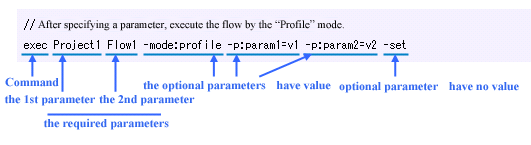
Each command consist one or two words. Some of command need some of option argument.
Argument is "MUST" Argument or Optional Arguments
MUST Argument need to have several ordering arguments.
An optional argument is a keyword which starts with "-", like "-username". If you specify a value for an option, you can specify the value by seperating with ":", like "-username:guest". If there is a blank included in the value, the whole argument should be quoted by the mark ", like "-description: blank". Different with Must argument, the optional argument can be specified in the different order.
//Command sample
//"//" is comment
Command List
connect
| Must argument | Description |
|---|---|
| 1st argument | Specified username. |
| 2nd argument |
Specified password. If password is not set, you do not need to specify the password. |
// as for /FlowService/guest
connect /FlowService/guset password
user
user
version
Show version number.
Show version number.
version
help
Show command help.
| Must argument | Description |
|---|---|
| 1st argument |
Specified command name for showing the help. If not specified, show the list of all command. |
//show exec command help.
help exec
quit
quit
regist project
| Must argument | Description |
|---|---|
| 1st argument | Specify a xfp filename for the project you are going to register. |
| Keyword | Value | Description |
|---|---|---|
| -s | None |
You can specify it when the xfp file has been put under the home directory of the server. If you specify the option, the xfp file can't be uploaded. |
//Register the Project1.xfp which already exists in the server.
regist project Project1.xfp -s
//Register the Project2.xfp which exists under the "test" subfolder of the home directory.
regist project test/Project2.xfp -s
regist url
| Must argument | Description |
|---|---|
| 1st argument | Specify the project name of the Flow for the execution settings. |
| 2nd argument | Specify the Flow name of the Flow for the execution settings. |
| 3rd argument | Specify a URL for the execution settings. |
| Keyword | Value | Description |
|---|---|---|
| -name | Exist |
Specify an execution setting name. The default is none. |
| -description | Exist |
Specify the Description. The default is none. |
| -mode | Exist |
Specify an execution mode. The default is normal.
|
| -sessionlifetime | Exist |
You can specify a valid session time in the time format.([[HH:]MM:]SS) For example, if the time is 1 hour 10 minutes 5 seconds, you can specify it as "1:10:5" by seperating the numbers with ":". You can also specify the time in the unit of second, like "1800". The default is 1800. |
| -user | Exist |
If you want to set an execution user for the execution settings, you can specify it here. The default is none. |
| -password | Exist | The password specified when you defined the execution user. |
| -protocol | Exist |
Specify the protocol by "http" or "https" to enable the execution setting. Under the initial status, both the http and the https are valid. |
//Make a connection between Flow1 and "/FLow1" in the debugging mode.
register url Project1 Flow1 /Flow1 -mode:debug
regist soap
| Must argument | Description |
|---|---|
| 1st argument | Specify the project name of the Flow for the execution settings. |
| 2nd argument | Specify the Flow name of the Flow for the execution settings. |
| 3rd argument | Specify the Operation name of the SOAP for the execution settings. |
| Keyword | Value | Description |
|---|---|---|
| -name | Exist |
Specify the execution setting name. The default is none. |
| -description | Exist |
Specify the Description. Under the initial status, there is no description. |
| -mode | Exist |
Specify the execution mode. The default is normal.
|
| -user | Exist |
If you want to set an execution user for the execution settings, you can specify it here. The default is none. |
| -password | Exist | The password specified when you defined the execution user. |
| -tns | Exist |
Specify the SOAP's TargetNamespace. The default is "urn:asteria-service-flowservice". |
| -style | Exist |
The SOAP's can be specified as "rpc" or "document". The default is rpc. |
| -use | Exist |
The SOAP's style can be specified as "encoded" or "literal". The default is encoded. |
| -endpoint | Exist |
The standurd endpoint URL of a SOAP is "http://<SERVER>:<PORT>/soap". If the endpoint has been specified, the specified path can be added after the standurd endpoint URL. |
regist soap Project1 Flow2 Method1
regist ftp
| Must argument | Description |
|---|---|
| 1st argument | Specify the project name of the Flow for the execution settings. |
| 2nd argument | Specify the Flow name of the Flow for the execution settings. |
| 3rd argument | Specify a folder to be monitored. |
| Keyword | Value | Description |
|---|---|---|
| -name | Exist |
Specify an execution setting name. If it is the default value, there will be no execution name. |
| -description | Exist |
Specify the description. If it's the default value, there will be no description. |
| -mode | Exist |
Specify an execution mode. The default is normal.
|
| -user | Exist |
If you want to set an execution user for the execution settings, you can specify it here. If it's the default value, there will be no execution user. |
| -password | Exist | The password specified when you defined the execution user. |
| -includeSubdir | Exist |
Specify whether to take the subfolder as an object or not by true/false. The default is false. |
regist ftp Project1 Flow2 dir1
regist schedule
| Must argument | Description |
|---|---|
| 1st argument | Specify the project name of the Flow for the execution settings. |
| 2nd argument | Specify the Flow name of the Flow for the execution settings. |
| 3rd argument |
Specify the date for the schedule execution. The format is as same as the Flow's DateTime type. |
| Keyword | Value | Description |
|---|---|---|
| -name | Exist |
Specify an execution setting name. If it is the default value, there will be no execution name. |
| -description | Exist |
Specify the description. If it's the default value, there will be no description. |
| -mode | Exist |
Specify an execution mode. The default is normal.
|
| -user | Exist |
If you want to set an execution user for the execution settings, you can specify it here. If it's the default value, there will be no execution user. |
| -password | Exist | The password specified when you defined the execution user. |
| -holiday | Exist |
Specify the holiday setting name set in the Flow ServiceManagement Console. If it wasn;t specified, the Flow will be executed in the holidays. |
| -holidayaction | Exist |
Specify the processing when the execution date of the schedule is holiday. If the -holiday is specified, but -holidayaction isn't, it will be Skip.
|
| -restart | Exist |
Specify the action if the execution time comes while the Flow is stopping. The default is One.
|
| -p | Exist |
Specify the argument of the Flow in the format of "parameter name= value". By specifying multiple "-p"s, you can pass the multiple parameters as arguments. |
//Execute the Flow3 at the noon on May 5th, 2003 by the schedule.
regist schedule Project1 Flow3 2003-05-05T12:00:00 -p:var1=aaa -p:var2=bbb
regist interval
| Must argument | Description |
|---|---|
| 1st argument | Specify the project name of the Flow for the execution settings. |
| 2nd argument | Specify the Flow name of the Flow for the execution settings. |
| 3rd argument |
The interval of the schedule can be specified in the time format ([[HH:]MM:]SS). For example, if the time is 1 hour 10 minutes 5 seconds, you can specify it as "1:10:5" by seperating the numbers with ":". You can also specify the time in the unit of second, like "1800". |
| Keyword | Value | Description |
|---|---|---|
| -name | Exist. |
Specify an execution setting name. If it is a default value, there will be no execution name. |
| -description | Exist |
Specify the description. If it's a default value, there will be no description. |
| -mode | Exist |
Specify an execution mode. The default is normal.
|
| -user | Exist |
If you want to set an execution user for the execution settings, you can specify it here. If it's a default value, there will be no execution user. |
| -password | Exist | The password specified when you defined the execution user. |
| -startdate | Exist |
Specify the start date in the date format. If it's a default value, the current time is the start date. |
| -enddate | Exist |
Specify the end date in the date format. If it's a default value, there is no end date. |
| -validtime | Exist |
You can specify the start time of the valid time by the time format which is seperated by "-". It doesn't matter if the start time is later than the end time. If it's a default value, the whole time will be valid. |
| -holiday | Exist |
Specify the holiday setting name set in the Flow Service Management Console. If it wasn't specified, it is executed in the holidays. |
| -holidayaction | Exist |
Specify the processing if the execution time of the schedule is on a holiday. If the -holiday is specified, but -holidayaction isn't, it will be Skip.
|
| -restart | Exist |
Specify the action if the execution time comes while the Flow is stopping. The default is One.
|
| -p | Exist |
Specify the argument of the Flow in the format of "parameter name= value". By specifying multiple "-p"s, you can pass the multiple parameters as arguments. |
//Execute Flow4 every 2 hours and 30 minitus.
regist interval Project1 Flow4 2:30:00
register daily
| Must argument | Description |
|---|---|
| 1st argument | Specify the project name of the Flow for the execution settings. |
| 2nd argument | Specify the Flow name of the Flow for the execution settings. |
| 3rd argument |
Specify the time in the time format to execute the schedule. You can describe it by seperating the numbers of hour, minute and second by ":". |
| Keyword | Value | Description |
|---|---|---|
| -name | Exist |
Specify an execution setting name. If it is a default value, there will be no execution name. |
| -description | Exist |
Specify the description. If it's a default value, there will be no description. |
| -mode | Exist |
Specify an execution mode. The default is normal.
|
| -user | Exist |
If you want to set an execution user for the execution settings, you can specify it here. If it's a default value, there will be no execution user. |
| -password | Exist | The password specified when you defined the execution user. |
| -startdate | Exist |
Specify the start date in the date format. If it's a default value, the current time is the start date. |
| -enddate | Exist |
Specify the end date in the date format. If it's a default value, there is no end date. |
| -holiday | Exist |
Specify the holiday setting name set in the Flow Service Management Console. If it wasn't specified, it is executed in the holidays. |
| -holidayaction | Exist |
Specify the processing if the execution time of the schedule is on a holiday. If the -holiday is specified, but -holidayaction isn't, it will be Skip.
|
| -restart | Exist |
Specify the action if the execution time comes while the Flow is stopping. The default is One.
|
| -p | Exist |
Specify the argument of the Flow in the format of "parameter name= value". By specifying multiple "-p"s, you can pass the multiple parameters as arguments. |
//Execute the Flow5 at the noon every day during May, 2003.
regist daily Project1 Flow5 12:00:00 -startdate:2003-05-01T00:00:00 -enddate:2003-06-01T00:00:00
regist weekly
| Must argument | Description |
|---|---|
| 1st argument | Specify the project name of the Flow for the execution settings. |
| 2nd argument | Specify the Flow name of the Flow for the execution settings. |
| 3rd argument |
Specify a time in the time format to execute the schedule. You can describe it by seperating the numbers of hour, minute and second by ":". |
| Keyword | Value | Description |
|---|---|---|
| -w | Exist |
Specify a day in a week. You can specify multiple days.
|
| -name | Exist |
Specify an execution setting name. If it is a default value, there is no execution name. |
| -description | Exist |
Specify the description. If it's a default value, there will be no description. |
| -mode | Exist |
Specify an execution mode. The default is normal.
|
| -user | Exist |
If you want to set an execution user for the execution settings, you can specify it here. If it's a default value, there will be no execution user. |
| -password | Exist | The password specified when you defined the execution user. |
| -startdate | Exist |
Specify the start date in the date format. If it's a default value, the current time is the start date. |
| -enddate | Exist |
Specify the end date in the date format. If it's a default value, there is no end date. |
| -holiday | Exist |
Specify the holiday setting name set in the Flow Service Management Console. If it wasn't specified, it is executed in the holidays. |
| -holidayaction | Exist |
Specify the processing if the execution time of the schedule is on a holiday. If the -holiday is specified, but -holidayaction isn't, it will be Skip.
|
| -restart | Exist |
Specify the action if the execution time comes while the Flow is stopping. The default is One.
|
| -p | Exist |
Specify the argument of the Flow in the format of "parameter name= value". By specifying multiple "-p"s, you can pass the multiple parameters as arguments. |
//Execute the Flow6 at the noon on Monday every week.
regist weekly Project1 Flow6 12:00:00 -w:MON -w:TUE
regist monthly
| Must argument | Description |
|---|---|
| 1st argument | Specify the project name of the Flow for the execution settings. |
| 2nd argument | Specify the Flow name of the Flow for the execution settings. |
| 3rd argument |
Specify a time in the time format to execute the schedule. You can describe it by seperating the numbers of hour, minute and second by ":". |
| Keyword | Value | Description |
|---|---|---|
| -d | Exist |
Specify an execution date in a month. You can specify multiple dates. |
| -name | Exist |
Specify an execution setting name. If it is a default value, there is no execution name. |
| -description | Exist |
Specify the description. If it's a default value, there will be no description. |
| -mode | Exist |
Specify an execution mode. The default is normal.
|
| -user | Exist |
If you want to set an execution user for the execution settings, you can specify it here. If it's a default value, there will be no execution user. |
| Specify the start date of the schedule in the date format. | Exist | The password specified when you defined the execution user. |
| -startdate | Exist |
Specify the start date of the schedule in the date format. If it's a default value, the current time is the start date. |
| -enddate | Exist |
Specify the end date in the date format. If it's a default value, there is no end date. |
| -holiday | Exist |
Specify the holiday setting name set in the Flow Service Management Console. If it wasn't specified, it is executed in the holidays. |
| -holidayaction | Exist |
Specify the processing if the execution time of the schedule is on a holiday. If the -holiday is specified, but -holidayaction isn't, it will be Skip.
|
| -restart | Exist |
Specify the action if the execution time comes while the Flow is stopping. The default is One.
|
| -p | Exist |
Specify the argument of the Flow in the format of "parameter name= value". By specifying multiple "-p"s, you can pass the multiple parameters as arguments. |
//Execute the Flow7 at the noon of 5th, 15th and 25th every month.
regist monthly Project1 Flow7 12:00:00 -d:5 -d:15 -d:25
regist mail
| Must argument | Description |
|---|---|
| 1st argument | Specify the project name of the Flow for the execution settings. |
| 2nd argument | Specify the Flow name of the Flow for the execution settings. |
| 3rd argument |
Specify an interval for monitoring mail in the date format. For example, if the time is 1 hour 10 minutes 5 seconds, you can specify it as "1:10:5" by seperating the numbers with ":". You can also specify the time in the unit of second, like "1800". |
| 4th argument | Specify a POP connection name for the mail monitoring. |
| Keyword | Value | Description |
|---|---|---|
| -name | Exist |
Specify an execution setting name. If it's a default value, there will be no an execution name. |
| -description | Exist |
Specify Description. If it's a default value, there will be no Description. |
| -mode | Exist |
Specify an execution mode. The default value is normal.
|
| -user | Exist |
If you want to set an execution user for the execution settings, you can specify it here. If it's a default value, there will be no execution user. |
| -password | Exist | The password specified when you specified the execution user. |
| -holiday | Exist |
Specify the holiday settign name set in the Flow Service Management Console. If it isn't specified, the Flow will be executed in the holidays. |
| -holidayaction | Exist |
Specify the processing when the schedule execution time is on holidays. If -holiday is specified, but -holidayaction isn't, it will be Skip.
|
| -attachment | Exist |
Specify a Flow to process the attachment file. You can specify the Flow name by seperating the Flow name and the project name with ".", like "Project1.Flow1". |
| -error | Exist |
Specify a Flow to process the error. You can specify the Flow name by seperating the Flow name and the project name with ".", like "Project1.Flow1". |
| -transaction | Exist |
Specify whether to make the body processing and attachment file processing transactional or not by using "true/false". The default value is false. |
| -html | Exist |
Specify the processing when the mail is HTML mail. The default value is Text.
|
| -overlap | Exist |
Specify the processing if the last processing hasn't finished when the current starts up. The default value is Skip.
|
| -deleteAction | Exist |
Specify a condition to delete mail. The default value is NormalEnd.
|
| -deleteValue | Exist |
If "-deleteAction" is "ReturnValue", specify the return value of the Flow which deletes the mail. If "-deleteAction" isn't "ReturnValue", it will be ignored. |
// After specifying a Flow for processing the attachment file, monitor the mailbox called "pop1" every 10 minutes.
regist mail Project1 Flow4 10:00 pop1 -attachment:Project1.Flow5 -transaction:true
regist queue
| Must argument | Description |
|---|---|
| 1st argument | Specify the project name of the Flow for the execution settings. |
| 2nd argument | Specify the Flow name of the Flow for the execution settings. |
| 3rd argument |
Specify an interval to monitor the queue in the time format. For example, if the time is 1 hour 10 minutes 5 seconds, you can specify it as "1:10:5" by seperating the numbers with ":". You can also specify the time in the unit of second, like "1800". |
| 4th argument | Specify a queue connection name for monitoring. |
| 5th argument | Specify a queue name for monitoring. |
| Keyword | Value | Description |
|---|---|---|
| -name | Exist |
Specify an execution setting name. If it's a default value, there will be no an execution name. |
| -description | Exist |
Specify Description. If it's a default value, there will be no Description. |
| -mode | Exist |
Specify an execution mode. The default value is normal.
|
| -user | Exist |
If you want to set an execution user for the execution settings, you can specify it here. If it's a default value, there will be no execution user. |
| -password | Exist | The password specified when you specified the execution user. |
| -holiday | Exist |
Specify the holiday settign name set in the Flow Service Management Console. If it isn't specified, the Flow will be executed in the holidays. |
| -holidayaction | Exist |
Specify the processing when the schedule execution time is on holidays. If -holiday is specified, but -holidayaction isn't, it will be Skip.
|
| -selection | Exist | Specify a selection formula for the queue. |
| -overlap | Exist |
Specify the processing for the case if the last processing hasn't ended when the current starts. The default value is Skip.
|
| -deleteAction | Exist |
Specify a condition for deleting data from the queue. The default value is NormalEnd.
|
// Monitor "q1" whose queue connection is "queue1".
regist queue Project1 Flow4 10:00 queue1 q1
unregist project
Cancel the all execution settings of the project.
Unregsiter the specified project, but don't delete the xfp file.
| Must argument | Description |
|---|---|
| 1st argument |
Specify the project name of the project you want to unregister. When you register it, you should specify a file name, but when you unregister it, you should specify the project name. |
//Unregister the Project1.
unregist project Project1
unregist url
| Must argument | Description |
|---|---|
| 1st argument | Specify an execution setting name or an URL.. |
※ For the compatibility with the past, "project name", "Flow name" and "URL" are 3 valid formats as arguments.
// Cancel the execution settings for the URL called "/Test1".
unregist url /Test1
unregist soap
| Must argument | Description |
|---|---|
| 1st argument | Specify an execution setting name or a TargetNamespace. |
| 2nd argument |
If the 1st argument is TargetNamespace, specify the Operation name. If the 2nd argument isn't specified, the 1st argument can't used as the execution setting name. |
※For the compatibility with the past, "project name", "Flow name" and "URL" are 3 valid formats as arguments.
//Cancel the execution settings for the method called "{urn:asteria-service-flowservice}Method1".
unregist soap urn:asteria-service-flowservice Method1
unregist ftp
| Must argument | Description |
|---|---|
| 1st argument | Specify the folder or the execution setting name. |
//Cancel the execution settings for dir1.
unregist ftp dir1
unregist schedule
When you register it, the keyword of each schedule type is different, but when you unregister it,
the all keywords will be "schedule".
| Must argument | Description |
|---|---|
| 1st argument | Specify an execution setting name or a schedule ID. |
※ For the compatibility with the past, "project name", "Flow name" and "URL" are 3 valid formats as arguments.
//Unregister the schedule corresponding with ID.
unregist schedule 0eb3b70243c44dad9d3397806f44ad23
unregist mail
| Must argument | Description |
|---|---|
| 1st argument | Specify an execution setting name or a connection name. |
//Unregister the execution setting for the connection "pop1".
unregist mail pop1
unregist queue
| Must argument | Description |
|---|---|
| 1st argument | Specify an execution setting name or a connection name. |
| 2nd argument |
When the 1st argument is the connection name, specify the queue name. When the 2nd argument isn't specified, the 1st argument can be used as an execution name. |
//Unregister the execution name for the connection "jms1" and queue "queue1".
unregist queue jms1 queue1
enable url
| Must argument | Description |
|---|---|
| 1st argument | Specify an execution setting name or a URL. |
//Enable the execution settings for the URL called "/Test1".
enable url /Test1
enable soap
| Must argument | Description |
|---|---|
| 1st argument | Specify an execution setting name or a TargetNamespace. |
| 2nd argument |
If the 1st argument is a TargetNamespace, specify an Operation name. If the 2nd argument isn't specified, the 1st argument will be used as an execution setting name. |
//Enable the execution settings for the mehod called "{urn:asteria-service-flowservice}Method1".
enable soap urn:asteria-service-flowservice Method1
enable ftp
| Must argument | Description |
|---|---|
| 1st argument | Specify an execution setting name or a folder. |
//Enable the execution settings for dir1.
enable ftp dir1
enable schedule
When register, the keyword of each schedule type is different, but when enable,
the all keywords are "schedule".
| Must argument | Description |
|---|---|
| 1st argument | Specify an execution setting name or a schedule ID. |
//Enable the schedule corresponding the ID.
enable schedule 0eb3b70243c44dad9d3397806f44ad23
enable mail
| Must argument | Description |
|---|---|
| 1st argument | Specify an execution setting name or a connection. |
//Enable the execution settings for the "pop1" connection.
enable mail pop1
enable queue
| Must argument | Description |
|---|---|
| 1st argument | Specify an execution setting name or a connection name. |
| 2nd argument |
If the 1st argument is the connection name, specify the queue name. If the 2nd argument isn't specified, the 1st argument can be used as an execution name. |
//Enable the execution setting for the "jms1" connection and the "queue1" queue.
enable queue jms1 queue1
disable url
| Must argument | Description |
|---|---|
| 1st argument | Specify an execution setting name or a URL. |
//Disable the execution setting for the URL called "/Test1".
disable url /Test1
disable soap
| Must argument | Description |
|---|---|
| 1st argument | Specify an execution setting name or a TargetNamespace. |
| 2nd argument |
When the 1st argument is a TargetNamespace, specify an Operation name. If the 2nd argument isn't specified, the 1st argument can be used as an execution name. |
//Disable the execution settings for the method called "{urn:asteria-service-flowservice}Method1".
disable soap urn:asteria-service-flowservice Method1
disable ftp
| Must argument | Description |
|---|---|
| 1st argument | Specify an execution setting name or a folder. |
//Disable the execution settings for dir1.
disable ftp dir1
disable schedule
When register, the keyword of each schedule type is different, but when disable,
the all keywords are schedule.
| Must argument | Description |
|---|---|
| 1st argument | Specify an execution setting name or a schedule ID. |
//Disable the schedule correspongding with the ID.
disable schedule 0eb3b70243c44dad9d3397806f44ad23
disable mail
| Must argument | Description |
|---|---|
| 1st argument | Specify an execution setting name or a connection. |
//Disable the execution settings for the "pop1" connection.
disable mail pop1
disable queue
| Must argument | Description |
|---|---|
| 1st argument | Specify an execution setting name or a connection name. |
| 2nd argument |
When the 1st argument is the connection name, specify the queue name. If the 2nd argument isn't specified, the 1st argument can be used as an execution name. |
//Disable the execution name for the "jms1" connection and the "queue1" queue.
disable queue jms1 queue1
export
Usually, the extension of the execution setting file is ".xml". If you didn't specify the extension when you specify the argument, the ".xml" extension will be added automatically.
| Must argument | Description |
|---|---|
| 1st argument | Specify the exported filename. |
//Export the execution settings.
export project.xml
import
You can specify whether to enable or disable the processing or executions if the ID duplicates.
If the "Update" option (-r or -o) isn't specified, the execution setting for the duplicated ID won't be applied.
If the "Executable" option isn't specified, the setting of enabling or disabling the execution will depend on the settings of the file to be imported.
| Must argument | Description |
|---|---|
| 1st argument | Specify the filename to import. |
| Keyword | Value | Description |
|---|---|---|
| -r | None |
Delete the registration information and the execution setting of the all projects set before importing. It can't be specified at the sametime as "-o" is specified. |
| -o | None |
If the IDs of the execution settings are the same, overwrite it. It can't be specified at the sametime as "-r" is specified. |
| -ea | None |
Enable the all execution settings of importing. It can't specified at the sametime as "-da" is specified. |
| -da | None |
Disable the all execution settings of importing. It can't be specified at the sametime as "-ea" is specified. |
//Import the execution settings.
import project.xml
exec
Execute the specified Flow.
After executing it, the string values of the return value and the result stream will be displayed.
| Must argument | Description |
|---|---|
| 1st argument | Specify the project name of the Flow to be executed. |
| 2nd argument | Specify the Flow of the Flow to be executed. |
| Keyword | Value | Description |
|---|---|---|
| -mode | Exist |
Specify an execution mode. The default value is normal.
|
| -output | Exist | After specifying it, the stream of the execution result will be saved in the file specified in the value. |
| -p | Exist |
Specify the argument of the Flow in the format of "parameter name= value". By specifying multiple "-p"s, you can pass the multiple parameters as arguments. |
| -set | None |
Set the result stream of the Flow in the console variable "stream". |
//Specify the argument and execute the Flow1 in the profiling mode.
exec Project1 Flow1 -mode:profile -p:param1=v1 -p:param2=v2
post
Execute the specified Flow.
Different with the exec command, once the Flow starts, the control will return immediately before it finishes.
After executing it, the Request ID of the Flow execution will be displayed.
Additionally, the Request ID is set in the console variable "request-id".
| Must argument | Description |
|---|---|
| 1st argument | Specify the project name of the Flow to be executed. |
| 2nd argument | Specify the Flow of the Flow to be executed. |
| Keyword | Value | Description |
|---|---|---|
| -mode | Exist |
Specify an execution mode. The default value is normal.
|
| -p | Exist |
Specify the argument of the Flow in the format of "parameter name= value". By specifying multiple "-p"s, you can pass the multiple parameters as arguments. |
| -set | None |
Set the result stream of the Flow in the console varible "stream". |
| -suspend | None | Once the Flow startes, the status will be "Suspend" immediately. |
//After staring the Flow1, the status becomes "Suspend" at once.
post Project1 Flow1 -suspend
resume
Restart the suspending Flow.
After executiong the command, the result stream can't be shown until the Flow ends up.
If the request finishes running, nothing will be done.
| Must argument | Description |
|---|---|
| 1st argument |
Specify the Request ID of the request to be restarted. If it's a default value, the Request ID set in the Set variable "request-id" will be used. |
| Keyword | Value | Description |
|---|---|---|
| -timeout | Exist |
Specify the "Time-out" value which is until the Flow finishes in the unit of second. If it's the default value, the property value of "time-out" will be used. |
//Restart the request set in the Set variable "request-id". If the the Flow doesn't finishe when 10 seconds pass, the control will return.
resume -timeout:10
kill request
Stop the running Flow in force.
If you succeed in stopping the running Flow in force, the name of the component executed at last will be displayed.
| Must argument | Description |
|---|---|
| 1st argument | Specify the Request ID of the request you are going to stop in force. |
| 2nd argument |
Specify the "time-out" value which is until stopping in force in the unit of second. The default is 5 seconds. |
//Stop the specified request in force. If it doesn't finish although 10 seconds has passed, the control will return.
kill request 6e8e4181-700f-4cf0-9274-e83be63184ae 10
set session
Specify the Session ID to be used in the Flow execution.
If it isn't specified, the Session ID will be created once it is executed.
※ Though no error will occur if the Flow is executed by specifying the same Session ID from the multiple client ends,
because it will lead to confusion, please specify a unique string as possible as you can.
| Must argument | Description |
|---|---|
| 1st argument | Specify an arbitrary string as a Session ID. |
//Define the Session ID of the Flow execution after it as "SESSION-ID1".
set session SESSION-ID1
set request-id
The value of the ID set here isn't used in the "exec" or "post" command necessarily, you needn't set a value to the varibale again.
When the post command is running. the Request ID will be set to the variable automatically.
| Must argument | Description |
|---|---|
| 1st argument | Specify an arbitrary string as a Request ID. |
set stream
Read the inputs stream from the file, and set it.
| Must argument | Description |
|---|---|
| 1st argument |
Specify the format of the stream to be set. If you specify an arbitray one from the below except NULL, you should specify a filename as the 2nd argument. If you specify NULL, there will be no input stream.
|
| 2nd argument |
Specify an external filename to set it as the input stream. The maxmun size of the file you can specify is 8MB. If the file content is incorrect as the specified stream type, an error will occur. If the 1st argument is "NULL", it isn't needed. |
//Use xmldata.xml as the input stream of the Flow for the next time.
set stream XML xmldata.xml
list session
Listed items
- Session ID
- Execution username
- Time until time-out
- Running
If the session is running, "Running" will be displayed.
list session
list project
The Flow name isn't displayed.
Listed items
- Project owner
- Project name
list project
list url
Listed items
- Name
- URL
- Project name
- Flow name
- Execution mode
- Execution user
- Enable/Disable
list url
list soap
Listed items
- Name
- {TargetObjectURI} method name
- Project name
- Flow name
- Execution mode
- Execution user
- Enable/Disable
list soap
list ftp
Listed items
- Name
- Folder (If a subfolder is also taken as the object, "(*)" can be added to the end.)
- Project name
- Flow name
- Execution mode
- Execution user
- Enable/Disable
list ftp
list schedule
Only the Schedule ID can be displayed, but the description can't.
Listed items
- Name
- Schedule ID
- Project name
- Flow name
- Execution mode
- Execution user
- Enable/Disable
list schedule
list mail
Listed items
- Name
- Connection name
- Project name
- Flow name
- Execution mode
- Execution user
- Enable/Disable
list mail
list queue
Listed items
- Name
- Connection name and queue name
- Project name
- Flow name
- Execution mode
- Execution user
- Enable/Disable
list queue
list project-pool
Listed items
- Project owner name
- Project name
list project-pool
list function-pool
If the method is executed, the cache of the invalid functions in the server side will be cleared up.
Listed items
- Function owner name
- Function library file name
- Function name
list function-pool
list connection-pool
Only the connections whose owner is the login user are listed in the user connections.
Listed items
- Owner type (system or user)
- Connection type
- Connection name
- Number of used times
- The last time when it was used.
list connection-pool
list worker
Listed items
- Thread No.
- Request ID
If the Flow isn't running, it will display "wait". - Flow name
The requested Flow name - Session ID
- Request time
list worker
list request
Listed items
- Request ID
- Fliw name
Requested Flow name - Session ID
- Request time
- Status
An arbitrary one of "in queue", "running". "suspend" and "end".
list request
list mutex
Listed items
- MutexID
- Login status
It shows "true" basically, but it also showns "false" sometimes depending on cases.
list mutex
list transaction
Listed items
- Transaction ID
- Status
One of "Running", "RetryWaiting" and "Error". - The last time when the transaction was updated
list transaction
show project
| Must argument | Description |
|---|---|
| 1st argument | Specify the project name of the project you are going to display. |
show project Project1
show session
| Must argument | Description |
|---|---|
| 1st argument | The Session ID of the session you are going to display. |
show session ec1ec684-ce24-4d9f-bb5c-ad0efb76b5da
show user
About the specified user, his authentication and property are shown.
| Must argument | Description |
|---|---|
| 1st argument |
Specify the username of the user you are going to display. If it's a default value, the information of the login user will be shown. |
show user
show worker
Show the information about the specified Worker.
If the Worker isn't execution the Flow, nothing will be shown.
The information to be shown depends on the options.
| Must argument | Description |
|---|---|
| 1st argument | Specify the Thread No. of the Worker you are going to display. |
| Keyword | Value | Description |
|---|---|---|
| -fv | None | The displayed information includes the Flow variable of the currently running Flow. |
| -cp | None | The displayed information includes the property of the currently running component. |
| -stream | None | The displayed information includes the stream of the currently running Flow. |
//Show the status of the Worker2 by adding the all information.
show worker 2 -fv -cp -stream
show request
Specify the information about the specified Request.
If the request has finished running, nothing will be shown.
The displayed information will changed according to the options.
| Must argument | Description |
|---|---|
| 1st argument |
Specify the Request ID of the request you want to display. If it's a default value, the Request ID set in the console variable "request-id" will be used. |
| Keyword | Value | Description |
|---|---|---|
| -fv | None | The displayed information includes the Flow variable of the currently running Flow. |
| -cp | None | The displayed information includes the property of the currently running component. |
| -stream | None | The displayed information includes the stream of the currently running Flow. |
//Show the status of the request set for the console varible "request-id" by adding the all information.
show request -fv -cp -stream
show transaction
Show the below information about the specified transaction.
If the transaction has finished normally, nothing will be shown.
- User
- Running Flow
- Xid
- Recovery filename
- The last time when the status was updated
- Transaction item list
- Status
| Must argument | Description |
|---|---|
| 1st argument | Specify the Transaction ID of the transaction you want to display. |
show transaction 7c9edf5250fa439280d3d72d98feff53
clear aac
Clear the AAC use cache.
clear aac
clear connection-pool
Clear the connection pool.
clear connection-pool
clear project-pool
Clear the project pool.
clear project-pool
upload
Upload the specified file to the home directory.
If you want to upload the file to a sub-folder under the home directory, you need to create the sub-folder previously.
| Must argument | Description |
|---|---|
| 1st argument | Specify the path of tha file you want to upload. |
| 2nd argument |
Specify a filename for saving it in the server side. If it's a default value, the filename specified by the 1st argument will be saved under the home directory. Specify it and the directory, you can save it in the sub-folder, too. |
//Upload the file called "abc.txt" to the home directory using the name called "def.txt".
upload c:\abc.txt def.txt
timing
Show the time from the command starts to it finishes in the unit of milisecond.
| Must argument | Description |
|---|---|
| 1st argument | Specify whether to enable the measurementof the processing time or not by on/off. |
//Change to the mode which displays the command processing time
timing on
script
Read the external file which describes the command and execute it.
| Must argument | Description |
|---|---|
| 1st argument | Specify the path of the script file which describes the command. |
| 2nd argument |
Specify the encoding of the script file. If it's a default value, it will be the encoding of the platform. |
//Execute the script file called "script.txt".
script script.txt
spool
Record the output result of the console to a file.
The content written into the file are all added to the file.
| Must argument | Description |
|---|---|
| 1st argument |
Specify the name of the file which is used to output data or on/off. For the first-time execution, you should specify the output filename, but once the output file was set, you can stop/restart outputting by off/on. |
//Output the execution log to the file called "flow-ctrl.log".
spool flow-ctrl.log
alias
Regsiter the word's alias.
If the command was input, each word's alias will be converted first, then it will be passed to the processor.
Under the initial status, "exit" is registered as the alias of "quit".
| Must argument | Description |
|---|---|
| 1st argument | Specify a word which you are going to register as a alias. |
| 2nd argument | Specify a word which is the object of the alias. |
//Register "xmlTestFlow" as the alias of the "Flow which tests XML".
alias xmlTestFlow Flow which tests XML
//After registering the alias, the word "xmlTestFlow" can be used as "Flow which tests XML".
exec Project1 xmlTestFlow
//The Flow executed by the above "exec" command is "the Flow which tests Project1.XML".
unlock mutex
Unlock Mutex.
| Must argument | Description |
|---|---|
| 1st argument | Specify the ID of the Mutex you are going to unlock. |
unlock mutex /guest.Project1.Flow1
recover transaction
Recover the transaction manually.
| Must argument | Description |
|---|---|
| 1st argument | Specify the ID of the transaction you are going to recover. |
recover transaction 06f6bf2259ff4de5821598bf43e935d4
xa
Execute the method for the XAResource.
| Must argument | Description |
|---|---|
| 1st argument |
Specify the method of the XAResource you are going to execute. The method is one of the below. About the description of each method, please refer to XAResource's JavaDoc.
|
| 2nd argument | Specify the connection name (RDB connection name) of the XAResource for which you are going to execute the method. |
| 3rd argument |
Specify the GlobalTransactionId of the Xid which will be the method's argument. If the method specified in the 1st argument is "recover", it isn't needed. |
| Keyword | Value | Description |
|---|---|---|
| -con | Exist |
Specify the type of the connection specified in the 2nd argument. The default is "RDBConnection". Now, except the RDBConnection, there is nothing can be the XAResource, so it's unnecessary to specify it. |
| -fid | Exist |
Specify the FormatId of the Xid which will be the argument of the method. If it's a default value, it will be de default value of ASTERIA WARP. |
| -bid | Exist |
Specify the BranchQualifier of Xid which will be the argument of the method. The default value is "0". |
| -flag | Exist |
If the method specified in the 1st argument is "recover" or "end", specify the flag which will be the argument. The value which can be specified is the constant "TMxxxx" defined in the XAResource. (You can set multiple flugs by seperating with "|".) The default value of each method is as below.
|
| -onePhase | Exist |
If the method specified in the 1st argument is "commit", you can specify OnePhase by "true/false". The default value is "false". |
//Execute the "recover" method after specfying the flag.
xa recover RDB1 -flag:TMNOFLAGS
//Execute rollback
xa rollback RDB1 7c9edf5250fa439280d3d72d98feff53
svn
Execute the command of the version control.
The currently supported commands are "log", "status", "update".
The format of a paramete or a response is as same as the svn command line client.
The optional parameter of the flow-ctrl seperates the paramter and the value using ":", like "-param:value",
To match with the svn command line client, the svn command also seperates the paramter and the value by using space, like "-param value".
svn log
Show the history.
| Must argument | Description |
|---|---|
| 1st argument |
Specify the file you want to show the log. If the it's a default value, the home directory will be shown. |
| Keyword | Value | Description | -r or --revision |
Exist |
Specify the revision from which the log will be shown. Specify the Revision No. or the date (yyyy-MM-dd format). If it's a default value, the log the is from the latest revision. If can't be specified at the sametime as "-c" is specified. |
|---|---|---|
| -q or --quiet |
None |
Only summary is displayed. If it's specified, the comment won't be shown. |
| -v or --verbose |
None |
The details are displayed. If it's specified, the changed path will be shown. |
| -c or --change |
Exist |
Specify the revision whose log you will show. If it's specified, only the information of the revision will be shown. Specify the Revision No. or the date (yyyy-MM-dd date). It can't specified at the sametime as "-r" is specified. |
| --stop-on-copy | None | If it's specified, the log before copyng won't be shown. |
| -l or --limit |
Exist |
Specify the maximun of the logs can be shown. The default value is 100. |
//Show the 200 dir1's logs at most, as well as the changed paths.
svn log dir1 -l 200 -v
svn status
Show the status of the files.
| Must argument | Description |
|---|---|
| 1st argument |
Specify the file whose status you want to show. If it's a default value, the home directory will be object. |
| Keyword | Value | Description |
|---|---|---|
| -u or --show-updates |
None | Show the updated information on the repository side. |
| -q or --quiet |
None |
Only summary will be shown. If it's specified, the unmanaged file can't be shown. |
| -v or --verbose |
None |
The details will be shown. If it's specified, the unmodified file will be shown. |
| -N or --non-recursive |
None | If it's specified, the sub-folder won't be the object. |
| --depth | Exist |
The depth of the object is limited in one of the below.
|
| --no-ignore | None | If it is specified, the ignored file will be shown. |
//Show the status, as well as the updated information of the repository.
svn status -u
You can output the svn status in one of the below formats.
Each of the first 6 rows output has 1-character width.:
The 1st row: show if the items are added or modified etc. or not.
' ' No modifications.
'A' Added.
'C' Conflicting.
'D' Deleted.
'I' Ignored.
'M' Modified.
'R' Replaced.
'X' The item isn't under the version control, but is being used by the external definition.
'?' The item isn't under the version control.
'!' The item is missing (deleted by another command which isn't svn) or is incomplete.
'~' The item is under the version control, but is disturbed by some item whose type is different.
The 2nd row: Show the modification of the file or the directory.
' ' No modifications.
'C' Conflicting.
'M' Modified.
The 3rd row: Show if the directory of the work copy has been locked or not.
' ' Unlocked.
'L' locked.
The 4th row: Show if the item is prepared to be added with the history or not.
' ' The item isn't prepared to be added with the history.
'+' The item is prepared to be added with the history.
The 5th row: Show if the referred URL is being switched by the svn switch or not, which is relative to the parent of the project.
' ' It't normal.
'S' It's being switched.
The 6th row: Show the repository lock token.
(If -u is specified,)
' ' Normal
'K' Has the lock token.
(If -u isn't specified,)
' ' It isn't locked in the repository, and doesn't have a lock token.
'K' It is locked in the repository, and has the lock token.
'O' It's locked in the repository. Another work copy has the lock token.
'T' It's locked in the repository. It has the lock token, but was taken away.
'B' It isn't locked in the repository. It has the lock token, but was destroyed.
The 8th row shows that if the items in the work copy are older than the repository on the server side or not. (If -u is specified):
'*' A new revision exists on the server side.
' ' The work copy is the latest.
The remained field is a variable length, and can be seperated by space.:
Working revision (if -u or -v is specified)
The last committed revision or modifier (if -v is specified)
The path of the work copy is always the last field, blank is included in it.
svn update
Get the specified revision from the repository.
| Must argument | Description |
|---|---|
| 1st argument |
Specify the file you want to update. If it's a default value, the home directory will be the object. |
| Keyword | Value | Description |
|---|---|---|
| -r or --revision |
Exist |
Specify a revision to get. Specify a Revision No. or a date (the yyyy-MM-dd format). If it's a default value, get the latest revision. |
| -q or --quiet |
None |
Only the summary will be shown. If it's specified, the updated information won't be shown. |
| -N or --non-recursive |
None | If it's specified, a sub-folder will be the object. |
| --depth | Exist |
The depth of the object is limited in one of the below.
|
| --force | None | If it's specified, the files modified in local will be updated in force, too. |
//Update the Project1.xfp to Revision 100.
svn update Project1.xfp -r 100
service status
>service status
Enabled