Flow Service Tuning
Here is the instruction about the tuning points related to the Flow Service settings. Before beginning to tune it, you should understand the architecture of the Flow Service, and check the execution environment. About the Flow Service's architecture, please refer to "Introduction" > "Flow functions" > "Process configuration of the Flow Service" and "Introduction" > "More topics" > "The Flow Service's architecture".
FlowService, which is the core of the Flow Service, consists of kinds of "listeners" and "Flow Engine". The former is used to receive the external events, and the latter is the Flow's runtime environment. After checking the FlowService's processing status by monitor tool, you can check the tuning points. About the monitor tools, please refer to "Execution monitoring" > "Monitor tools" .
The processing model of the FlowService is shown as below.

Flow Engine
In the Flow Engine, the acceptor accepts the start requests of the Flow from each listerners, and registers them into the queue at once. The pooled thread (Worker) whose status is empty gets the first entry from the queue and begins to process it. The thread processes the requested Flow (the main Flow including the SubFlow, the Error Processing Flow, the NextFlow) from the beginning to the end. When it completes processing, the status will become empty.
You can modify the Flow Engine settings from the the Management Console's "Settings"-"Services"-"Flow"'s "Flow Engine" page.
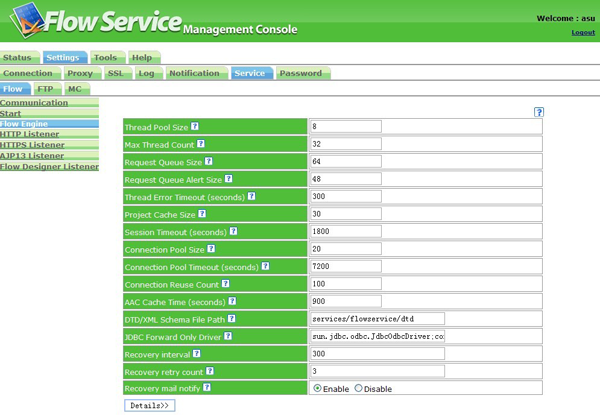
The main items related to tuning is as below. About the detals about each items, please refer to the Management Console's "Help".
- Thread Pool Size
- Max Thread Count
- Request Queue Size
- Request Queue Alert Size
- Connection Pool Size
You can tune it according to the below points.
- Decide how to tune it according to the system requirements and the hardware's specification.
- If you execute the Flow by the Timer Component, you should tune the thread count according to the count.
- Set an appropriate value for the Flow Engine according to the total number of simultaneous requests sent from each listeners.
- When a system has the period during which there are many threads to be executed and the one during which there are only a few threads to be executed, it's better to make the value of the thread pool size same as the max thread count so that the response will be more quickly. (Because it will cost CPU if you start to use a new thread, and the number of the threads to be executed once has been decided in the architecture of the Flow Service.)
- Set an appropriate connection pool size according to the thread size.
Various Listeners
When the execution settings of the Flow is set to the "URL Execution", the start request of the Flow is accepted by the HTTP Listener or the HTTPS Listener, the start request from AJP13 is accepeted by the AJP13 Listener. When the execution settings is set to "Schedule Execution" or the execution from the flow-ctrl command and the FlowExecuteClient class(Java), the start request of the Flow is accepted by the Flow Designer Listener (Admin-HTTP Listener).
You can go to the Management Console's "Settings"-"Services"-"Flow", and open the page of the corresponding listener to modify the settings of these listeners.
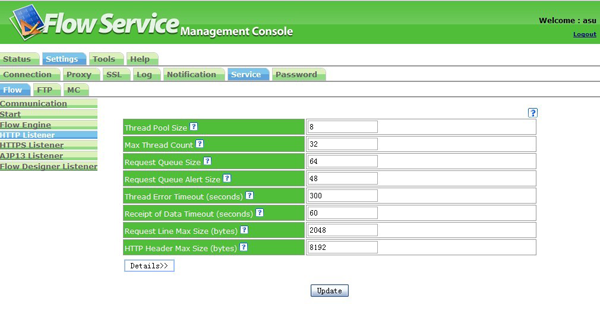
The main items related to the tuning are as below. About the details of each items, please refer to the Management Console's "Help".
- Thread Pool Size
- Max Thread Size
- Request Queue Size
- Request Queue Aler Size
Tune it according to the below points.
- Set an appropriate value for the HTTP Listener according to the the number of the HTTP requests. Once the request from the URL Execution is added 1, the HTTP Listener's and the Flow Engine's max thread size will add 1 seperately at least.
- Ususally, although the HTTP Listener is active, its spare (namely the CPU cost is lower) time is relatively long, so it will be effective to shorten the gap between the normal pool size and the max pool size.
- When a system has the period during which there are many threads to be executed and the one during which there are only a few threads to be executed, it's better to make the value of the thread pool size same as the max thread count so that the response will be more quickly. (Because it will cost CPU if you start to use a new thread, and the thread count to be executed once in has been decided in the architecture of the Flow Service.)
Others
In the Management Console's "Settings"-"Services"-"Flow", there is an instruction about the others items related to the tuning. About the details of each items, please refer to the Management Console's "Help".
Start
You can check the "Max Memory Size" through the Management Console's "Settings"-"Services"-"Flow"'s "Start" page.
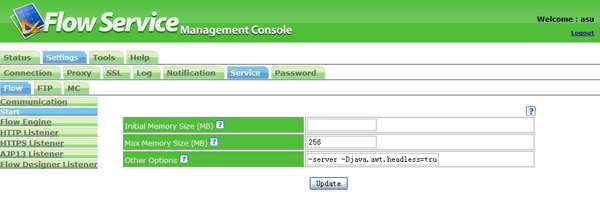
Tune it according to the below points.
- Set an appropriate max memory size.
- Make the initial memory size equal to the max memory size. Because the memory is decreasing while the data is being processed, it's necessary to speed up the response.