See Request Content
OnSee request listscreen click the link of requestID, or on See pipeline execution statusscreen click the link of request No. column detailed information of the request can be confirmed.
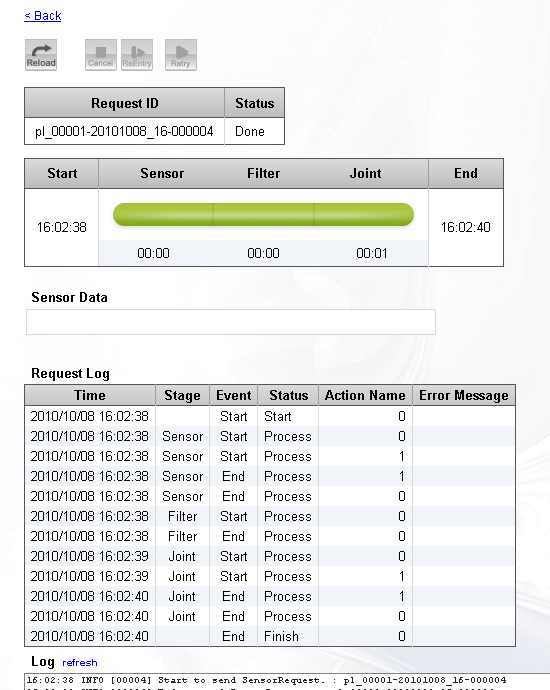
Request contents
| RequestID | RequestID. |
|---|---|
| Status | Request status. |
| Request status | Status of starting, ending time, each stage. |
| Input data of sensor | Click the detail button on pipeline setting screen and set "Work file" to"save" in displayed information, input data from the sensor will be saved. The data is displayed here. |
| Status log of each stage. | |
| Log | Log contents related to request. |
When input data from the sensor is saved, the request can be reentried again.
Button operation
Various operations to the request are possible by clicking the button upside.
 |
Reload screen. |
|---|---|
 |
Cancel the request and stop the request. Since the request operation could not immediately be stopped, the current operation will be processed according to the end of the order, to set stop. |
 |
Use the same input data and reentry the request. If input data from the sensor is not saved, this operation cannot be executed. If you want to use this operation, click the detail button beforehand on pipeline set screen and set "Work file" to"save". |
 |
Retry the request of retrying waiting at once. It is valid only for the request that is waiting for automatically retrying and manually retrying. |
- Related items