Failover using Checkpoints
In a multiserver environment, you can automatically retry flows on a failover server if the server running a flow goes down. Even if a single server is available, the Flow Service can maintain availability for flows through automatic retries or recovery. Retries start from the last successful Checkpoint component.
You can follow the sections below to configure failover servers and configure failover for a flow, then use the monitoring and retry functionality.
- Configuring Failover Servers
- Monitoring Server Status
- Configuring Failover for a Flow
- Syncing Flows
- Monitoring and Re-Executing Flows
Configuring Failover Servers
All failover servers need to connect to the same checkpoint database and save execution data to the same folder path. You can configure the failover settings in the management console. Go to the Settings > Services > Flow page and, in the Checkpoint section, set the Checkpoint Connection and Checkpoint Storage Path properties. Restart the server to apply the changes.
- See Also
- For a procedure to configure the checkpoint functionality and checkpoint database, see Configuring Checkpoints on the Server under "More Topics" > Checkpoints.
Monitoring Server Status
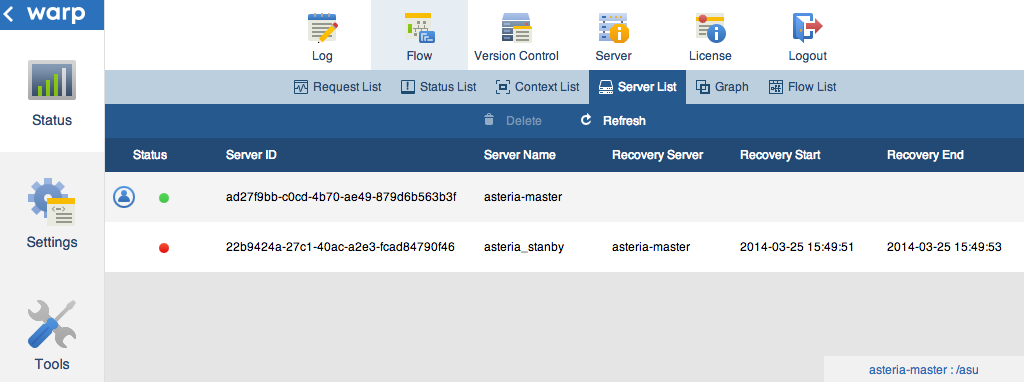
On the Status > Flow > Server List page of the management console, you can check the status of each server sharing the same checkpoint configuration.
Changing the Server Name
By default, the server name is the server ID. You can change the server name on the Settings > Services > Flow page, in the Server section.
Note
The Flow Service sets the Server ID when the Flow Service starts for the first time.
Configuring Failover for a Flow
Set OtherServerRetry to true and set BeginCheckpoint to Use in the properties for the flow's start component. You also need to sync the flow to the other servers, for example, using version control. See the next section to sync flows using version control in the management console.
- See Also
- To add Checkpoint components to your flow: See the Using Checkpoint Components section under the More Topics for Checkpoints.
Syncing Flows
See below to use version control to sync the flows' project files to failover servers. You can configure version control for a user account on the Tools > Account page of the management console.
After you edit a flow, commit your changes to the VCS:
- Commit your changes in the Flow Designer: In the version control toolbar, click Commit.
- Sync your changes on each server: Log into the management console on each server, on the Status > Version Control page, click Update.
Note
If the flow versions get out of sync on different servers, retries on another server may fail with an error.
Monitoring and Re-Executing Flows
You can monitor flow execution during failover and re-execute a failing flow on a failover server using the management console. See the next sections to get the request status and re-execute flows, as well as walk through the Flow Service's retry process.
- Monitoring Retries in a Multiserver Environment
- Automatically Retrying Requests in a Multiserver Environment
- Manually Re-Executing Flows in a Multiserver Environment
- Restrictions on Retrying using Local Resources
Monitoring Retries in a Multiserver Environment
On the following pages you can monitor server and request status.
Server Status
On the Status > Flow > Server List page, you can see the server status. A green status indicates the server is running. A red status indicates that the server has terminated. The  icon indicates the server that you're currently logged into.
Request Status
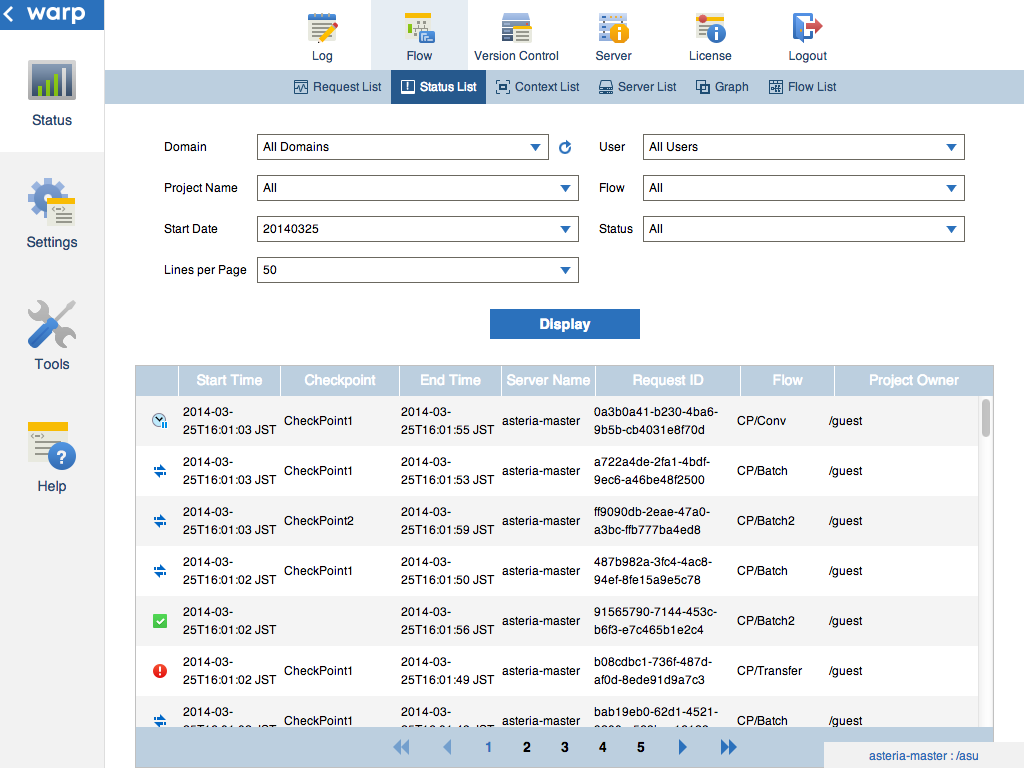
On the Status > Flow > Status List page, you can see the request status on each server.
Automatically Retrying Requests in a Multiserver Environment
When a request's status is running or waiting for a retry and the server terminates abnormally, other servers retry the request. The Flow Service follows the failover process below.
- When a server terminates abnormally, the earliest server to detect that a server has gone offline changes the requests' status to "waiting for a retry," so that the requests are retried on that server.
- The other server adds the changed requests to its own retry process.
- The other server retries the requests.
Manually Re-Executing Flows in a Multiserver Environment
You can manually re-execute requests that have an error status or a status of waiting for a retry on another server if the server that last ran the request goes down. In the management console on the Status > Flow > Status List page, select a request and click the re-execute button.
Note
See below for notes on re-execution:
- The Flow Service changes the owner of the request to the server that you're re-executing the request from.
- If you re-execute a flow and the flow hasn't reached the maximum retry count and the flow throws an error, the Flow Service automatically retries the flow, on the same server, the new owner of the flow.
Restrictions on Retrying using Local Resources
The Flow Service doesn't copy any local resources when it retries flows on another server. Flows that use local resources can fail on the retry in a multiserver environment in the following scenarios:
- Using local files on the server
- Specifying localhost for a network path or DB URL
- Using ODBC data sources
- Using schedules