Tuning the Flow Service
This section provides guidelines for tuning the Flow Service server for your business needs, server hardware, and system requirements. Here you can find guides to tuning the settings for server-side services, such as the flow engine and HTTP listener.
- See Also
-
You can use the Flow Service's monitoring tools to track and monitor performance metrics for the server.
Tuning Threading and Execution Settings
You can optimize flow-processing performance by tuning the processes that compose the flow execution model:
Following flow execution at the process level
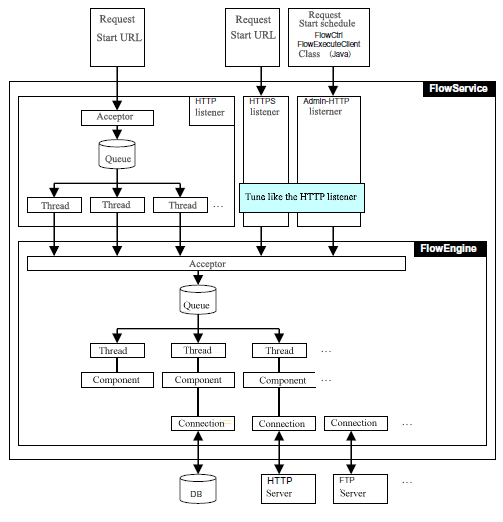
The following diagram traces the processing of a request: listeners receive requests from external systems and the flow engine executes the flows using multithreading. The listeners and flow engine are part of the FlowService process, the physical process that executes flows.
The diagram also maps the parts of the execution model that you can tune: the thread pool and request queue that make up the listeners and flow engine. Below are the main settings you use to tune performance:
- Thread Pool Size
- Thread Max Size
- Request Queue Size
- Request Queue Warning Size
Executing flows in the flow engine
The flow engine is the part of the FlowService process that compiles and executes flows. See below for the procedure that the flow engine follows to execute the requests it receives:
- Inside the flow engine, accepter threads receive requests sent from any and all listeners.
- The accepter threads add the requests to the queue.
- An available worker in the pool takes the first request from the queue and begins processing the flow.
Executing a flow in a worker thread
The entire flow that the request contains executes in a single worker thread, including any subflows and error-processing flows. While the worker thread executes the components from the start component to the end component, worker threads hold in memory execution data like flow variable values, stream data, etc.
The worker thread returns to the free state after the flow ends.
Tuning the Flow Engine
This section provides performance tuning guidelines for the flow engine's settings.
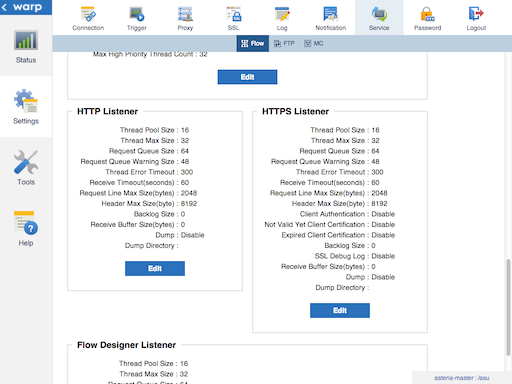
Configure the flow engine's settings in the Flow Engine section on the Settings > Services > Flow page in the management console.
Guidelines for tuning threading and execution settings
- If you're using Timer components to execute flows, raise Thread Pool Size and Thread Max Size together, since Timer components start new flows in new threads.
- Configure the flow engine's thread pool size high enough to accept the total number of simultaneous requests coming from all the listeners you're using.
- If your system has peak periods of lots of simultaneous threads and off-peak periods of few simultaneous threads, keep Thread Pool Size equal to Thread Max Size for fast response times. Note that creating new threads in the flow engine costs CPU. And, only a fixed amount of threads can be created at one time.
Tuning other flow engine settings
Adjust the Connection Pool Size based on your changes to the Thread Pool Size.
High-priority requests and parallel requests provide other avenues for optimizing flow performance. In the flow engine settings, you can configure the Max Parallel Thread Count and Max High Priority Thread Count. You can find use cases and configuration guides in the Flow Service Manual's "More Topics": see Executing High-Priority Requests and Parallel Subflows.
Tuning Listeners
This section provides guidelines to tuning settings for listeners:
- HTTP and HTTPS listeners: When you run a flow by URL trigger, the HTTP listener or HTTPS listener accepts the start-flow request.
- Flow Designer Listener (Admin-HTTPD): When you run a flow by schedule trigger, using the flow-ctrl tool, or using the FlowExecuteClient class in Java, the Flow Designer listener accepts the start-flow request.
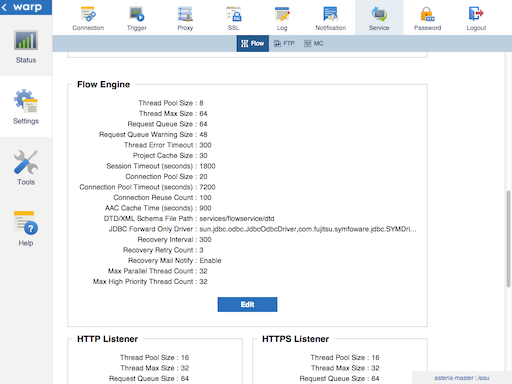
Configure listener settings on the Settings > Services > Flow page in the management console.
Guidelines for tuning listener settings
-
As you increase the listener's Thread Max Size by one, increase the flow engine's Thread Max Size by one.
The listener's worker thread passes the received request to the flow engine worker thread. The listener thread waits for the response until the flow engine worker thread finishes processing the flow. So, if you want to receive more requests, increase the listener's Thread Max Size, then, to process those requests, increase the flow engine's Thread Max Size by the same amount.
-
To handle periods of high load, set Thread Pool Size equal to Thread Max Size.
Listener threads spend a lot of time waiting for requests. At this time, there is almost no CPU cost. So, even if the thread pool size is set to the same value as the maximum thread size, there is almost no CPU cost. This way, requests up to the specified maximum thread size can be processed efficiently.
Other Performance Settings
You can set Java startup options on the management console's Settings > Services > Flow page, under the Startup section.
Measure the amount of memory used by the Flow Service and set the Max Memory Size and Initial Memory Size accordingly.