Flow Service Functionality
The following sections introduce the tools you use to integrate data in the Flow Service platform. Below you can find links to using the functionality.
Overview
The Flow Service consists of client and server tools: In the visual Flow Designer, you create graphical data flows to automate manual tasks and connect apps, databases, files, APIs, and other business systems. The Flow Service server processes flows and supports enterprise-scale requirements such as parallel flow processing and failover servers.
Creating Flows
You build flows using components and triggers in the Flow Designer.
- Components execute a data processing operation, such as "process data sent in an HTTP request" or "insert into a database."
- Triggers start a flow. For example, you can use a URL as a trigger and send an HTTP request to start a flow.
See the example for the steps of processing in an HTTP flow.
Running Flows
After you create a flow in the Flow Designer, you save it to the server, where flows are executed. Within the Flow Service platform, the Flow Service is the multithreaded server environment that contains the server-side services needed to execute flows, such as the HTTP listener and the flow engine.
Managing the Server
You can manage the running flows and server-side services in the web-based management console.
Components
Data flow components make it easy for any team to automate workflows that use their current tools.
Simplify Data Processing
The components present a standard interface that hides the complexity of connecting to the underlying systems. The components manage security, negotiate firewalls and internet protocols, and provide high performance even when working with large datasets and remote data sources.
Connect to Data Across the Organization
Components provide read/write access to systems inside and outside the enterprise: from CSV, XML, and Excel to databases, cloud services, and REST APIs.
Triggers
A trigger is the first step of a flow. The following diagram shows the different ways to start a flow, using triggers for HTTP, SOAP, POP/IMAP, JMS message queues, FTP, and schedules.
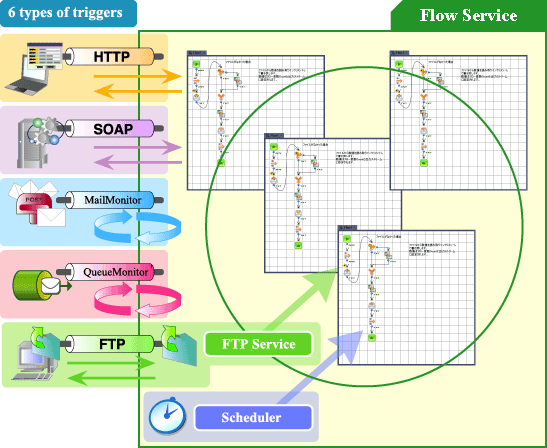
The following table outlines example flows for each trigger type. See the next section for an in-depth example of filling out a web form.
| Trigger type | Flow Service action | Trigger action |
|---|---|---|
| HTTP | The Flow Service connects a flow and a URL. | Send an HTTP request from a client to run a flow. |
| SOAP | The Flow Service connects a flow and a method name. | Send a request from a SOAP client to run a flow. |
| FTP | The Flow Service's built-in FTP server detects uploads to the specified folder. | Upload a file to the FTP server to run a flow. |
| The Flow Service monitors a mail server regularly. | Send an email from a mail client to run a flow. | |
| Message queue | The Flow Service monitors a JMS queue regularly. | Send a message from a client to run a flow. |
| Schedule | The Flow Service uses the built-in scheduler to execute the flow. | Specify a time, date, or interval for execution. |
Example: Filling Out a Web Form
Below is a simple flow that uses a URL trigger:
- You fill out a web form in your web browser. Submitting the form posts the data to the URL where the Flow Service is listening. This request triggers the data flow.
- Data flow components process the form -- validating the input and inserting the data into a database, for example.
Applications in the Flow Service
The Flow Service platform is composed of the following applications:
| Flow Designer | The codeless development environment. |
|---|---|
| Flow Service | The server environment that hosts the services needed to execute flows. |
| Management Console | The browser-based management tool. |
Flow Designer
The Flow Designer provides no-code workflows for integrating business systems. It also contains the following helper utilities:
| Trigger manager | Manage flow triggers. |
|---|---|
| Log viewer | View Flow Service logs. |
| Diff tool | Compare two projects using this graphical tool. |
| DB specification tool | Output table definitions to an Excel file. |
See Basic Flow for a tutorial that walks through the basic workflow. Designing Flows expands on the basic workflow. Here, you can find procedures you can adapt into your own workflows.
You can find guides to using the helper utilities in the Flow Designer user's guide.
Flow Service
The Flow Service is the multithreaded server environment that hosts flow processing. The Flow Service server runs the flow engine and other services needed to integrate remote data sources such as the HTTP listener. You can configure the services in the management console.
The following Process Structure section introduces the server-side services that phyically execute flows. You can tune threading settings to optimize performance.
Management Console
Use the web-based management console to manage users, check logs, and perform other administrative tasks like starting and stopping the server-side services.
See below for a reference to what you can do on each page. For procedures, see Administration or click Help in the management console.
| Tab | Descriptions | ||||||||||||||||
|---|---|---|---|---|---|---|---|---|---|---|---|---|---|---|---|---|---|
| Status | On the Status pages, you can monitor the status of the server-side services, flow execution status, and version control status.
|
||||||||||||||||
| Settings | On the following pages, you can configure server settings and data stored on the server --- such as data source connection strings, passwords, digital certificates, and logs.
|
||||||||||||||||
| Tools | Manage Flow Service accounts and server-side processes.
|
||||||||||||||||
| System | Manage or upgrade the Flow Service license.
|
||||||||||||||||
| Help | Click this to open the help for the current page. |
Specifications
Below you can find supported formats, databases, network protocols, and applications. See the product homepage for the latest information.
Supported Formats
| XML / HTML / CSV / Fixed length / Text / Binary / ZIP / GZIP / Tar / PDF / Excel/ XBRL |
Supported Databases
| Oracle IBM Db2 IBM Db2 for i Microsoft SQL Server/Microsoft Azure SQL Database Microsoft Azure Cosmos DB PostgreSQL MySQL MariaDB Dr.SumEA FileMaker SAP HANA Amazon Aurora MySQL Amazon Aurora PostgreSQL MongoDB |
Supported Network Protocols
| HTTP / HTTPS SMTP / SMTPS POP3 / POP3S IMAP / IMAPS FTP / SFTP LDAP SOAP 1.1 / 1.2 |
Supported Applications
| IBM Domino Microsoft Excel Microsoft Active Directory |
Process Structure
Within the platform, the Flow Service is the server that runs all the services needed to execute flows. See below for an introduction to the services running on the server.
You can configure the services on the Settings > Services pages of the management console.
- Process Structure of the Server
- Service Details
- Flow Execution at the Process Level
- Cooperative Execution
- See Also
- See Flow Service Architecture in "More Topics" to tune threading settings and other performance settings at the level of the processes running the server.
Process Structure of the Server
The server-side services can use multithreading to process multiple requests at the same time.
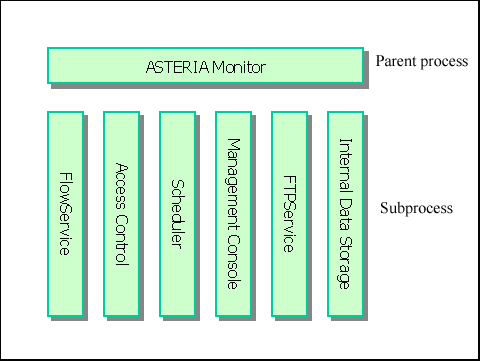
Each of the services that make up the Flow Service runs as a process, and each process has a separate Java VM (Java Virtual Machine) instance. The following diagram shows the server's process structure:
Service Details
| Service name | Description |
|---|---|
| FlowService | Within the server environment, FlowService is the name of the specific process that runs the processing engine and manages flow execution. See the next section, Flow Execution at the Process Level, for more information. |
| AccessControl | This service manages and authenticates a Flow Service account. |
| Scheduler | This service runs flows at a specified time and date or on a repeat interval. |
| ManagementConsole | This service runs the web-based management console. |
| FtpService | This service provides an FTP server, which runs flows once a file is received. Note that in the standard installation, this service is not running by default. |
| InternalDataStorage | The HSQL (http://hsqldb.sourceforge.net) database where the server stores internal data. Use the InternalDataStorage service only for testing connections or sample flows. Note that the file size will not increase during normal use. |
| ASTERIA WarpMonitor | This is the superprocess, which runs or stops the other services as subprocesses and monitors the execution status of each flow. |
Back to Process Structure.
Flow Execution at the Process Level
The specific process named FlowService is the process that runs the flow engine and listeners. The listeners receive external events; the flow engine compiles flows and executes them using multithreading.
Flow execution procedure
A flow is defined by XML in .xfp project files; the flow engine reads these XML files dynamically and compiles them.
The flow engine uses multithreading to run the flow specified by a trigger; the flow engine also uses multithreading to run the listener process for the trigger.
Within the flow, components work cooperatively. Components pool connections to reduce the cost of initializing connections to external systems.
Conceptual diagram
The following diagram illustrates how flows are executed within the FlowService process.

- See Also
-
- See Threading and Execution, under the "More Topics" section for "Flow Service Architecture," to break down the diagram, follow flow execution through the execution model, and see the threading settings in context.
- See Designing Flows > Requests for an introduction to requests. A request is the processing of a flow from start to end. A request is executed in a single thread.
Cooperative Execution
The Flow Service cooperates with other services such as the Scheduler and AccessControl services. Below is the model of how the services execute operations.
Model of operations and services

Back to Process Structure.
Folder Structure
The Flow Service stores files in the following 2 folders, referred to throughout this documentation with the following notation.
| Target | Folder notation | Default path | |
|---|---|---|---|
| Flow Service Installation folder |
[INSTALL_DIR] | Windows | C:\Program Files\asteria5[c,cp] |
| UNIX | /[Installation user's home folder]/asteria5[c,cp] | ||
| Data folder | [DATA_DIR] | Windows | C:\asteriahome5[c,cp] |
| UNIX | /[Installation user's home folder]/asteriahome5[c,cp] | ||
Folders Installed
The starred folders listed below are used when a user configures files for development. For more information about the files used for maintenance or migration, refer to the "Backup" and "Log Maintenance" chapters in the Administration guide.
| Folder | Description |
|---|---|
| [INSTALL_DIR]/boot/bin | Contains executables for the Flow Service. |
| [INSTALL_DIR]/boot/lib | Contains libraries for the Flow Service. |
| [INSTALL_DIR]/server/bin | Contains executables for Flow Service utilities. |
| [INSTALL_DIR]/server/lib | Contains libraries for the Flow Service. |
| [INSTALL_DIR]/server/license | Contains the license files for 3rd-party libraries. |
| [INSTALL_DIR]/server/webapps | Contains files related to the management console. |
| [INSTALL_DIR]/updater/bin | Contains the configuration files of the updater process. |
| [INSTALL_DIR]/updater/lib | Contains the libraries of the updater process. |
| [DATA_DIR]/log (※) | Contains log files. You can also access these with the management console and the log viewer. You can change the log output folder with the management console. |
| [DATA_DIR]/system/conf (※) | Contains configuration files. |
| [DATA_DIR]/system/license (※) | Contains the license file. |
| [DATA_DIR]/system/lib/components (※) | Contains libraries for components and mapper functions. |
| [DATA_DIR]/system/lib/drivers (※) | Contains driver libraries, such as JDBC driver libraries. |
| [DATA_DIR]/system/lib/ext (※) | Contains libraries for components and mapper functions. |