Threading and Flow Execution
See below to follow flow execution and tune performance at the thread level, within the processes running the server-side services.
- Using Multithreading in the Flow Service
- Configuring Thread Execution
- FlowService Process Architecture
- Executing High-Priority Requests and Parallel Subflows
- Tuning Listener Threads
- See Also
-
- Troubleshoot flow execution: Follow flow snippets and patterns at the component level in "Designing Flows."
- Configure service settings on the Settings > Services > Flow page in the management console.
- See Process Structure in "Flow Service Functionality" for an overview of the server at the process level.
Using Multithreading in the Flow Service
The Flow Service's ASFramework thread execution model specifies how the Flow Service executes flows using multithreading. The ASFramework uses multithreading to execute requests asynchronously and process flows with high performance.
Configuring Thread Execution
You can configure the threading settings for individual services on the server, like the HTTP listener. The services have the same settings, like ThreadPoolSize and ThreadMaxSize, since they have the same thread execution model, which the ASFramework defines.
The following sections detail the available settings and their context in the ASFramework.
- Configuring Multithreading
- Executing Threads Using the ASFramework
- Configuring the Thread Pool and Request Queue
- Components of a Process in the Flow Service
Configuring Multithreading
The ASFramework uses multithreading after it assigns a request to a thread. It executes the threads asynchronously -- which thread will finish first is unknown.
Set the service's ThreadMaxSize property to define the maximum number of threads that can run in the process that's running the service. Set the ThreadPoolSize property to define the minimum threads available in the process's thread pool.
Executing Threads Using the ASFramework
The following diagram shows the components of the ASFramework. The ASFramework processes requests using a request queue and a thread pool. See the next section to configure the ThreadPoolSize and RequestQueueSize properties. See below for how the threads interact, as shown in the diagram.
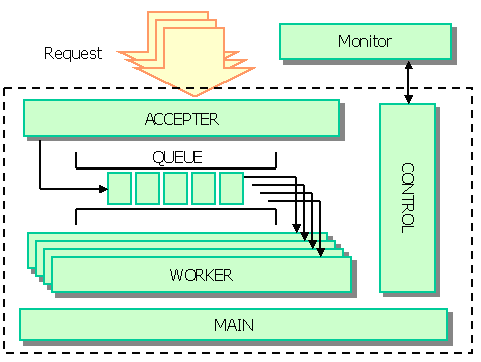
The ASFramework queues requests and assigns an available thread in the pool to the next request in the queue. The ASFramework executes threads that have the following roles: accepter, worker, main, and control.
| Main | The ASFramework's main thread maintains the specified ThreadPoolSize, increasing worker threads up to the ThreadMaxSize and incrementally decreases the finished threads from the ThreadMaxSize back to the ThreadPoolSize. The main thread also detects the thread-processing times and writes time-out errors to the logs. |
| Control | The control thread gets the ASTERIA Warp Monitor's status requests and stop requests and returns the response. |
| Accepter | The accepter thread waits for requests and adds the received requests to the queue. |
| Worker | The worker thread removes requests from the queue and executes them. |
Configuring the Thread Pool and Request Queue
Each service is made up of the thread pool and request queue that the ASFramework defines. You can configure the following properties in the settings for each service on the Settings > Services page in the management console.
- ThreadPoolSize: Specify the minimum number of threads that the ASFramework will keep available.
- RequestQueueSize: Specify the number of requests that can be kept in the request queue.
Components of a Process in the Flow Service
Illustrated in the diagram below, the ASFramework groups the threads into core processes, which run inside one physical process, like the HTTP listener. A core process contains a request queue managed by the accepter thread, and a thread pool of worker threads.
The diagram below shows the physical Java process and the core processes it contains. See the next section to configure and troubleshoot the services at the level of the physical process.
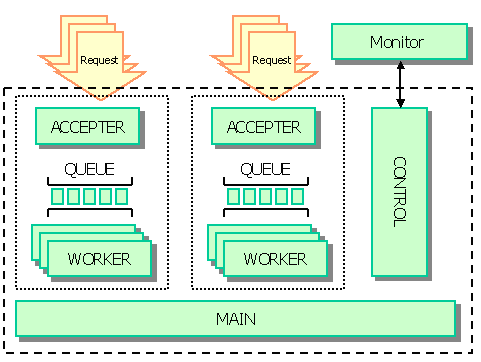
FlowService Process Architecture
This section shows how the listeners and flow engine interact to execute requests. In the topics below, you can follow flow execution on the server and find additional topics like the TCP port that a service uses.
See the next section to configure high-priority requests and use the ParallelSubFlow component to improve the performance of executing subflows with parallel processing.
- Executing Requests at the Process Level
- Receiving Requests with Listeners
- Executing Requests with the FlowService Process
Executing Requests at the Process Level
The following diagram and the next sections detail how the Flow Service executes requests within the FlowService physical process: listener processes receive requests and the flow engine executes the request.

Receiving Requests with Listeners
The preceding diagram shows how the FlowService process executes a request. Execution starts when the process receives a request. This can be a start-flow request from an external system or a control request from the ASTERIA Warp Monitor -- for example, when a URL trigger processes HTTP requests as start-flow requests.
FlowService process and all server processes contain listener processes that listen on a TCP port. You can find the ports used for each service listed in the "Miscellaneous" section in the Flow Service administrator's guide.
Each listener receives and sends requests using a request queue and thread pool, as defined by the ASFramework. You can configure the request queue and thread pool for each service on the Settings > Services > Flow page in the management console.
Executing Requests with the FlowService Process
The flow engine provides the functionality that executes flows within the FlowService process. See below for the procedure that the flow engine follows to execute requests:
- Inside the flow engine, accepter threads receive requests sent from any and all listeners.
- The accepter threads add the requests to the queue.
- An available worker in the pool takes the first request from the queue and begins processing.
Following the worker thread
The entire flow that the request contains executes in a single worker thread, including any subflows and error-processing flows. While the worker thread executes the components from the start component to the end component, worker threads hold in memory execution data like flow variable values, stream data, etc.
The worker thread returns to the free state after the flow ends.
Executing High-Priority Requests and Parallel Subflows
High-priority requests and parallel subflows are processed separately from normal requests, which accounts for improvements in performance -- the high-priority mode doesn't change the CPU priority.
See below to follow execution through the thread-level components and configure the threading settings to optimize performance for high-priority requests and parallel requests.
- Following High-Priority and Parallel Execution
- Executing High-Priority Requests
- Executing Parallel Requests
- Configuring the High-Priority and Parallel Thread Pools
Following High-Priority and Parallel Execution
The flow engine is actually composed of three separate engines that separately process normal, high priority, and parallel requests. As the diagram below shows, the engines follow the same basic procedure to process requests.
The only difference is that the parallel threads follow a different path to the accepter thread: parallel requests are started from a request that's already running.
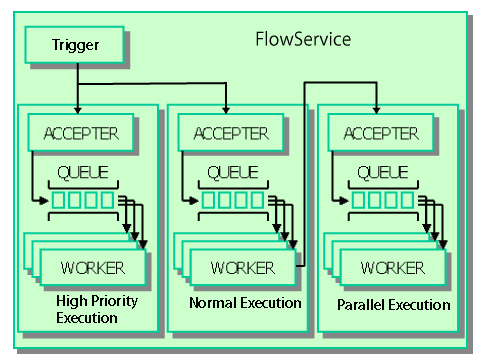
The arrows in the diagram show the sequence of executing a request:
- Executing normal and high-priority requests: A trigger invokes normal and high-priority requests.
- Executing parallel requests: A parent request invokes a parallel request. In the parent request, when a ParallelSubFlow component executes it starts a parallel request. The parent request executes in the normal or high-priority engine, and the parallel request executes in the parallel-request engine.
Executing High-Priority Requests
Using the High-Priority Mode
The high-priority execution mode is most useful in the following scenarios:
- Executing business-critical processes: Use the high-priority mode when you need to execute business-critical requests in a separate engine that you can protect from getting overloaded.
- Executing batch requests on a schedule: You could also use the high-priority mode to reserve the high-priority execution engine for executing batch requests on a schedule.
Configuring High-Priority Execution
You can configure a trigger to execute flows using a high-priority request: set the trigger's Execute Mode setting to High. You can also select the Execute Mode in the execute-flow dialog that's displayed when you click  .
.
Note
Configuring trigger settings
- To configure triggers in the Flow Designer, click the
 icon in the Flow Designer's main toolbar.
 - You can also configure triggers on the Settings > Trigger page in the management console, or using the Trigger Manager tool.
Executing Parallel Requests
You can use the ParallelSubFlow component to improve performance on multi-CPU or multicore servers. ParallelSubFlow components process a loop iteration in a separate, parallel request. If you use a ParallelSubFlow component, the Flow Service processes the subflow in the engine that's dedicated to parallel requests.
Configuring the High-Priority and Parallel Thread Pools
You can specify the maximum number of threads that can be created to execute high-priority requests and parallel requests. In the Flow Engine section of the Settings > Services page of the management console, set the Max High Priority Thread Count and Max Parallel Thread Count properties.
Note
- If the number of requests exceeds the maximum threads, requests will wait in the respective queue, just as with the normal request queue.
- The values you set for Max High Priority Thread Count and Max Parallel Thread Count also determine the size of the respective thread pool.
Tuning Listener Threads
If you want to process requests over the Thread Max Size, increase the flow engine's Thread Max Size property by one as you increase the listener's Thread Max Size by one.
The listener's worker thread passes the received request to the flow engine worker thread. The listener thread waits for the response until the flow engine worker thread finishes processing the flow. Therefore, if you want to receive more requests, increase the listener's Thread Max Size, then, to process those requests, increase the flow engine's Thread Max Size by the same amount.
Tuning Performance for the HTTP Listener
To handle periods of high load, you can increase the Thread Pool Size to be equal to the Thread Max Size.
Listener threads spend a lot of time waiting for requests. At this time, there is almost no CPU cost. So, even if the thread pool size is set to the same value as the maximum thread size, there is almost no CPU cost. This way, requests up to the specified maximum thread size can be processed efficiently.