Starting and Ending Flows
See below to start with the basics and find more advanced topics for starting and ending flows.
- Using Start Components: Define the flow's input stream to process the flow's input data.
- Passing in Flow Parameters: Define public flow variables that map to additional input parameters.
- Using End Components: Configure end components to process errors, end loops and branches, and output the results of processing.
- See Also
-
- See Starting and Ending Flows in Designing Flows > Components for guides to get started with start and end components.
- See Triggers for A-Z guides to create flows that you invoke with HTTP, FTP, SOAP, email, schedules, etc.
Using Start Components
You need to start every flow with a start component. To change the start component, right-click the start component and select the component in the Replace Start Component menu. Select the HttpStart component to facilitate processing an HTTP request. Configure the start component's output stream to pass input data to the flow.
- See Also
- Configure the start component's properties to do the following:
- Execute a flow in a single transaction: Set the BeginTransaction property to true. See More Topics > Transactions for guides to executing transactions in the Flow Service.
- Handle errors: In the Exception property, select a flow to process errors. See More Topics > Error Processing.
Defining the Flow's Input Stream
Configure the start component's output stream to access data input by the user or the caller of the flow. Select the start component in the workspace to configure the stream type and fields in the Stream pane.
Selecting the Stream Type
Select a stream type that matches the input data. Or, select the Any option to accept a stream of any type.
Note
The Flow Service validates that the stream type you define is the same as the type of the stream that is input at run time. If the stream types don't match, an error will occur.
Defining the Stream Fields
See Designing Flows > Streams for procedures to define the fields for each type of stream.
Passing in Flow Parameters
The caller of the flow or a trigger can pass input parameters through public flow variables. For example, you can access HTTP request parameters as flow parameters, when the stream type is MIME, and the contents of the request as a stream.
Define the public flow variables in the Variables tab. See Defining Flow Variables in "More Topics" for Variables for a procedure.
See "More Topics" for Triggers to define flow parameters and process incoming data.
Using End Components
Normally, a flow ends with an end component or an error. You can also end parallel branches with end components. Configure the end component's properties to specify how to end a flow or return to a parent flow.
Adding End Components
Add end components from the Control tab of the palette.
Ending Parallel Branches
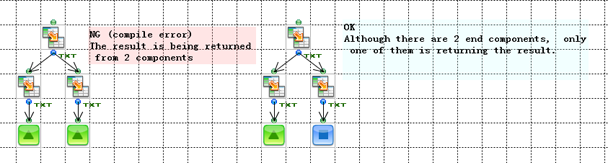
The logic of your flow must determine only one end component by the end of the flow. You must resolve parallel branches to a single branch.
A flow can output a single output stream or no output stream. You can add multiple end components on parallel branches, but you can't end a flow with multiple EndResponse components.
Selecting How to End a Flow
You can end a flow normally with the first group of components listed below. You can use the second group to process errors or break out of a loop.
Normal Termination
Immediate Termination
Configuring the End Component's Properties
Configure the end component's properties to do the following:
Committing and Rolling Back Transactions
You can set the end component's Transaction property to commit or roll back a transaction when you're executing a flow in a transaction. When you're using a NextFlow component, you can set the Transaction property to DoNothing: the transaction continues into the next flow.
To configure the transaction, set the start component's BeginTransaction property set to true.
See below to walk through the execution of a transaction, on the Flow Service side and on the data source side.
- See Also
- See More Topics for Transactions for an overview of designing flows that use transactions.
Processing the Commit or Rollback
After the flow finishes, the transaction manager executes all the COMMIT statements or all the ROLLBACK statements, depending on the value you set for the end component's Transaction property. The execution order is connections' transactions first, then components' transactions.
Processing a NextFlow Component
When you set the NextFlow component's the Transaction property to DoNothing, the transaction continues into the next flow. The transaction manager doesn't commit or roll back transactions for connections or components, and the flow continues to execute in the same transaction.
Outputting a Return Value
Set the ReturnValue property for the end component of a flow to specify a string return value for the flow.
Getting a subflow's return value: In the subflow, set the end component's ReturnValue property. In the parent flow, reference the return value in the properties of the SubFlow component.
Getting the return value of an error-processing flow: In the error-processing flow, set the end component's ReturnValue property and set the ReturnType property to ExceptionComponent. The flow will return to the component where the error occurs. From a mapper in the parent flow, you can reference this component's Exception String property.
Using EndResponse Components
Use the EndResponse component  to exit the flow and output the stream that results from processing the flow. See below to avoid errors when using EndResponse components in parallel streams and loops.
- See Also
- See Parallel Branching in the Flow Control section of Designing Flows for more details on the next two examples.
Ending Parallel Streams
Be sure to end only one branch with the EndResponse component and end any other parallel branches with the End component.
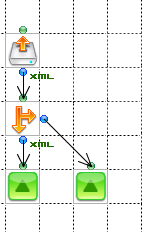
Returning Results on a Conditional Branch
You can use an EndResponse component on each branch of a conditional-branching component, since only one EndResponse component will be executed.
Returning Loop Output
Use an EndResponse component to end a loop and return the streams that result to the caller of the flow. An EndResponse component also ends an iteration of a loop: each iteration of the loop reaches the EndResponse component and returns to the component that started the loop.
The flow executes the EndResponse component after the loop finishes. Set the EndResponse component's ReturnStream property to specify how to merge the EndResponse component's input streams into a single output stream. The EndResponse component returns its output stream to the caller of the flow.
- PackRecords: Output a stream that combines the records of the EndResponse component's input streams. For example, if you connect a stream with 1 record to an EndResponse component in a loop that iterates 10 times, the EndResponse's output stream will contain 10 records.
- Last: Output the stream from the last loop iteration.
- PackStreams: Output the EndResponse component's input streams as a stream container.
Note
You'll get an error if you end parallel branches during a loop with different EndResponse components. The error will occur in the second EndResponse component that the flow reaches.
- See Also
-
See the Component reference for details on how the component packs each stream type, for example, the component concatenates Text-type streams.
Using End Components
Use the End component  to end a flow without outputting a stream. You can configure multiple End components on multiple parallel branches in a flow. If you end all parallel branches with an End component, the flow won't return a result.
HttpEnd
Use the HttpEnd component  to end flows that start with the HttpStart component, when a URL trigger executes the flow. See below for the basic tasks of defining the HTTP response.
- See Also
-
- See the Component reference to set the HttpEnd component's properties in a specific integration, like returning the data in JSON.
- See URL Triggers in "Designing Flows" for a guide to create a flow that runs when you request a URL, starting with creating a URL trigger.
Returning a Status Code
Set the ResponseCode property to return an HTTP status code. If you don't specify a status code, the status code is 200 OK.
Redirecting Clients
Select a 300 status -- for example, 302 moved temporarily -- for the ResponseCode property and specify a URL in the Location property to redirect clients after the flow's execution.
Setting the Content Type
Set the ContentType property to specify the Content-Type header in the HTTP response. The default value is AutoDetect: the Flow Service detects the Content-Type based on the stream type.
Setting Cookies and Headers
Set cookies and headers in the HTTP response by defining properties on the Cookie and AdditionalHeaders tabs. Enter the name, data type, and value.
NextFlow
The NextFlow component  invokes the next flow after the parent finishes.
The next flow is processed by the same request as the parent flow. The final output stream of a series of flow executions is the stream of the last flow to execute.
Invoking the Next Flow
Selecting the next flow: Set the NextFlow property to the flow to invoke next. You can use the mapper to change the next flow dynamically.
Using transactions with NextFlow components
When you set BeginTransaction to true for a parent flow, set the NextFlow component's Transaction property to specify when to execute the next transaction: Select Commit or Rollback to end the parent flow's transaction and execute the next flow in a new transaction. Or, select DoNothing to execute the next flow in the same transaction.
Passing Input Parameters
To pass input parameters to the next flow, select the NextFlow component and enter parameters on the Param tab in the inspector.
ExceptionReturn
Use the ExceptionReturn component  to end error-processing flows and return to the caller flow.
Returning to the Parent Flow
Set the ReturnType property to specify where to return in the parent flow after the error-processing flow finishes:
| Value | Description |
|---|---|
| ExceptionComponent [true] | Return to the parent flow, to the component where the error occurred, and execute the next component. |
| EndOfParent [false] | Return to the parent flow and end the flow. |
Exception
Exception components end a flow immediately with an error status, while EndResponse or End components end a flow normally. You can configure multiple Exception components in a Flow, but the flow will finish once the stream reaches one.
Getting and Setting the Error Message
You can end a subflow with an Exception component to terminate the subflow immediately and return immediately to the parent flow. To get the error message in the parent flow, you can connect a Mapper after the SubFlow component and reference the SubFlow component's ExceptionString property.
To set the error message, set the Exception component's Message and ErrorCode properties. 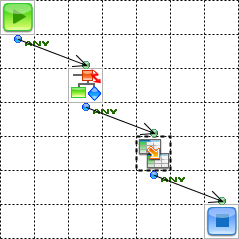
Break
You can use Break components to end a flow immediately. Remaining loop iterations, parallel branches, and components are not processed.
But, the Break component represents a normal termination while the Exception Component represents an abnormal termination.
You can also specify a return value, output a stream, and specify the commit action for flow transactions.
Outputting a Stream
Set the Break component's OutputStream property to one of the following to exit a loop and return the data that the loop processes:
EndResponse: Output all the records created until the Break component was reached. The Break component outputs all of the records created as each successful loop iteration reaches the EndResponse component.
ThisComponent: Only output the Break component's input stream -- the result of the current iteration.
SOAPFault
The SOAPFault component ends a flow and returns a SOAPFault envelope. You can use this component to output a SOAP 1.1 server response. SOAPFault components end the request immediately. Ending the request also ends any subflows, invoked by SubFlow components, or error-processing flows.